We’d like to remind Forumites to please avoid political debate on the Forum.
This is to keep it a safe and useful space for MoneySaving discussions. Threads that are – or become – political in nature may be removed in line with the Forum’s rules. Thank you for your understanding.
Esim for travel Samsung S21 query





I have purchased a Nomad esim for an upcoming trip to Turkey to give me data while I am there.
I have a Samsung Galaxy S21 and looking at the esim instructions you are meant to be able to go into SIM manager on the phone and select what each SIM is allowed to do e.g calls, messaging, data but these options don't show.
My worry is that when I arrive in Turkey my main SIM will try to connect and then I will get hit with roaming charges - which is what having an esim is trying to prevent. Obviously I will need to have roaming set to on for the esim to work.
Has anyone come across this before and come up with a solution?
Comments
-
It's certainly possible to do what you want, but the SIMs have to be active before you can add/remove services from them. Have you installed/activated the Nomad SIM?
I'm not familiar with the Nomad product but would warn that some travel SIMs are "triggered" by the country they are first activated in, be aware of any instructions or conditions on your SIM.
Is it your intention to leave your "normal" SIM active (for calls/SMS) because depending on your network/plan that could trigger a daily roaming charge as well as any call charges (may also charge for incoming calls, incoming texts are always free).
1 -
We went to Turkey last year, I set the esim for data and left my main sim active for calls/texts just in case. No roaming charges came up.
1 -
In Samsung’s SIM manager you should normally be able to set mobile data to the Nomad eSIM, while leaving calls/texts on the normal SIM if required. Also turn data roaming off for the UK SIM if the phone allows per-SIM roaming control. If unsure, switch the UK SIM off entirely while abroad.
1 -
- I think @flaneurs_lobster is correct in that you might need to be careful of two things:
- Be careful where you start the eSIM as it may be triggered for the country that you initiate the eSIM
- You might need the eSIM to be active before you can activate services on it in the SIM Manager.
I have an S21 and just checked in my SIM Manager. I can only choose my local SIM as that is the only SIM I have in my phone. But I do have the option of an eSIM in the SIM Manager so I assume its just a case of adding one.
Does the Nomad eSIM come with an app?
1 -
Thanks for the reply.
Yes - I basically need to keep my original SIM set for calls and texts but set the eSIM as the default for data.
Looks like the eSIM activates when I reach Turkey and when roaming is switched on.
Problem is doing this before the original SIM generates roaming charges.
0 -
Thanks for the reply.
The SIM manager on my S21 doesn't currently allow me to set the default action for what SIM can do what.
The only way of activating the eSIM seems to be when you reach the destination which then happens automatically.
Yes - Nomad eSIM comes with an app where you can manage the eSIM and see how much data is left on it.
0 -
The SIM manager on my S21 doesn't currently allow me to set the default action for what SIM can do what.
Are you sure? Running One UI 8?
Scroll down in the Sim manager screen - is there a section headed 'Preferred SIMs'?
Should also be a switch labelled 'Data switching and backup calling'. Tun it off.
1 -
There is a Primary SIM option which i can set which SIM this refers to but not down to the specifics of calls, messaging and data.
There is a data switching and backup calling option which is switched to off.
I have looked and I am running One UI version 7.0
0 -
Any chance that you are running a non-UK phone? Had a dig around the techy bits and it seems the screen I can see was not universally implemented.
Maybe @d0nnyoz could comment on whether their S21 has this
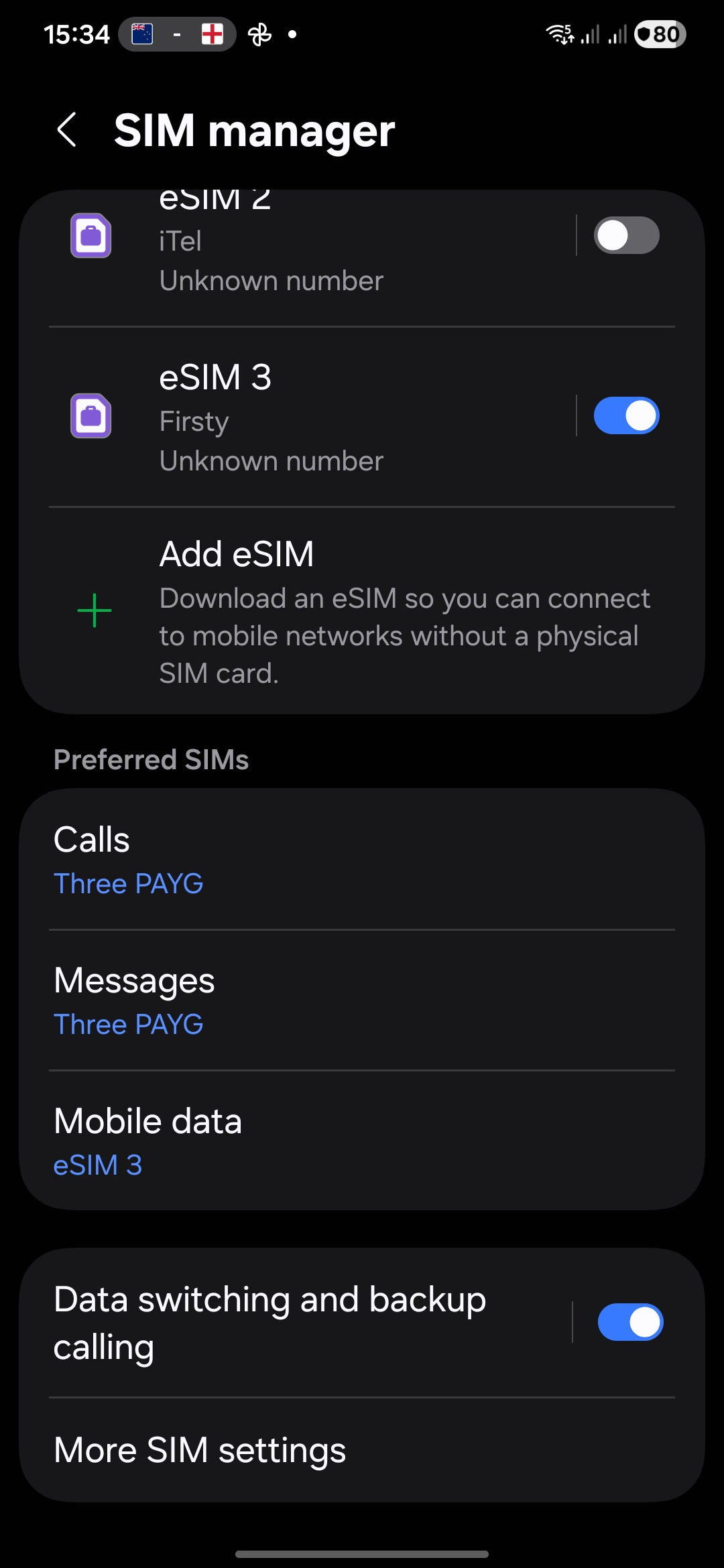 2
2 -
Thanks for trying to help!
Mine is definitely a UK phone.
0







Confirm your email address to Create Threads and Reply

Categories
- All Categories
- 355.8K Banking & Borrowing
- 254.9K Reduce Debt & Boost Income
- 456.1K Spending & Discounts
- 248.3K Work, Benefits & Business
- 605.9K Mortgages, Homes & Bills
- 179K Life & Family
- 263.7K Travel & Transport
- 1.5M Hobbies & Leisure
- 16.2K Discuss & Feedback
- 37.7K Read-Only Boards