We’d like to remind Forumites to please avoid political debate on the Forum.
This is to keep it a safe and useful space for MoneySaving discussions. Threads that are – or become – political in nature may be removed in line with the Forum’s rules. Thank you for your understanding.
Excel Question about Filling down and Converting Date Time
Comments
-
Even easier solution - Enter your formula into E2
=(A2/ 86400) + 25569
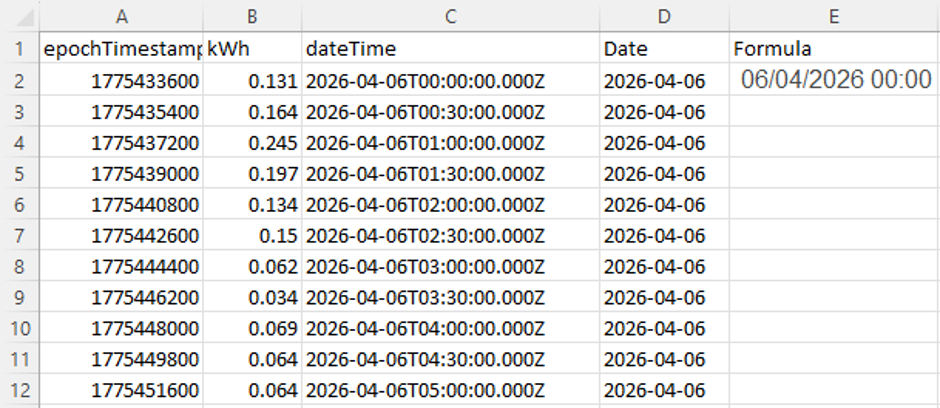
Select Cell E2 & Press CTRL C to copy
Select Cell E3 & Press CTRL + SHIFT + Down Arrow key
Now press CTRL V
0 -
^^ This.
But in general check that the formula has in fact been copied down to all rows in use it can fail with blank adjacent cells. In this case not an issue if all 73x rows have data.
0 -
Select cell at top of column, double-click the small square at the bottom-right corner of the cell, the fill handle. Excel should fill down as far as the neighbouring data continues.
NB 25569 is Excel’s serial date number for 1 January 1970, but I’d use DATE(1970,1,1) because it is more readable.
0 -
^^ or even better, same caveat
0 -
I don't get a small square at the bottom right of the cell
0 -
Why is there no field header? Have you actually created a table?
0 -
What's wrong with putting the formula in the top cell of the column then double clicking on the bottom right corner of that cell to copy it down to line up with the 73,000 adjacent cells?
Edit: I thought smart meters hold up to 13 months of data, which is a lot less than 73,000 readings anyway.
I’m a Forum Ambassador and I support the Forum Team on the In My Home MoneySaving, Energy and Techie Stuff boards. If you need any help on these boards, do let me know. Please note that Ambassadors are not moderators. Any posts you spot in breach of the Forum Rules should be reported via the report button, or by emailing forumteam@moneysavingexpert.com.
All views are my own and not the official line of MoneySavingExpert.
0











Confirm your email address to Create Threads and Reply

Categories
- All Categories
- 355.8K Banking & Borrowing
- 254.9K Reduce Debt & Boost Income
- 456.1K Spending & Discounts
- 248.3K Work, Benefits & Business
- 605.9K Mortgages, Homes & Bills
- 179K Life & Family
- 263.7K Travel & Transport
- 1.5M Hobbies & Leisure
- 16.2K Discuss & Feedback
- 37.7K Read-Only Boards