We’d like to remind Forumites to please avoid political debate on the Forum.
This is to keep it a safe and useful space for MoneySaving discussions. Threads that are – or become – political in nature may be removed in line with the Forum’s rules. Thank you for your understanding.
Excel Question about Filling down and Converting Date Time




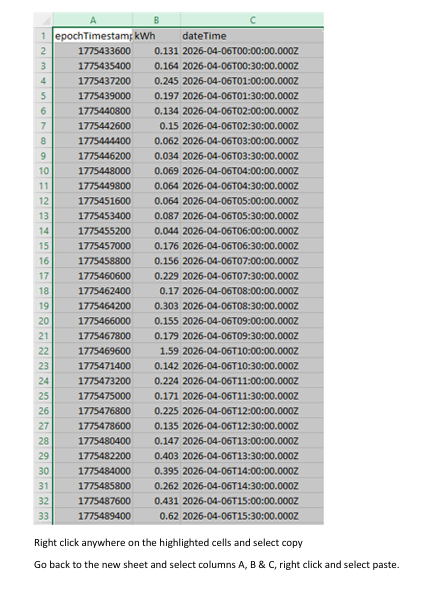
I've started downloading my electricity and gas usage and it is 73000 lines long in this format
epochTimestamp | kWh | dateTime | |
|---|---|---|---|
1.65E+09 | 0 | 2022-04-11T00:00:00.000Z |
|
1.65E+09 | 0 | 2022-04-11T00:30:00.000Z |
|
1.65E+09 | 0.139 | 2022-04-11T01:00:00.000Z |
|
1.65E+09 | 0.066 | 2022-04-11T01:30:00.000Z |
|
1.65E+09 | 0.05 | 2022-04-11T02:00:00.000Z |
|
How do I convert the Epoch time column to date time without having to fill down 73000 rows?
01/01/2022 00:00 |
|---|
01/01/2022 00:30 |
01/01/2022 01:00 |
01/01/2022 01:30 |
01/01/2022 02:00 |
01/01/2022 02:30 |
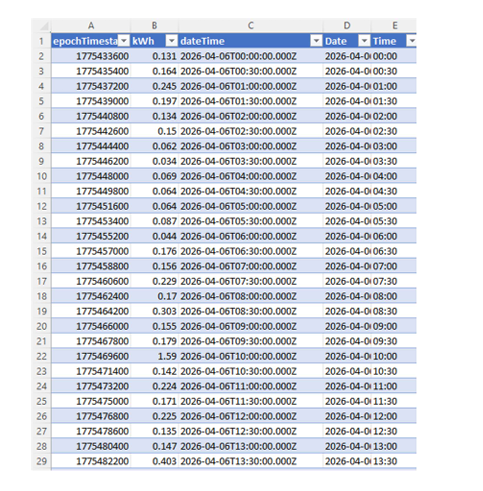
I know how to convert epoch time to 01/01/2022 00:00 ( =(A2 / 86400) + 25569 in column D) but I have to fill down 73000 rows, there must be an easier way to do this without all this filling down, then copy paste the values from column D to column E then delete columns A and C and D to get workable date times for a pivot table?
Comments
-
Right click the top of column A/B/C whatever to select. Then choose the date format as appropriate.
Hastings Direct 4775.99
La Redoute 676.21
Barclaycard 295.20
0 -
73,000 lines long? Have you started downloading from the start of time itself?
1 -
It's smart meter data with readings every 30 mins, so it's only 4 years worth (or 2 years if gas and electric are on different lines)
0 -
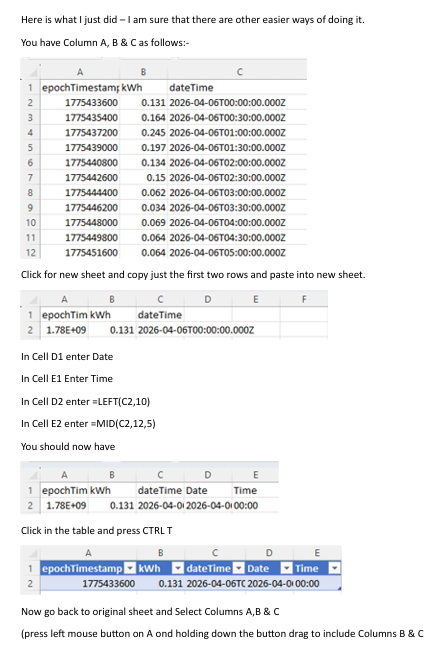
Click anywhere in the data and CTRL-t to insert a table. When you enter a formula in your first row it should then automatically populate right down to the last row.
0 -
And I still have to fill down 73000 rows
0 -
That doesn't work I get this
epochTimestamp
kWh
dateTime
1649635200
100
2022-04-11T00:00:00.000Z
11/04/2022 00:00
1649637000
0
2022-04-11T00:30:00.000Z
1649638800
0.139
2022-04-11T01:00:00.000Z
1649640600
0.066
2022-04-11T01:30:00.000Z
1649642400
0.05
2022-04-11T02:00:00.000Z
0 -
Open Copilot within the spreadsheet and ask it to do it for you.
0 -
I don't have Copilot in it, this version of excel is 2019
0 -
Select cell with formula. Copy cell.
Select empty cell below formula. Scroll to bottom row using scroll bar. Will take hardly any time. Shift click cell in last row in column of the formula. All cells now selected that need formula. Paste formula into cells. 73000 cells filled in seconds.
0 -










Confirm your email address to Create Threads and Reply

Categories
- All Categories
- 355.8K Banking & Borrowing
- 254.9K Reduce Debt & Boost Income
- 456.1K Spending & Discounts
- 248.3K Work, Benefits & Business
- 605.9K Mortgages, Homes & Bills
- 179K Life & Family
- 263.7K Travel & Transport
- 1.5M Hobbies & Leisure
- 16.2K Discuss & Feedback
- 37.7K Read-Only Boards