We’d like to remind Forumites to please avoid political debate on the Forum.
This is to keep it a safe and useful space for MoneySaving discussions. Threads that are – or become – political in nature may be removed in line with the Forum’s rules. Thank you for your understanding.
Microsoft Outlook free getting full but have Lifetime Microsoft Office





I am getting a message that my Microsoft Outlook Free account is getting full up (5GB max) I already have Microsoft Office loaded on my pc with Lifetime license. I would like to know if I can add extra capacity for Outlook storage and if this will work with my existing desktop Outlook?
What are the best update options without duplicating the existing Microsoft Office Lifetime already loaded?
Appreciate any advice
Comments
-
An annual MS 365 subscription of £19.99 gets you 100GB of MS Storage (what you refer to as Outlook storage). As long as you use the same MS account when you subscribe as you use for MS Office (is it a legit copy licenced to you?) then the only difference you'll see is the upper limit increase on the storage indicator.
Sub comes with access to the online versions of the usual MS Office programs but will not interfere with your local MS Office programs.
1 -
Thanks for the reply. The Microsoft Office with Lifetime license was loaded by the company I purchased the pc from. Not sure how to check if it's legit?
The reason for my confusion is that I read that updating the Outlook M365 basic at £19.99 would enable 100GB of capacity unlike the current 5GB for the free version. However, this would be for web / mobile version rather than the desktop version which I currently use on my pc
Whilst all the other Office programs are working well I am loathed to move to a Microsoft Family version or similar which are approx £100 per annum
My concern is the desktop version of Outlook will stop working and I will only be able to use a web version of Outlook?
0 -
Are you sure this isn't referring to your Onedrive storage space for which the limit is 5Gb?
Also are you referring to Oulook as in the email client (which isn't usually free) or Outlook as in the web interface and what used to be Hotmail?
Microsoft in their wisdom decided to call everything email wise "Outlook", so now there's various different things floating around with the same name - the email client Outlook, the website outlook.com (formally Hotmail), the apps that are called Outlook…
2 -
My concern is the desktop version of Outlook will stop working and I will only be able to use a web version of Outlook?
Well if it helps, I have three versions of Outlook running on my laptop - browser, desktop and desktop (PWA), - don't ask me, no idea …
alongside a £19.99 annual sub for MS 365.
Take a look at the Account page in one of your MS Office products, should show who is logged into the product.
1 -
I think you're right it's the OneDrive that is getting full up getting close to the 5GB limit. It doesn't help with Microsoft calling everything Outlook. It's my previous Live & Hotmail accounts. I am currently able to view these via my desktop Microsoft Office pc and also my mobile but the concern is upgrading to Microsoft 365 Basic at £19.99 pa would create a conflict with my desktop Outlook version?
Not sure if I'm getting my self confused over this but Microsoft don't make things clear
0 -
So this is nothing to do with Outlook its a Onedrive issue.
I would suggest initially having a look at what's on your Onedrive to see what you don't actually need anymore:
https://support.microsoft.com/en-us/office/what-is-microsoft-cloud-storage-2a261b34-421c-4a47-9901-74ef5bd0c426And then see where you stand.
The "what counted towards your limit" changed in 2023:
https://directionforward.com/news/2023/microsoft-has-announced-changes-to-personal-outlookcom-and-onedrive-accounts - key point being "In the past, email attachments were counted as part of your Outlook.com mailbox quota, but not as part of OneDrive. Now, email attachments in Outlook.com will be counted as part of your OneDrive data allowance."So suggest you go through and see what you don't need.
0 -
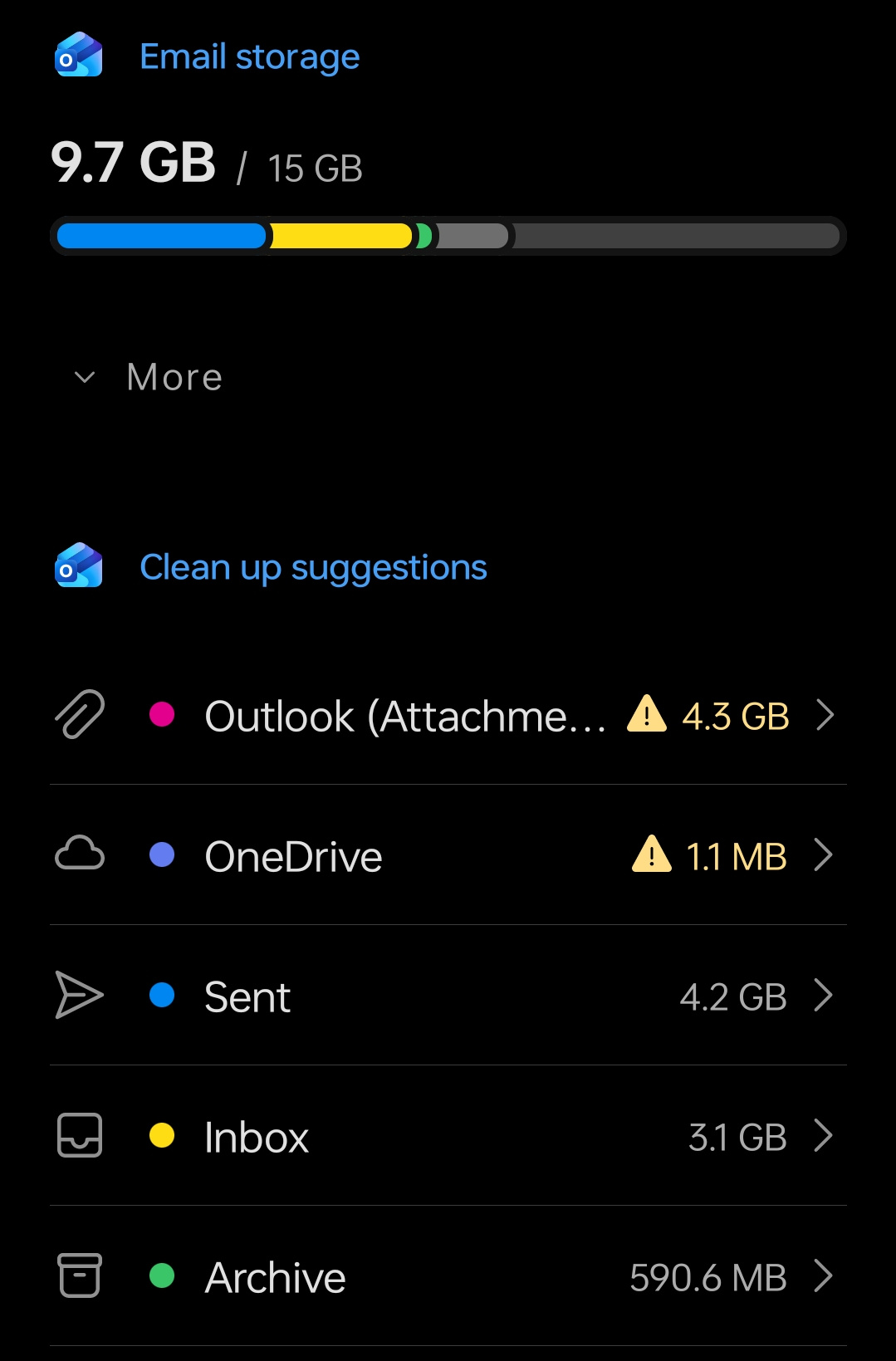
I've taken a screenshot and it's Outlook that's at 4.3GB and One Drive is very low (see attached) - not sure if I should just upgrade to Microsoft 365 Basic at £19.99 and if this will cause conflict with my desktop version. I've got another member of the family with the same issue
Not sure if Microsoft have made this overly complicated or I'm just getting confused by it?
 0
0 -
I was under the impression that emails + attachments in Hotmail/Outlook webmail use up your OneDrive capacity, effectively limiting you to 5GB in your emails unless you upgrade your storage limit. Even if you're using the Outlook desktop client, unless you're deliberately moving your emails to your local client and deleting them from the cloud then they will continue to be using up your cloud storage in the background.
1 -
Yes it's very confusing. I wouldn't have the expertise to move things so it's nothing I'm doing deliberately. I don't know if Microsoft are making things complicated or I'm not understanding it properly. Whilst I've got a Lifetime license on Windows Office I'm not sure why they don't offer a Lifetime offer on extending storage capacity for Outlook (ie. the old Live & Hotmail)
If another member of the family is facing the same issue I'm I better off taking a Family package or both having individual - Basic 365 upgrade?
0 -
I would be looking at the contents of emails that are using up this space - making local and backup copies and then just deleting the email
5Gb is a hell of a lot it’s it’s just “normal” emails but can disappear fast if containing pictures and /or video
0







Confirm your email address to Create Threads and Reply

Categories
- All Categories
- 355.8K Banking & Borrowing
- 254.9K Reduce Debt & Boost Income
- 456.2K Spending & Discounts
- 248.3K Work, Benefits & Business
- 605.9K Mortgages, Homes & Bills
- 179K Life & Family
- 263.7K Travel & Transport
- 1.5M Hobbies & Leisure
- 16.2K Discuss & Feedback
- 37.7K Read-Only Boards