We’d like to remind Forumites to please avoid political debate on the Forum.
This is to keep it a safe and useful space for MoneySaving discussions. Threads that are – or become – political in nature may be removed in line with the Forum’s rules. Thank you for your understanding.
Clearing Drafts




I've got two draft posts which I'm trying to clear. I've tried to clear them by setting the dates (both in the past month), selecting posts and then choosing 'clear all' but it just seems to clear my selections not the drafts.
Where am I going wrong? 🤔
Comments
-
You can access your drafts, to delete them properly, via which is accessible via your user profile or the 'quick links' listing under 'my drafts'.
Edit: think I misunderstood the question!
0 -
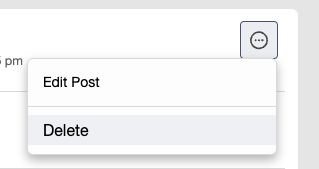
Simply click or tap the three dots in a circle next to each draft, then choose the delete option
 Official MSE Forum Team member.Please report all problem posts to forumteam@moneysavingexpert.com1
 -
Hi @maman
On the right of individual draft, click the circle. This will show the option to 'Delete'.
I've tried to clear them by setting the dates (both in the past month), selecting posts and then choosing 'clear all' but it just seems to clear my selections not the drafts.
It sounds like you are trying to use the options in the side-panel. That's a filter to narrow down the drafts visible. The 'Clear All' option is just to reset that filter.
Join the MSE Forum
Get the Free MoneySavingExpert Money Tips E-mail
To report inappropriate posts: click the report button
Flag a news story: news@moneysavingexpert.com1 -
Thanks all, sorted now. 👍
1








Confirm your email address to Create Threads and Reply

Categories
- All Categories
- 355.7K Banking & Borrowing
- 254.9K Reduce Debt & Boost Income
- 456.1K Spending & Discounts
- 248.3K Work, Benefits & Business
- 605.8K Mortgages, Homes & Bills
- 179K Life & Family
- 263.6K Travel & Transport
- 1.5M Hobbies & Leisure
- 16.2K Discuss & Feedback
- 37.7K Read-Only Boards