Ready, steady… save!
You don’t need a chart to join in. Here are 2 ways to record your savings:
1. Cross it off
Pop a chart into your first post. Saved an amount? Cross it out! Read more »
£0.01 £0.02 £0.03
2. Write it down
Skip the chart and add updates to your first post. Read more »
“Another +£3 saved today. Go me!”
Use +£ before each new saving so it counts towards your total.
📨 Have you signed up to the Forum's new Email Digest yet? Get a selection of trending threads sent straight to your inbox daily, weekly or monthly!
Text Editor: Alt text input field




What I did:
Added ALT text to an image
What happened:
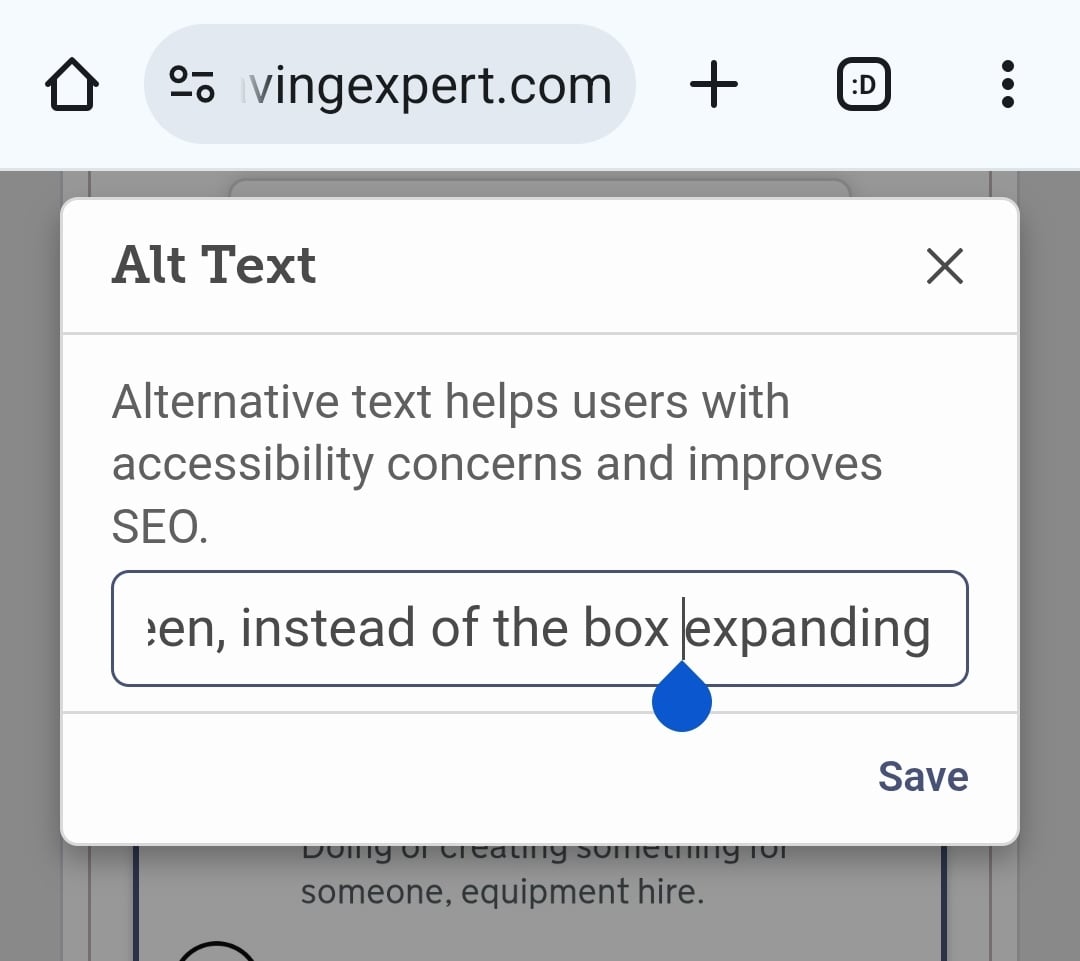
The box for typing the ALT text is very small and does not expand, which ironically is an access issue for the cognitive load of typing thorough alt text. It makes it difficult because it requires holding a string of thought that one can no longer see, and is extremely difficult for going back to proofread before submitting.
Like this:
Why it matters:
Posters need to not be put off adding high quality alt text,
readers need to have high quality alt text for accessibility,
many disabilities (including my own) affect cognitive function in a way that makes it difficult to write high quality alt text in such a small field. The input field expanding would make it more accessible.
Device/Browser:
Android Chrome
Confirm your email address to Create Threads and Reply

Categories
- All Categories
- 356K Banking & Borrowing
- 255K Reduce Debt & Boost Income
- 456.2K Spending & Discounts
- 248.5K Work, Benefits & Business
- 606.2K Mortgages, Homes & Bills
- 179.1K Life & Family
- 264K Travel & Transport
- 1.5M Hobbies & Leisure
- 16.2K Discuss & Feedback
- 37.7K Read-Only Boards