We’d like to remind Forumites to please avoid political debate on the Forum.
This is to keep it a safe and useful space for MoneySaving discussions. Threads that are – or become – political in nature may be removed in line with the Forum’s rules. Thank you for your understanding.
📨 Have you signed up to the Forum's new Email Digest yet? Get a selection of trending threads sent straight to your inbox daily, weekly or monthly!
Gmail folders missing on phone




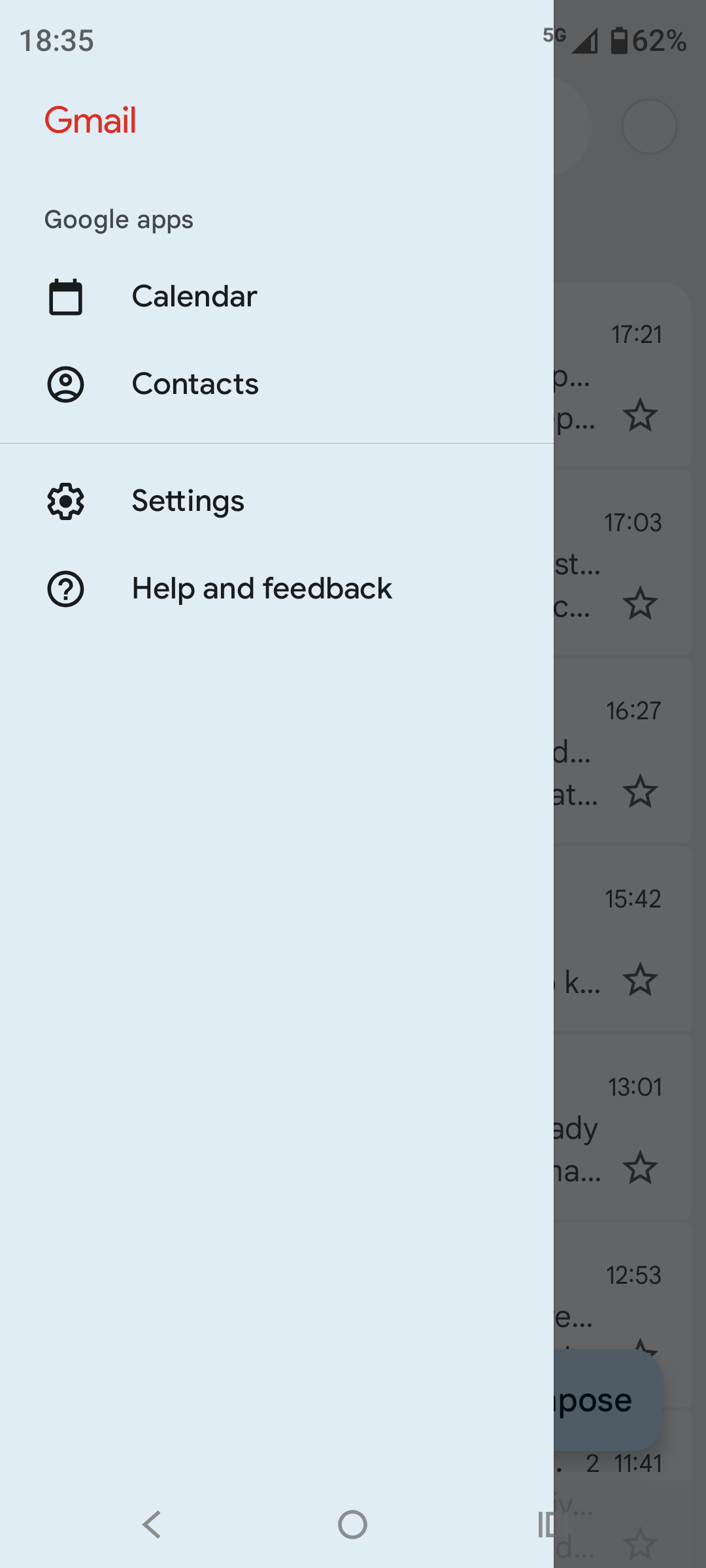
My email provider is Fasthosts, where I have an IMAP mailbox. When I log onto webmail I can see the folder structure that matches what I have on my laptop using Thunderbird. Until recently the same folders could be seen in the Gmail app on my phone (Motorola Edge 40 Neo, Android 15) by selecting the three bars, but now all I see is this:
I've checked on my backup phone (an older Motorola, Android 13) and the full folder structure is still visible there:
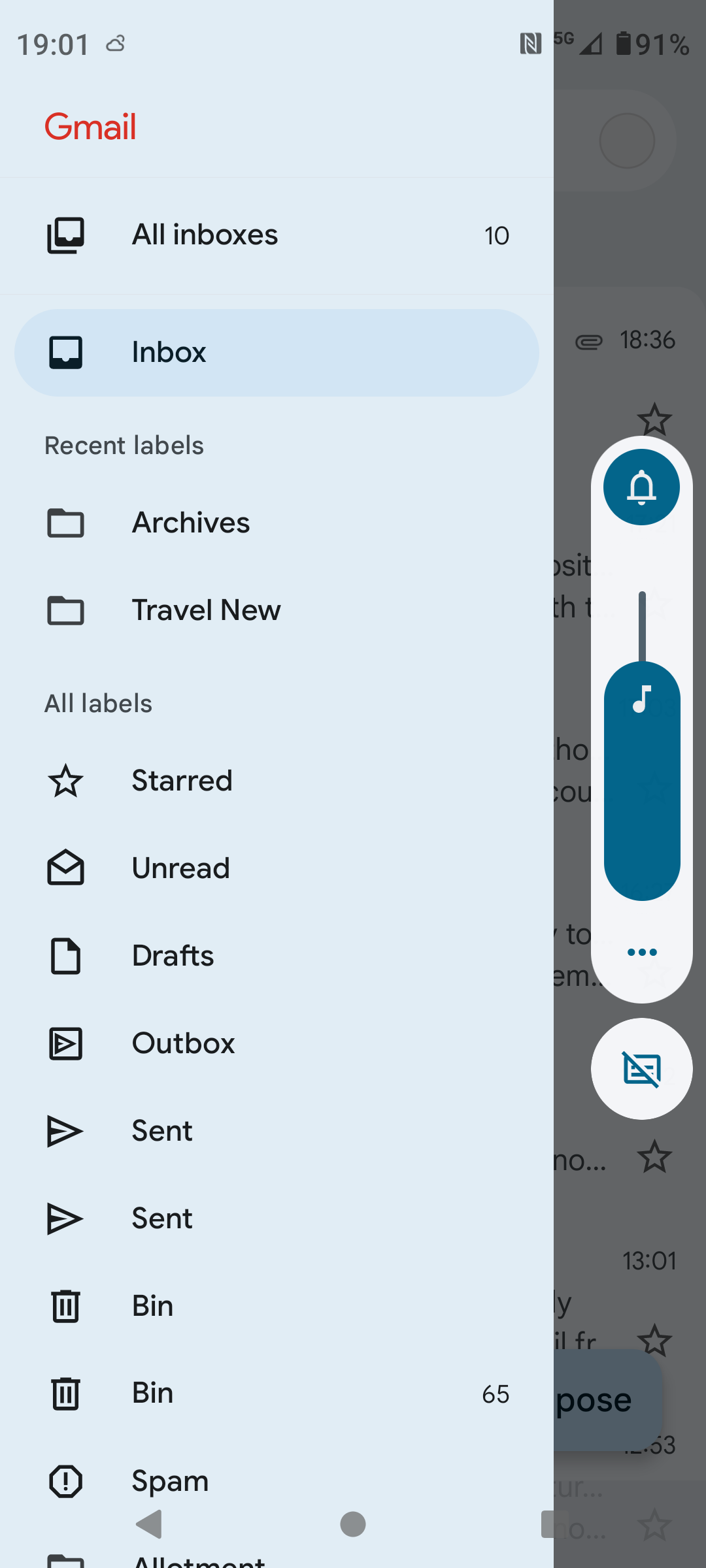
Gmail versions are 2026.01.26 (which Play store says is the latest version) on the current phone and 2025.06.08 on the old one. I've removed and readded Gmail on the current phone but that made no difference.
I'm guessing this has been caused by a recent update to Gmail (I updated apps yesterday and Gmail might have been one that was included), has anyone else seen a similar issue, and crucially has anyone got any suggestions on how to resolve it?
Comments
-
If you haven't done it already, reboot the phone.
Move along, nothing to see.1 -
Maybe?
Stompa2 -
Is running Thunderbird as an app on your phone an option?
1 -
On recent Gmail updates, the left-hand menu defaults to Google account folders only. Third-party IMAP accounts don’t show their folder tree unless you tap the email address at the top of the menu or switch accounts.
1 -
Thanks for the responses so far.
@spud17 I should have mentioned that one of the first things I did was a reboot, and I've done another one this morning, no change from either of them.
@Stompa Thanks for the link, it doesn't appear in that document that Google have done anything that impacts IMAP accounts.
@flaneurs_lobster There is a Thunderbird Android app, so that, or another email client, might well be the eventual solution if Gmail proves unresolvable.
@Vitor There's no email address shown at the top of the menu. I forgot to mention that if I switch account to my rarely used gmail account then it does, as you suggest, show the folders that account has, but when I switch back it just reverts to the menu shown in the first image. However, it does sound like this is a planned change, so it may just be down to working out what I need to do in order to see what I want. I think I'll probably post a question on Google's support forum and see if there is a solution that works for me.
0 -
Checking Google Play Store for the latest customer reviews of the gmail app is always illuminating, to see if there are any recent unadvertised UX changes.
One user (9 Feb) reports no longer seeing mail folders visible in Outlook and Google suggest checking this help article
https://support.google.com/mail/answer/6383854
Most of it is simple stuff which you will have done but there may be a nugget in there if you go through all the suggestions.
2 -
@glennevis Yes, I'd taken a look at the reviews on Play store and that article seems to be their standard response for what they describe as sync issues, so I'd already looked through it. The only relevant step I haven't done is the final one, to clear storage, but I was warned on the Gmail community forum, where I've also asked the question, to only do that as a last resort. If I don't get any other suggestions either on there or here then I'll probably have to give it a try, then if that doesn't work I'll move to another email app (if anyone has any suggestions for what the best ones are I'd be happy to see them).
0 -
@SiliconChip I have the same problem this wee, did you manage to resolve it?
I've rebooted, cleared cache, but don't want to clear storage as that feel like starting again!
0 -
I have this problem also. It's my mac mail account that I have set up on Gmail Android app (Google Pixel 9 Pro). No real issues until yesterday when the folders / labels disappeared and I see exactly what you see in your screenshot.
I did something yesterday that made them reappear and I thought hooray! I've fixed it… but this morning they were gone again. I think them reappearing coincided with me clearing the cache but doing that today makes no difference. I also had removed and readded the account but that wasn't obviously what caused them to reappear.0 -
@LadyPenelopeFW and @mungkystuff No resolution for me yet, I haven't got round to doing the clear storage yet but when I do I'll report back on here. It's interesting that other people are starting to experience the same issue, it suggests to me there is a problem with the latest version of Gmail so I might just hold off taking any drastic action to see if Google come up with an update that fixes it.
2










Confirm your email address to Create Threads and Reply

Categories
- All Categories
- 355.8K Banking & Borrowing
- 254.9K Reduce Debt & Boost Income
- 456.2K Spending & Discounts
- 248.3K Work, Benefits & Business
- 605.9K Mortgages, Homes & Bills
- 179K Life & Family
- 263.8K Travel & Transport
- 1.5M Hobbies & Leisure
- 16.2K Discuss & Feedback
- 37.7K Read-Only Boards