We’d like to remind Forumites to please avoid political debate on the Forum.
This is to keep it a safe and useful space for MoneySaving discussions. Threads that are – or become – political in nature may be removed in line with the Forum’s rules. Thank you for your understanding.
📨 Have you signed up to the Forum's new Email Digest yet? Get a selection of trending threads sent straight to your inbox daily, weekly or monthly!
Any Brother printer experts out there?
Comments
-
interstellaflyer said:
It's a 10 year old printer, is it really worth repairing, generally the ink pad, which collects all the surplus ink from priming and cleaning etc is pretty much designed to last the expected life of the printer.JohnB47 said:I have a Brother DCP-J4120DW printer that has been giving me an ink pad full message a few times over recent months. I've read up how to purge the counter to make the priner work again (and I've done that twice now) but I'm now reading that the purge only works for a while (in my case about five months since I last did it - with fairly low usage).
So I'm now wondering about replacing the ink pad myself. I've looked at a few shaky videos and they never seem to show what I want - how to get to the pad on my particular machine and what it looks like, so that I can order it. One video started part way through the dismantling and ended with the removal of some sort of box which was set aside before the machine was reassembled - who knows if that box contained the pad - but it did have a ribbon cable coming out of it.
So, any help with that would be great but I also have a question. If the printer doesn't solely rely on the print counter to tell when the pad needs changed, how does it know when someone replaces the pad? It surely doesn't have some mechanical way of measuring how much ink is in the pad?
I ask this because I don't want to get to the point of changing the pad, then resetting the purge counter and then finding that there's something else needed to tell the printer that the pad was changed.
I could really do with someone who has changed the pad on my model.
Thanks.Well, firstly, I have a natural curiousity about things, so when something malfunctions, my instinct is to find out why that's happened, which leads on to wondering how it works. I can't help doing it.
Next is the pleasure I get from gathering information about the problem and possible 'fixes' and spare parts, mostly through the internet and sites like this one.
Then, if I can actually fix the problem myself, with minimal expence, I'll get real pleasure from doing it.
Finally, I get satifaction from knowing that I saved a perfectly good printer (and the spare ink cartridges I have for it) from being thrown out - and saved the cost of buying a new one.
So now I'm planning to buy a replacement ink pad absorber unit for £34 and if all goes well my printer, which is otherwise fully working, will last a few more years.
0 -
-
If you attempt it take photos as you remove bits and reverse the process.0
-
An excellent video, thanks. Surprisingly all done single handedly. It's not the printer same model as mine but it's very similar to it, as I see from the Manual I found.TimeLord1 said:
It answers some questions I had (the box has a moisture censor which works in combination with a 'count' to determine when it needs replaced and the replacement pads I've seen for sale all need to be used).
I've ordered a replacement box now but I'll keep the old one and will clean/dry it just for fun.1 -
That's good. I enjoy the challenge to keep things running; get some plastic tubs, mark them A, B, and C, and as you dismantle the photo, place it into the tubs. You can also Tipp-Ex parts. And use the video as a guide. Be careful of old degrading plastic that kills off printers mostly. And if you can't fix it remove the harddrive memory before disposal.1
-
Does a printer have a hard drive memory?TimeLord1 said:That's good. I enjoy the challenge to keep things running; get some plastic tubs, mark them A, B, and C, and as you dismantle the photo, place it into the tubs. You can also Tipp-Ex parts. And use the video as a guide. Be careful of old degrading plastic that kills off printers mostly. And if you can't fix it remove the harddrive memory before disposal.1 -
Yes, that's why when they end up abroad, some people connect the hard drive and print everything it's ever previously printed for information.1
-
I don't think that's right.TimeLord1 said:Yes, that's why when they end up abroad, some people connect the hard drive and print everything it's ever previously printed for information.
Printers have a small amount of flash memory to store settings and some temporary storage while it works on a print (some cheaper printers use the host device to do this)
Also, even if it was true, I can't really see people overseas connecting up old home printers and buying cartridges / toners / Paper then printing things just to see if there is any data of interest (and identifiable and not our of date)1 -
Yep that's a fact older printers don't have the memory capacity but fairly new ones do. There was a program on main TV, about our old tech ending up in sub continents and they was mass printing data held in memory capacity. Look it up.PHK said:
I don't think that's right.TimeLord1 said:Yes, that's why when they end up abroad, some people connect the hard drive and print everything it's ever previously printed for information.
Printers have a small amount of flash memory to store settings and some temporary storage while it works on a print (some cheaper printers use the host device to do this)
Also, even if it was true, I can't really see people overseas connecting up old home printers and buying cartridges / toners / Paper then printing things just to see if there is any data of interest (and identifiable and not our of date)1







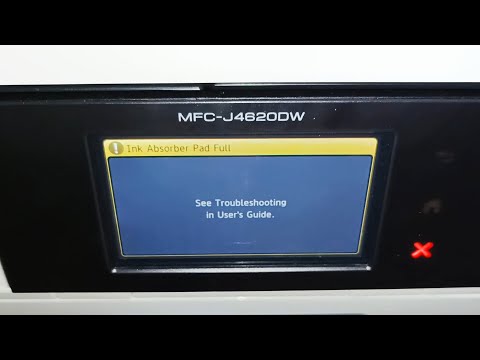 https://youtu.be/_ymhMaSt51w?si=WnqtGk7qvS719DYZ


Confirm your email address to Create Threads and Reply

Categories
- All Categories
- 355.8K Banking & Borrowing
- 254.9K Reduce Debt & Boost Income
- 456.2K Spending & Discounts
- 248.3K Work, Benefits & Business
- 605.9K Mortgages, Homes & Bills
- 179K Life & Family
- 263.8K Travel & Transport
- 1.5M Hobbies & Leisure
- 16.2K Discuss & Feedback
- 37.7K Read-Only Boards