We’d like to remind Forumites to please avoid political debate on the Forum.
This is to keep it a safe and useful space for MoneySaving discussions. Threads that are – or become – political in nature may be removed in line with the Forum’s rules. Thank you for your understanding.
📨 Have you signed up to the Forum's new Email Digest yet? Get a selection of trending threads sent straight to your inbox daily, weekly or monthly!
Sky TV Rip Off Help
Comments
-
Very odd, I've checked on mobile and desktop and there is no such option for me. Googling it seems to agree that you have to call.MouldyOldDough said:JSmithy45AD said:
You're obviously on Sky Stream, I'm on Q and the only thing I can remove is Discovery+Ayr_Rage said:
Sorry @Detail_Merchant you are mistaken, some CAN be removed under "Home Set-up" depending on which product you have.Detail_Merchant said:
Unfortunately you can't downgrade anything online, not even add-ons such as the HD pack.Ayr_Rage said:You may be able to remove some add-ons such as HD, UHD and Atmos through the online account but will need to call to get a new deal on TV and broadband.
The only thing you can do online is upgrade, add add-ons, or re-contract. And some of the upgrade options will involve re-contracting for another 24 months (as kipsterno1 said).
There may be a re-contract option online, but in my experience this promises very little discount from the full list price (e.g. £5/month) in return for locking in for another 24 months. The website tries to make it look better by multiplying out the £5/month by 24 months to say you are saving £120, but compared to the total amount you are committing to over 24 months it is pretty small.
The best discounts seem to be obtained by giving 31 days notice to cancel all the TV (not broadband) and then once the TV has gone off then calling back to see what deal they will give, but there is no guarantee that this will get a deal as good as a new customer.
Also that might not be viable if the person is on Sky+ as Sky are moving away from Sky+, and even Sky Q is not available to order online any more.
Screenshot from 30 seconds ago.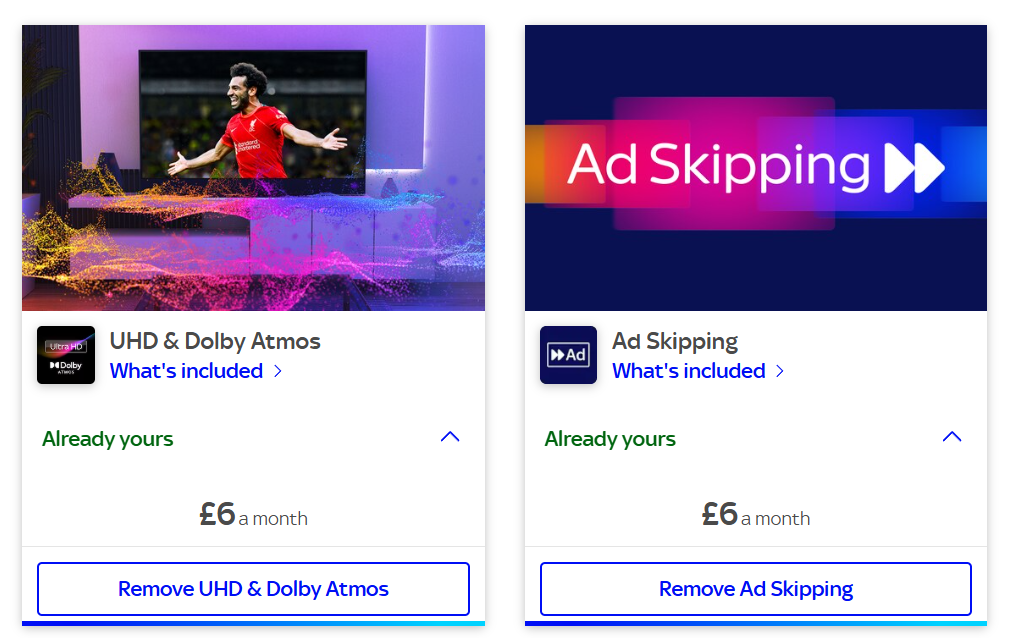
Paramount+ may be the same but I don't have the subscription. HD & UHD are contact only to remove.I'm on Q and can remove HD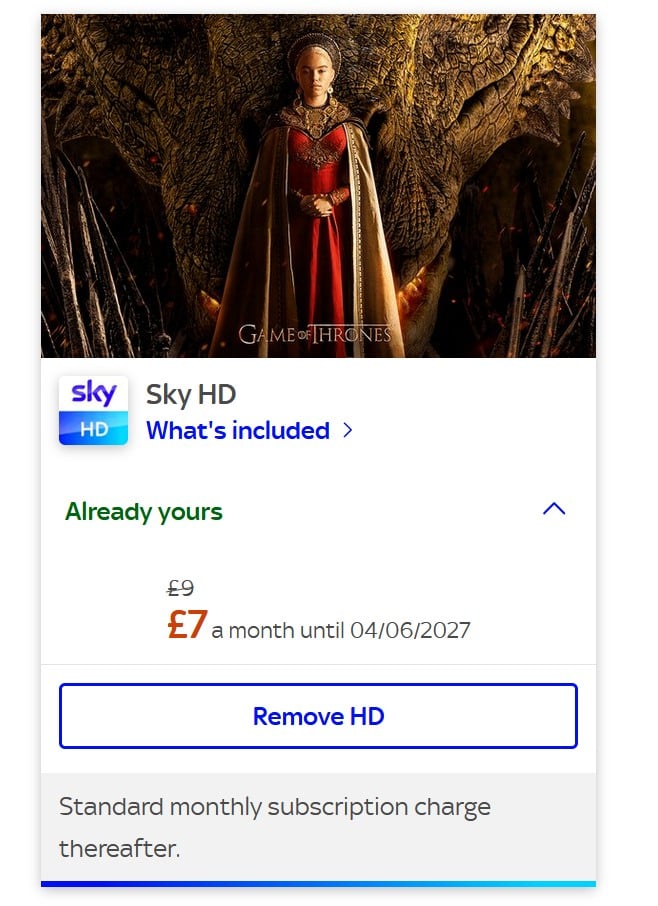 1
1 -
They charge an EXTRA £7 a month (reduced from £9!!) to receive stuff in the HD definition that has been standard across the broadcast industry for the last decade?
They are taking the urine.3 -
Ah, that looks like it's for a Sky stream subscriber. I'm pretty sure the OP is talking about Sky+ or Sky Q, where what I said is true.Ayr_Rage said:
Sorry @Detail_Merchant you are mistaken, some CAN be removed under "Home Set-up" depending on which product you have.Detail_Merchant said:
Unfortunately you can't downgrade anything online, not even add-ons such as the HD pack.Ayr_Rage said:You may be able to remove some add-ons such as HD, UHD and Atmos through the online account but will need to call to get a new deal on TV and broadband.
The only thing you can do online is upgrade, add add-ons, or re-contract. And some of the upgrade options will involve re-contracting for another 24 months (as kipsterno1 said).
There may be a re-contract option online, but in my experience this promises very little discount from the full list price (e.g. £5/month) in return for locking in for another 24 months. The website tries to make it look better by multiplying out the £5/month by 24 months to say you are saving £120, but compared to the total amount you are committing to over 24 months it is pretty small.
The best discounts seem to be obtained by giving 31 days notice to cancel all the TV (not broadband) and then once the TV has gone off then calling back to see what deal they will give, but there is no guarantee that this will get a deal as good as a new customer.
Also that might not be viable if the person is on Sky+ as Sky are moving away from Sky+, and even Sky Q is not available to order online any more.
Screenshot from 30 seconds ago.1 -
Detail_Merchant said:
Ah, that looks like it's for a Sky stream subscriber. I'm pretty sure the OP is talking about Sky+ or Sky Q, where what I said is true.Ayr_Rage said:
Sorry @Detail_Merchant you are mistaken, some CAN be removed under "Home Set-up" depending on which product you have.Detail_Merchant said:
Unfortunately you can't downgrade anything online, not even add-ons such as the HD pack.Ayr_Rage said:You may be able to remove some add-ons such as HD, UHD and Atmos through the online account but will need to call to get a new deal on TV and broadband.
The only thing you can do online is upgrade, add add-ons, or re-contract. And some of the upgrade options will involve re-contracting for another 24 months (as kipsterno1 said).
There may be a re-contract option online, but in my experience this promises very little discount from the full list price (e.g. £5/month) in return for locking in for another 24 months. The website tries to make it look better by multiplying out the £5/month by 24 months to say you are saving £120, but compared to the total amount you are committing to over 24 months it is pretty small.
The best discounts seem to be obtained by giving 31 days notice to cancel all the TV (not broadband) and then once the TV has gone off then calling back to see what deal they will give, but there is no guarantee that this will get a deal as good as a new customer.
Also that might not be viable if the person is on Sky+ as Sky are moving away from Sky+, and even Sky Q is not available to order online any more.
Screenshot from 30 seconds ago.
Except that I am on Q and can still remove HD !
If I was half as smart as I think I am - I'd be twice as smart as I REALLY am.1 -
Maybe the OP's relative is in contract for the HD part and that option is not available to them.MouldyOldDough said:Detail_Merchant said:
Ah, that looks like it's for a Sky stream subscriber. I'm pretty sure the OP is talking about Sky+ or Sky Q, where what I said is true.Ayr_Rage said:
Sorry @Detail_Merchant you are mistaken, some CAN be removed under "Home Set-up" depending on which product you have.Detail_Merchant said:
Unfortunately you can't downgrade anything online, not even add-ons such as the HD pack.Ayr_Rage said:You may be able to remove some add-ons such as HD, UHD and Atmos through the online account but will need to call to get a new deal on TV and broadband.
The only thing you can do online is upgrade, add add-ons, or re-contract. And some of the upgrade options will involve re-contracting for another 24 months (as kipsterno1 said).
There may be a re-contract option online, but in my experience this promises very little discount from the full list price (e.g. £5/month) in return for locking in for another 24 months. The website tries to make it look better by multiplying out the £5/month by 24 months to say you are saving £120, but compared to the total amount you are committing to over 24 months it is pretty small.
The best discounts seem to be obtained by giving 31 days notice to cancel all the TV (not broadband) and then once the TV has gone off then calling back to see what deal they will give, but there is no guarantee that this will get a deal as good as a new customer.
Also that might not be viable if the person is on Sky+ as Sky are moving away from Sky+, and even Sky Q is not available to order online any more.
Screenshot from 30 seconds ago.
Except that I am on Q and can still remove HD !
Sometimes you have to contact Sky to get products removed but to add them you click a button.0 -
I remember you saying that you have to contact a certain team at Sky when renegotiating your contract? Were you by any chance adding and removing the monthly rolling add-ons fairly frequently?MouldyOldDough said:Detail_Merchant said:
Ah, that looks like it's for a Sky stream subscriber. I'm pretty sure the OP is talking about Sky+ or Sky Q, where what I said is true.Ayr_Rage said:
Sorry @Detail_Merchant you are mistaken, some CAN be removed under "Home Set-up" depending on which product you have.Detail_Merchant said:
Unfortunately you can't downgrade anything online, not even add-ons such as the HD pack.Ayr_Rage said:You may be able to remove some add-ons such as HD, UHD and Atmos through the online account but will need to call to get a new deal on TV and broadband.
The only thing you can do online is upgrade, add add-ons, or re-contract. And some of the upgrade options will involve re-contracting for another 24 months (as kipsterno1 said).
There may be a re-contract option online, but in my experience this promises very little discount from the full list price (e.g. £5/month) in return for locking in for another 24 months. The website tries to make it look better by multiplying out the £5/month by 24 months to say you are saving £120, but compared to the total amount you are committing to over 24 months it is pretty small.
The best discounts seem to be obtained by giving 31 days notice to cancel all the TV (not broadband) and then once the TV has gone off then calling back to see what deal they will give, but there is no guarantee that this will get a deal as good as a new customer.
Also that might not be viable if the person is on Sky+ as Sky are moving away from Sky+, and even Sky Q is not available to order online any more.
Screenshot from 30 seconds ago.
Except that I am on Q and can still remove HD !
I wonder if they can enable it for certain customers just to save the CS some time.0 -
Hi all my mum has been moved into a care home, I have been caring for her. If I cancelled the contract, I have POA. Could I set up a contract as a new customer at the same address? I have been living with her.
Sky wanted £88 to continue with the current package, no sports or movies, 500 Mbps Fibre, including house phone.
Virgin Media offered me £39.99 for a 2 year contract with Sky Sports Mix and some movies.0 -
JSmithy45AD said:
I remember you saying that you have to contact a certain team at Sky when renegotiating your contract? Were you by any chance adding and removing the monthly rolling add-ons fairly frequently?MouldyOldDough said:Detail_Merchant said:
Ah, that looks like it's for a Sky stream subscriber. I'm pretty sure the OP is talking about Sky+ or Sky Q, where what I said is true.Ayr_Rage said:
Sorry @Detail_Merchant you are mistaken, some CAN be removed under "Home Set-up" depending on which product you have.Detail_Merchant said:
Unfortunately you can't downgrade anything online, not even add-ons such as the HD pack.Ayr_Rage said:You may be able to remove some add-ons such as HD, UHD and Atmos through the online account but will need to call to get a new deal on TV and broadband.
The only thing you can do online is upgrade, add add-ons, or re-contract. And some of the upgrade options will involve re-contracting for another 24 months (as kipsterno1 said).
There may be a re-contract option online, but in my experience this promises very little discount from the full list price (e.g. £5/month) in return for locking in for another 24 months. The website tries to make it look better by multiplying out the £5/month by 24 months to say you are saving £120, but compared to the total amount you are committing to over 24 months it is pretty small.
The best discounts seem to be obtained by giving 31 days notice to cancel all the TV (not broadband) and then once the TV has gone off then calling back to see what deal they will give, but there is no guarantee that this will get a deal as good as a new customer.
Also that might not be viable if the person is on Sky+ as Sky are moving away from Sky+, and even Sky Q is not available to order online any more.
Screenshot from 30 seconds ago.
Except that I am on Q and can still remove HD !
I wonder if they can enable it for certain customers just to save the CS some time.No - I was just given a "fairly hefty" price - which I accepted and was re-contracted for 18 months - no changes from me at all !I was given no choice - either accept the price quoted or leave !
If I was half as smart as I think I am - I'd be twice as smart as I REALLY am.0















Confirm your email address to Create Threads and Reply

Categories
- All Categories
- 355.8K Banking & Borrowing
- 254.9K Reduce Debt & Boost Income
- 456.2K Spending & Discounts
- 248.3K Work, Benefits & Business
- 606K Mortgages, Homes & Bills
- 179K Life & Family
- 263.8K Travel & Transport
- 1.5M Hobbies & Leisure
- 16.2K Discuss & Feedback
- 37.7K Read-Only Boards