We’d like to remind Forumites to please avoid political debate on the Forum.
This is to keep it a safe and useful space for MoneySaving discussions. Threads that are – or become – political in nature may be removed in line with the Forum’s rules. Thank you for your understanding.
📨 Have you signed up to the Forum's new Email Digest yet? Get a selection of trending threads sent straight to your inbox daily, weekly or monthly!
Is Macrium Reflect useless now?
Comments
-
I've seen that too. It's not any noticably slower than any other backup I use.B0bbyEwing said:
Was looking at that actually.vacheron said:
But then I saw the bit about the free version being slower than the paid version which made me wonder ......... how much slower. Are we talking like a week to backup a music CD kind of slower or are speeds still acceptable?
I think it will image my 500GB NVME drive with about 430GB of data on it, to a second internal 4TB mechanical hard disk in well under an hour.
It's not so slow that I ever notice. I think it could just be marketing TBH.
I may even try a run tonight and confirm.
• The rich buy assets.
• The poor only have expenses.
• The middle class buy liabilities they think are assets.1 -
Will freeware meet your requirements? https://freefilesync.orgB0bbyEwing said:Finally got my backside in gear & went to do a file & folder backup.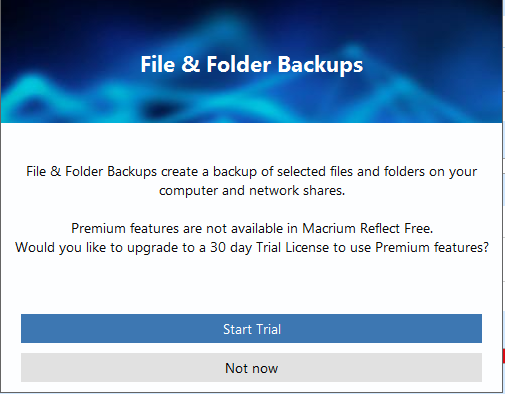
Looks like it's not an option.
I'm running version v8.0.7783.
Is there a version I can download somewhere that'll allow me to do a file & folder backup or isn't this possible? I don't want to do an image backup.
If it's not possible then is there FREE software that isn't full of bloatware that will allow me to do this?
Paid for is a total last resort, as in a 1-off payment.
Subscription is totally not an option. I'm completely against subscription based software & would resort to the tedious drag & drop process before I subscribe to anything.1 -
I now use the free Hasleo Backup Suite. It has a great scheduling system and lets you setup a system of full and incremental (or differential) backups, along with retention rules.I used to use Macrium free, but discovered a problem restoring from a backup to a different PC. Even though I was using an administrator account, it could not restore some of the files due to unrecognised rights. Only certain files created in a certain way on the original PC had this issue. It seems it is/was a known problem, but put me off using Macrium, even the paid version.
I’m a Forum Ambassador and I support the Forum Team on the In My Home MoneySaving, Energy and Techie Stuff boards. If you need any help on these boards, do let me know. Please note that Ambassadors are not moderators. Any posts you spot in breach of the Forum Rules should be reported via the report button, or by emailing forumteam@moneysavingexpert.com.
All views are my own and not the official line of MoneySavingExpert.
0 -
One option to use the current Macrium software ( will the latest compatibility and probably security freatures too) is to keep all the 'files and folders' that you wish to separately backup on a virtual i.e. logical drive. Then back that up. Takes a bit of setting up but is easy and simple in operation.It is a typical way of segmenting one's system and data to make it easier to manage.It is what I do. I have a C drive ( SSD) that contains the operating system ( windows in my case) and the apps. I also have a rust spinner hard drive that is sectioned to have a virtual data drive ( G drive) so that all the files and folders I want to backup ( to external drives ) are stored there. Other logical parts of that HD drive I use for other reasons such as a full backup of the SSD.It relies on drive partitioning into logical drivesThat can be done on a single main drive but I have my second drive partitioned like a great big filing cabinet. Macrium can then be set to treat each logical drive separatelyIt will take a bit of learning about how to partition a drive on your part and I would backup your drive(s) entirely before doing any such changes or even use a new data drive.Maybe a bit of learning will reap benefits for you bit you would not want to make a mistake and lose your files so other methods might be more up your street.0
-
Surprised you mention bugs. I've not noticed any.Could you tell us what to look out for please?0
-
I forgot last night but am running one now.vacheron said:
I've seen that too. It's not any noticably slower than any other backup I use.B0bbyEwing said:
Was looking at that actually.vacheron said:
But then I saw the bit about the free version being slower than the paid version which made me wonder ......... how much slower. Are we talking like a week to backup a music CD kind of slower or are speeds still acceptable?
I think it will image my 500GB NVME drive with about 430GB of data on it, to a second internal 4TB mechanical hard disk in well under an hour.
It's not so slow that I ever notice. I think it could just be marketing TBH.
I may even try a run tonight and confirm.
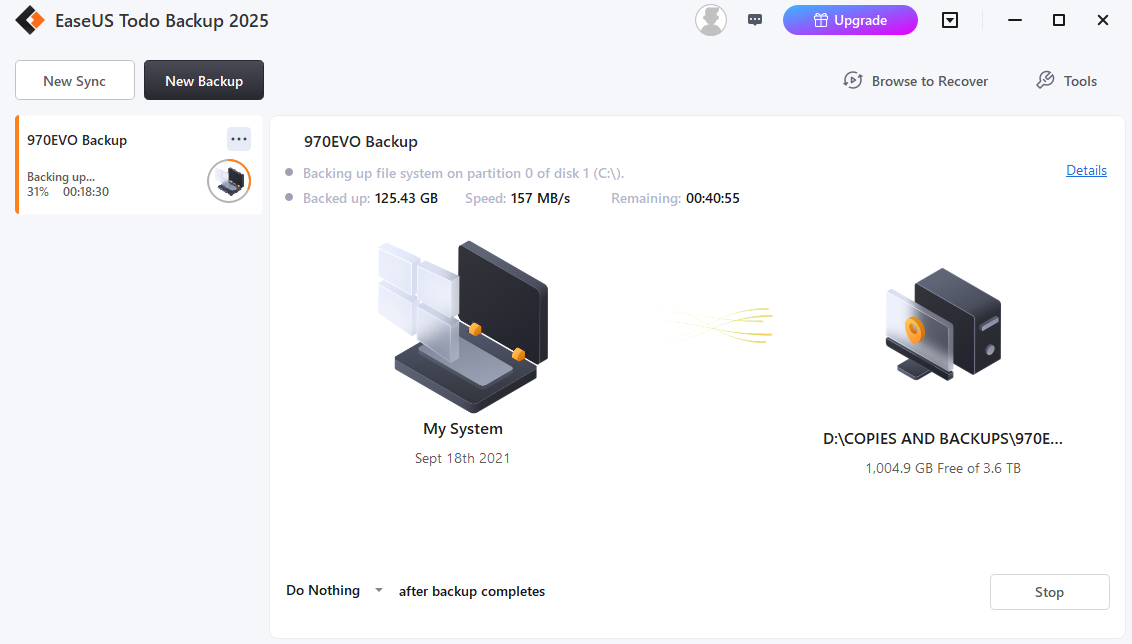
True to form, EaseUS Free has been backing up my NVME boot drive at an average of around 120MB's, (which is basically the maximum write speed of the mechanical HDD that I am writing to.
Sometimes it drops to 60-70MB/s and sometimes as high as 170-180MB/s which I believe is due to the software compressing the data on the fly.
At the time of writing it has backed up 125GB of data in just over 18 minutes.
So if the free version is indeed "slower", it's still faster than the physical limitation of the hardware that most users will be using to back up their data to!
• The rich buy assets.
• The poor only have expenses.
• The middle class buy liabilities they think are assets.1









Confirm your email address to Create Threads and Reply

Categories
- All Categories
- 355.8K Banking & Borrowing
- 254.9K Reduce Debt & Boost Income
- 456.2K Spending & Discounts
- 248.3K Work, Benefits & Business
- 605.9K Mortgages, Homes & Bills
- 179K Life & Family
- 263.8K Travel & Transport
- 1.5M Hobbies & Leisure
- 16.2K Discuss & Feedback
- 37.7K Read-Only Boards