We’d like to remind Forumites to please avoid political debate on the Forum.
This is to keep it a safe and useful space for MoneySaving discussions. Threads that are – or become – political in nature may be removed in line with the Forum’s rules. Thank you for your understanding.
📨 Have you signed up to the Forum's new Email Digest yet? Get a selection of trending threads sent straight to your inbox daily, weekly or monthly!
Is Macrium Reflect useless now?

B0bbyEwing
Posts: 2,561


 Forumite
in Techie Stuff
Finally got my backside in gear & went to do a file & folder backup.
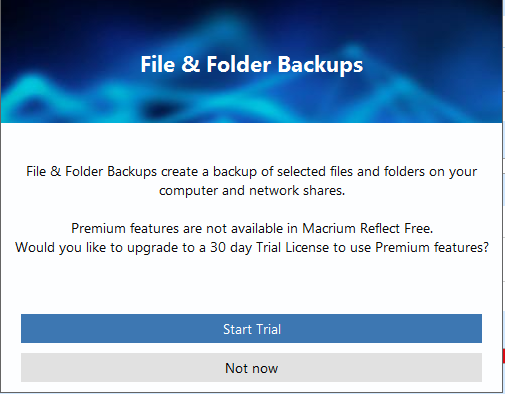
Looks like it's not an option.
I'm running version v8.0.7783.
Is there a version I can download somewhere that'll allow me to do a file & folder backup or isn't this possible? I don't want to do an image backup.
If it's not possible then is there FREE software that isn't full of bloatware that will allow me to do this?
Paid for is a total last resort, as in a 1-off payment.
Subscription is totally not an option. I'm completely against subscription based software & would resort to the tedious drag & drop process before I subscribe to anything.
Looks like it's not an option.
I'm running version v8.0.7783.
Is there a version I can download somewhere that'll allow me to do a file & folder backup or isn't this possible? I don't want to do an image backup.
If it's not possible then is there FREE software that isn't full of bloatware that will allow me to do this?
Paid for is a total last resort, as in a 1-off payment.
Subscription is totally not an option. I'm completely against subscription based software & would resort to the tedious drag & drop process before I subscribe to anything.
🤐🤐🤐
0
Comments
-
Hi,
The last free version that allowed file and folder copies without having to have the premium version is 7.3.
You can download it from here :
Download Macrium Reflect 7.3.5672 for Windows - Filehippo.com
I've used filehippo for many years and haven't had any problems.
EDIT - Actually, I've found a direct link for 7.3 directly from Macrium themselves so probably the best idea to get it from there :
https://download.macrium.com/reflect/v7/v7.3.6284/reflect_setup_free_x64.exe1 -
Thanks for the info.Peter999_2 said:Hi,
The last free version that allowed file and folder copies without having to have the premium version is 7.3.
You can download it from here :
Download Macrium Reflect 7.3.5672 for Windows - Filehippo.com
I've used filehippo for many years and haven't had any problems.
EDIT - Actually, I've found a direct link for 7.3 directly from Macrium themselves so probably the best idea to get it from there :
https://download.macrium.com/reflect/v7/v7.3.6284/reflect_setup_free_x64.exe
Some questions though...
How did you find the direct link? When I search "macrium reflect 7.3 download" there's seemingly no direct link.
Also, why is the direct link 110mb & the filehippo version only 5mb? I know they're not the exact file due to the numbers after the 3.
but over 100mb difference?🤐🤐🤐
0 -
The filehippo version is only 5MB as it is just the bootstrapper file - when you run it it actually then connects to Macrium to download the software.
I found the direct link from the second post in this forum thread - Where can I download Macrium Reflect Version 7? | Windows 11 Forum0 -
Have you tried it out - file & folder backup in that version?
Because I'm still getting the exact same 'error' / no-can-do message.
So I uninstalled the version I had via control panel>programs.
Then immediately ran the installer.
It wanted me to update to another 7.3 version so I did that but got the same error message as above.
So uninstalled THAT one, re-installed your second link & this time I said no to the update.
Still get the error message.
To clarify - on the left pane where it says "create a file and folder backup" that's what I'm clicking & I immediately get the error message.
If I click (left pane) on "image selected disk" ... then it lets me go ahead, but it's not imaging that I want to do.🤐🤐🤐
0 -
I've un-installed my paid for version of Macrium Reflect and installed Macrium Reflect Free and unfortunately get the same error message. Maybe it was never part of free ever (I honestly thought it was so apologies for that).
1 -
Just open up a cmd window and run xcopy or robocopy. You could make a batch file to automate it.0
-
I don't doubt that what you said is correct.mksysb said:Just open up a cmd window and run xcopy or robocopy. You could make a batch file to automate it.
I just don't know what you said.
I can read it. I just don't understand it.🤐🤐🤐
2 -
Perhaps spending a little time learning what that meant would be beneficial? You wouldn't need an app or program then.B0bbyEwing said:
I don't doubt that what you said is correct.mksysb said:Just open up a cmd window and run xcopy or robocopy. You could make a batch file to automate it.
I just don't know what you said.
I can read it. I just don't understand it.
Alternatively, you could pay someone (via a program or app) to do the backup. Whatever one you choose, someone is going to want paying for their work so it will either have adverts (perhaps for a premium version) or be paid for.
I appreciate your concern about subscriptions when an app doesn't need to be maintained and updated, but when it's something as important as backing up valuable data then you want to make sure that your solution keeps up to date and secure.
If I was looking for a backup solution then I'd start by reading reviews, narrow down the field and then use any trial versions to check it's for me.0 -
I used to use Makrium but now they've made it complicated I use EaseUS TODO to make images of my boot drives.
For my day to day filesystems I use Freefilesync and use their mirror function which will make an exact copy of the folders you select to any location you want on your backup drive. It's like the robocopy suggestion that @mksysb mentioned but with an easy graphical interface for the vast majority of PC users who aren't familiar with command line interfaces and batch file creation.
Because it inspects the existing files, it only overwrites files which have changed, been added or deleted, so it's very quick once you have made the first iteration.
You don't get the (often minimal) compression you might with backup software, but your files are on an NTFS filesystem, so can be read by almost anything forever! • The rich buy assets.
• The poor only have expenses.
• The middle class buy liabilities they think are assets.0 -
Was looking at that actually.vacheron said:
But then I saw the bit about the free version being slower than the paid version which made me wonder ......... how much slower. Are we talking like a week to backup a music CD kind of slower or are speeds still acceptable?🤐🤐🤐
0






Confirm your email address to Create Threads and Reply

Categories
- All Categories
- 355.8K Banking & Borrowing
- 254.9K Reduce Debt & Boost Income
- 456.2K Spending & Discounts
- 248.3K Work, Benefits & Business
- 605.9K Mortgages, Homes & Bills
- 179K Life & Family
- 263.8K Travel & Transport
- 1.5M Hobbies & Leisure
- 16.2K Discuss & Feedback
- 37.7K Read-Only Boards