We’d like to remind Forumites to please avoid political debate on the Forum.
This is to keep it a safe and useful space for MoneySaving discussions. Threads that are – or become – political in nature may be removed in line with the Forum’s rules. Thank you for your understanding.
📨 Have you signed up to the Forum's new Email Digest yet? Get a selection of trending threads sent straight to your inbox daily, weekly or monthly!
How to clean up restore health as an administrator
Comments
-
You enter the first command, press enter, wait for it to complete, type the second command, press enter.0
-
Once the above command is finished, (which should take a few minutes), do you enter the second part.
SFC /SCANNOW
So the command line will now look like this:
C:\WINDOWS\system32> SFC /SCANNOW
Hit ENTER• The rich buy assets.
• The poor only have expenses.
• The middle class buy liabilities they think are assets.0 -
I did it myself on my own PC to demonstrate, the whole process took about 3 minutes from start to finish.
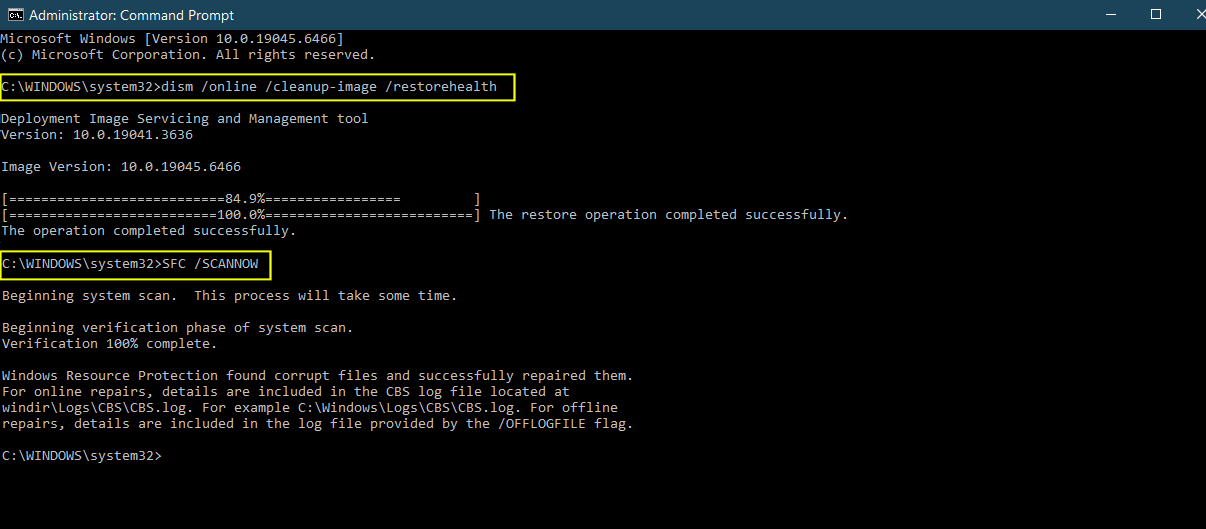
All these instructions were in my original post (the third reply after your original question), Had you just followed these to the letter you would have saved yourself about 10 hours. • The rich buy assets.
• The poor only have expenses.
• The middle class buy liabilities they think are assets.2 -
I thought it was all a single command, that's what I was doing wrong. It accepted putting both statements separately.
After running the first it says 'Restore operation completed successfully' and
'Resource Window Protection did not find any integrity violation'
Let's see if prevents the unscheduled restarting.1









Confirm your email address to Create Threads and Reply

Categories
- All Categories
- 355.8K Banking & Borrowing
- 254.9K Reduce Debt & Boost Income
- 456.2K Spending & Discounts
- 248.3K Work, Benefits & Business
- 606K Mortgages, Homes & Bills
- 179K Life & Family
- 263.8K Travel & Transport
- 1.5M Hobbies & Leisure
- 16.2K Discuss & Feedback
- 37.7K Read-Only Boards