We’d like to remind Forumites to please avoid political debate on the Forum.
This is to keep it a safe and useful space for MoneySaving discussions. Threads that are – or become – political in nature may be removed in line with the Forum’s rules. Thank you for your understanding.
📨 Have you signed up to the Forum's new Email Digest yet? Get a selection of trending threads sent straight to your inbox daily, weekly or monthly!
The Forum now has a brand new text editor, adding a bunch of handy features to use when creating posts. Read more in our how-to guide
How to clean up restore health as an administrator
Comments
-
Unfortunately, all I get is the black 'DOS type' screen when I type cmd in the search bar, nothing like the above.vacheron said:
Please see my first reply above, this suggests you are not running CMD as an administrator.peter021072 said:
740. I need to somehow 'Run DISM and SFC to repair system files Open Command Prompt as Administrator and run: DISM /Online /Cleanup-Image /RestoreHealth SFC /SCANNOW'flaneurs_lobster said:What's the error?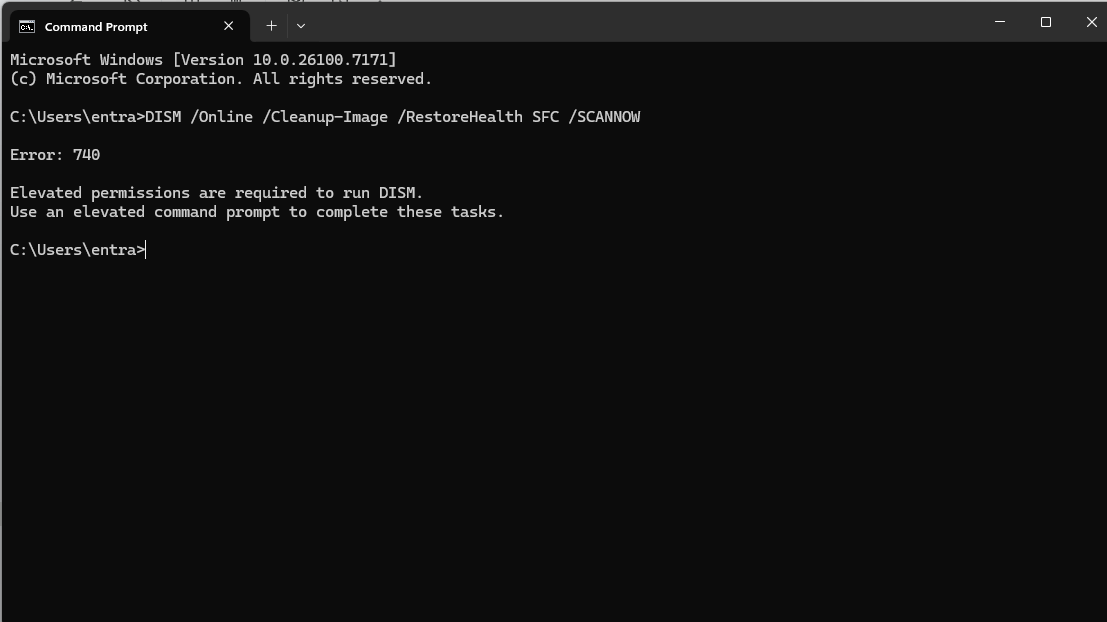
When you type CMD in the search bar, before hitting enter, you need to select "Run as admninstrator" from the option list to the right.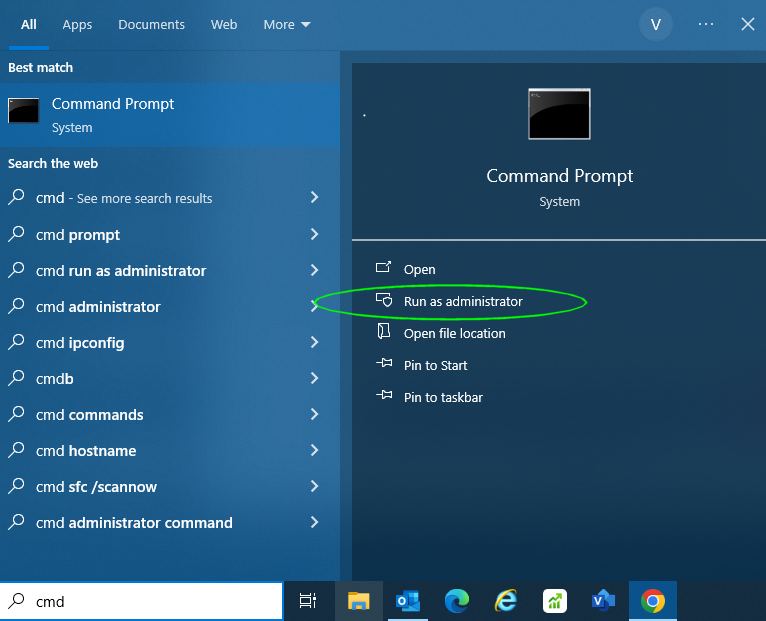 0
0 -
Yes sorry I copied the wrong screen. This is the administrator command prompt
error 87
I doubt if I can just add the DISM command it is expecting some other file directory.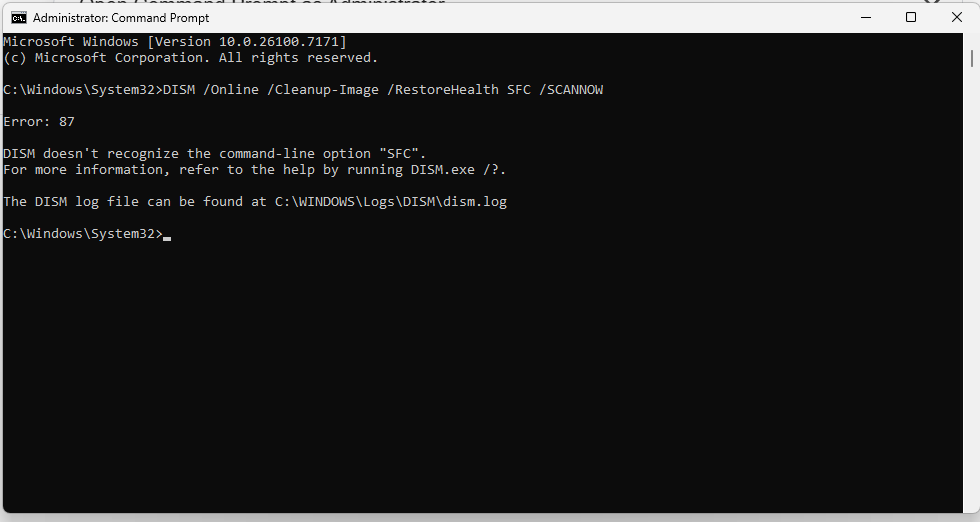
0 -
don’t hit enter immediately after you’ve typed CMD just type CMD and wait a little.peter021072 said:
Unfortunately, all I get is the black 'DOS type' screen when I type cmd in the search bar, nothing like the above.vacheron said:
Please see my first reply above, this suggests you are not running CMD as an administrator.peter021072 said:
740. I need to somehow 'Run DISM and SFC to repair system files Open Command Prompt as Administrator and run: DISM /Online /Cleanup-Image /RestoreHealth SFC /SCANNOW'flaneurs_lobster said:What's the error?
When you type CMD in the search bar, before hitting enter, you need to select "Run as admninstrator" from the option list to the right.• The rich buy assets.
• The poor only have expenses.
• The middle class buy liabilities they think are assets.0 -
Surely they are different commands first run
SFC /SCANNOW
THEN
DISM etc afterwards4.8kWp 12x400W Longhi 9.6 kWh battery Giv-hy 5.0 Inverter, WSW facing Essex . Aint no sunshine ☀️ Octopus gas fixed dec 24 @ 5.74 tracker again+ Octopus Intelligent Flux leccy
CEC Email energyclub@moneysavingexpert.com0 -
If I type cmd in the search line then - without pressing return - there is a right hand list. I press Run as Administrator, then this black screen I've posted below comes up with c:windows/system32/system32 prompt (with the backwards slashes).debitcardmayhem said:Surely they are different commands first run
SFC /SCANNOW
THEN
DISM etc afterwards
I can't do anything with that command except insert the clean up image statement in front of the line. Then I get error 87. Clearly that isn't the correct way of running the file and directory. I just can't seem to manipulate it even if I knew what to type. 0 -
What do you mean, 'in front of the line,' you insert after the flashing cursor.0
-
You are now in the administrator command line console which is good, but you are still typing the entire command into the line at once.peter021072 said:
If I type cmd in the search line then - without pressing return - there is a right hand list. I press Run as Administrator, then this black screen I've posted below comes up with c:windows/system32/system32 prompt (with the backwards slashes).debitcardmayhem said:Surely they are different commands first run
SFC /SCANNOW
THEN
DISM etc afterwards
I can't do anything with that command except insert the clean up image statement in front of the line. Then I get error 87. Clearly that isn't the correct way of running the file and directory. I just can't seem to manipulate it even if I knew what to type.Please try entering it as two separate commands as I explained in my first reply back on page one. 👍• The rich buy assets.
• The poor only have expenses.
• The middle class buy liabilities they think are assets.1 -
That's precisely what I've been trying to do. How? The original command prompt C:windows...... is there whatever, you just can't get rid of it. It's not possible to backspace or carriage return as with a normal word processor or program. I have no control over the command line except adding it on.You are now in the administrator command line console which is good, but you are still typing the entire command into the line at once.Please try entering it as two separate commands as I explained in my first reply back on page one. 👍0 -
It doesn't matter. As many have said, ignore everything listed before the ">" it is there by necessity and cannot be deleted, stop concerning yourself with it!peter021072 said:
That's precisely what I've been trying to do. How? The original command prompt C:windows...... is there whatever, you just can't get rid of it. It's not possible to backspace or carriage return as with a normal word processor or program. I have no control over the command line except adding it on.You are now in the administrator command line console which is good, but you are still typing the entire command into the line at once.Please try entering it as two separate commands as I explained in my first reply back on page one. 👍
Enter this part ONLY after the prompt - DISM /Online /Cleanup-Image /RestoreHealth
So the command line will now look like this:
C:\WINDOWS\system32> DISM /Online /Cleanup-Image /RestoreHealth
Hit ENTER• The rich buy assets.
• The poor only have expenses.
• The middle class buy liabilities they think are assets.1







 Yes sorry I copied the wrong screen. This is the administrator command prompt





Confirm your email address to Create Threads and Reply

Categories
- All Categories
- 354.6K Banking & Borrowing
- 254.4K Reduce Debt & Boost Income
- 455.5K Spending & Discounts
- 247.5K Work, Benefits & Business
- 604.3K Mortgages, Homes & Bills
- 178.5K Life & Family
- 261.8K Travel & Transport
- 1.5M Hobbies & Leisure
- 16.1K Discuss & Feedback
- 37.7K Read-Only Boards