We’d like to remind Forumites to please avoid political debate on the Forum.
This is to keep it a safe and useful space for MoneySaving discussions. Threads that are – or become – political in nature may be removed in line with the Forum’s rules. Thank you for your understanding.
📨 Have you signed up to the Forum's new Email Digest yet? Get a selection of trending threads sent straight to your inbox daily, weekly or monthly!
Asus laptop storage container
Comments
-
You've been to Currys, haven't you?akh43 said: A three year old laptop already out of action. £400.
I don't know how much they charge in your vicinity for motherboard repairs. Ordering a whole new motherboard can cost £130+, then likely an exorbitant rate for fitting it.
https://www.aliexpress.com/item/1005008517707229.html (They don't actually stock yours, only for a 14" screen)
https://www.ebay.co.uk/itm/156642871364
His skill level is just this: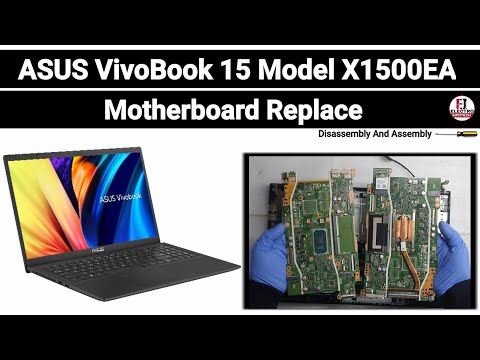 https://www.youtube.com/watch?v=VeSkc4gPqAI
The laptop I am using is ten years older than that and still going strong. Only had to replace the keyboard for £10.
Your PC Ran Into a Problem and Needs to Restart could also be due to faulty RAM. Did he test yours?
If the Motherboard had failed, then why didn't it just switch off whilst you were using it?
0 -
BFBW said:
You've been to Currys, haven't you?akh43 said: A three year old laptop already out of action. £400.
I don't know how much they charge in your vicinity for motherboard repairs. Ordering a whole new motherboard can cost £130+, then likely an exorbitant rate for fitting it.
https://www.aliexpress.com/item/1005008517707229.html (They don't actually stock yours, only for a 14" screen)
https://www.ebay.co.uk/itm/156642871364
His skill level is just this:https://www.youtube.com/watch?v=VeSkc4gPqAI
The laptop I am using is ten years older than that and still going strong. Only had to replace the keyboard for £10.
Your PC Ran Into a Problem and Needs to Restart could also be due to faulty RAM. Did he test yours?
If the Motherboard had failed, then why didn't it just switch off whilst you were using it?Yes it was from currys and cost me £229, I never really got on with asus so once he said it was the motherboard I had already decided to buy a new one. Got a lenovo one from currys yesterday for less than £200 so happy enough with that as I only really use for surfing a a few docs and to downloaded my bills and a few other bits.I seem to have bad luck with laptops, maybe because I go for cheap and cheerful, but the one time I did spend a bit more the hinge broke when it was just out of warranty and not worth fixing so I replaced with the asus as a quick fix.I just want to access the stuff I hadn't backed up, older stuff I have on an old hard drive, but different format.It is a small phone/computer shop. He didn't charge me for what he did so I am not complaining. He said he could not get it to power up to copy, but took out for SSD for me so I could do once I got a case, I would not have paid the cost for repair would rather buy a new one.0 -
Would have recommended you purchase a refurbished business quality laptop, rather than those cheap 'disposable' laptops.akh43 said:BFBW said:
You've been to Currys, haven't you?akh43 said: A three year old laptop already out of action. £400.
I don't know how much they charge in your vicinity for motherboard repairs. Ordering a whole new motherboard can cost £130+, then likely an exorbitant rate for fitting it.
https://www.aliexpress.com/item/1005008517707229.html (They don't actually stock yours, only for a 14" screen)
https://www.ebay.co.uk/itm/156642871364
His skill level is just this:https://www.youtube.com/watch?v=VeSkc4gPqAI
The laptop I am using is ten years older than that and still going strong. Only had to replace the keyboard for £10.
Your PC Ran Into a Problem and Needs to Restart could also be due to faulty RAM. Did he test yours?
If the Motherboard had failed, then why didn't it just switch off whilst you were using it?Yes it was from currys and cost me £229, I never really got on with asus so once he said it was the motherboard I had already decided to buy a new one. Got a lenovo one from currys yesterday for less than £200 so happy enough with that as I only really use for surfing a a few docs and to downloaded my bills and a few other bits.I seem to have bad luck with laptops, maybe because I go for cheap and cheerful, but the one time I did spend a bit more the hinge broke when it was just out of warranty and not worth fixing so I replaced with the asus as a quick fix.I just want to access the stuff I hadn't backed up, older stuff I have on an old hard drive, but different format.It is a small phone/computer shop. He didn't charge me for what he did so I am not complaining. He said he could not get it to power up to copy, but took out for SSD for me so I could do once I got a case, I would not have paid the cost for repair would rather buy a new one.0 -
BFBW said:
They need one of these: https://www.amazon.co.uk/s?k=nvme+enclosure&crid=ECRVQ4BY29GW
Do not choose a SATA option. Only NVMe.
Example: https://www.amazon.co.uk/AXFEE-Enclosure-Tool-free-NVMe-External-NVME-Adapter-NVME/dp/B0DZCY7KHG/I have now got the storage container, but when I plugged it into my new laptop it appears the bitlocker drive is protected and needs a password or recovery key, none of which I have.I have googled, but so many different videos I am so confused.Is there an easy way to access the contents and make the drive useable again?Thanks
0 -
If the old laptop was signed into your Microsoft account then the key should be in account.microsoft.com/devices/recoverykey
If it wasn't signed in (some people on here think that signing your laptop into a MS account is not cool) and you didn't copy the Bitlocker key away somewhere off the old laptop then I think you are less than optimal.1 -
flaneurs_lobster said:If the old laptop was signed into your Microsoft account then the key should be in account.microsoft.com/devices/recoverykey
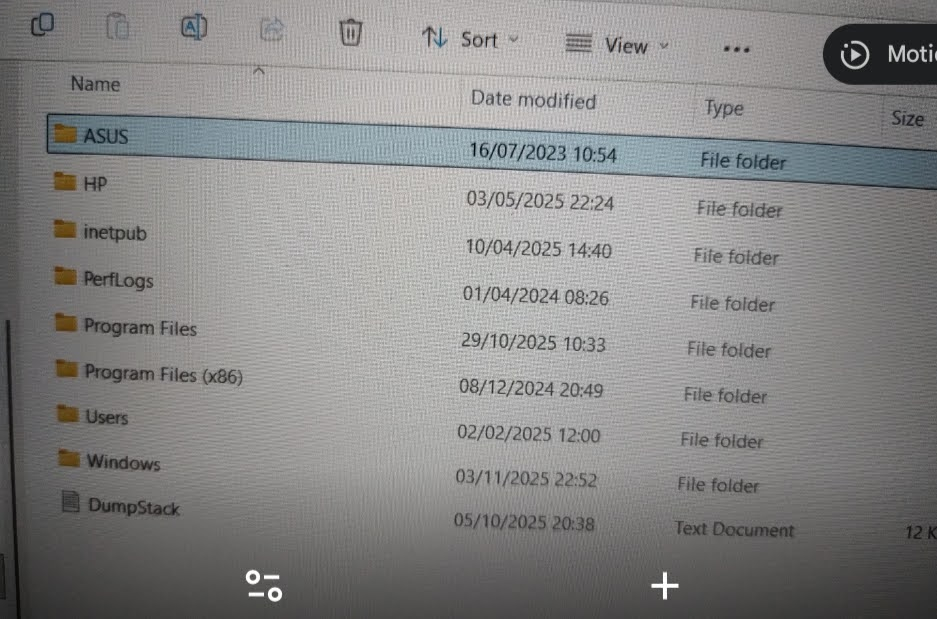
If it wasn't signed in (some people on here think that signing your laptop into a MS account is not cool) and you didn't copy the Bitlocker key away somewhere off the old laptop then I think you are less than optimal.Thanks for the info, as I log in with my microsoft account I checked and there were 2 bitlocker recovery key codes there, first one didn't work and the second one did, but the files I need do not seem to be in it. I tried the top one first as the date was most recent, assume the second one is from around the time I bought the laptop. Got the error below so tried the second one as the key ID matched. Managed to access but all that seems to be on it is programme files, no downloads, documents or pictures 😕Does that mean that none of my files saved over the past 2+ years?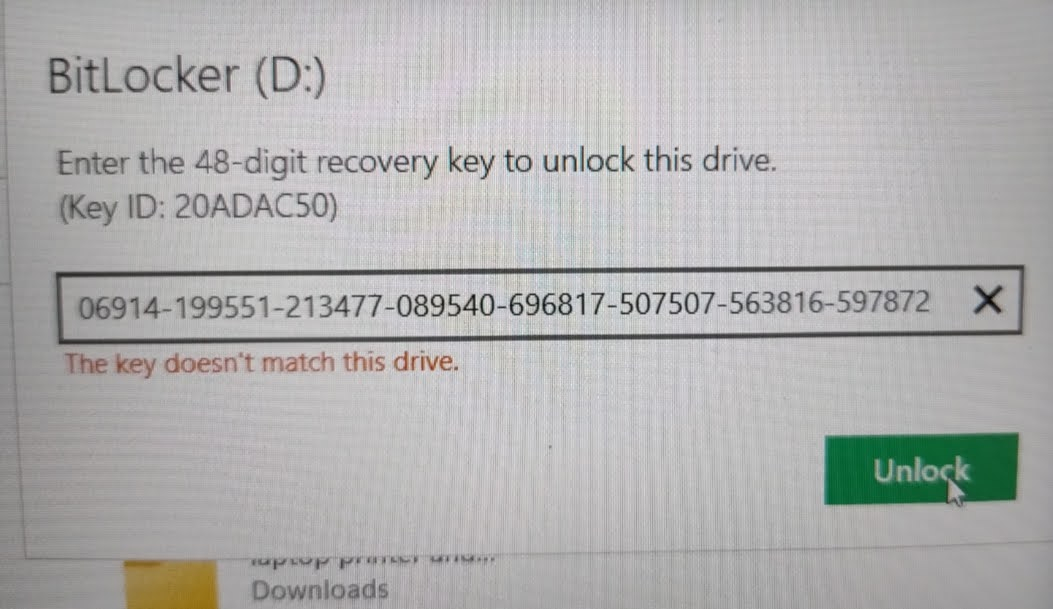
0 -
The first key was set up last week, presumably it's for your new laptop.
Have you looked in the Users folder, your data should be there.1 -
flaneurs_lobster said:The first key was set up last week, presumably it's for your new laptop.
Have you looked in the Users folder, your data should be there.I didn't realise the most recent one was my new laptop so will keep that info 👍Thanks very much for the tip, looks like all the info I need is hidden in users 👍initially said no access, but then let me in so will save the info I want to keep.Can I now use this second storage as further back up if needed? Can I transfer onto my original hard drive from a previous laptop to keep it all together or best to keep separate?Much appreciated for your help in this matter.
0 -
akh43 said:Can I now use this second storage as further back up if needed? Can I transfer onto my original hard drive from a previous laptop to keep it all together or best to keep separate?
This is down to how you are using your laptop and how much data you are using and if you are backing up to a cloud. Anything important or precious should be in three different places, at least one of which is in a different physical location.1











Confirm your email address to Create Threads and Reply

Categories
- All Categories
- 355.8K Banking & Borrowing
- 254.9K Reduce Debt & Boost Income
- 456.2K Spending & Discounts
- 248.3K Work, Benefits & Business
- 606K Mortgages, Homes & Bills
- 179K Life & Family
- 263.8K Travel & Transport
- 1.5M Hobbies & Leisure
- 16.2K Discuss & Feedback
- 37.7K Read-Only Boards