Ready, steady… save!
You don’t need a chart to join in. Here are 2 ways to record your savings:
1. Cross it off
Pop a chart into your first post. Saved an amount? Cross it out! Read more »
£0.01 £0.02 £0.03
2. Write it down
Skip the chart and add updates to your first post. Read more »
“Another +£3 saved today. Go me!”
Use +£ before each new saving so it counts towards your total.
We’d like to remind Forumites to please avoid political debate on the Forum.
This is to keep it a safe and useful space for MoneySaving discussions. Threads that are – or become – political in nature may be removed in line with the Forum’s rules. Thank you for your understanding.
📨 Have you signed up to the Forum's new Email Digest yet? Get a selection of trending threads sent straight to your inbox daily, weekly or monthly!
Trading212 - am i missing something

Robin9
Posts: 13,175


 Forumite
I opened a SS ISA a month ago and the monies went straight into the Investment,
I have subsequently made a top up and that is being held as Cash.
How do I transfer this to the Investment ?
Never pay on an estimated bill. Always read and understand your bill
0
Comments
-
There is normally a separate step to invest the money you add to the account. You'd be looking for the option to buy more of the investment. I'm not familiar with the interface as its been a few years since I used T212.1
-
Presumably you had to pick which fund(s) you wished to invest in with your initial ISA funding.
The couple of investment platforms I've used (not 212) require that you specify what you wish to do with additional funds - buy more of the same, buy something else or hold as cash.
Don't know if 212 allow for a default action to be set up.1 -
Robin9 said:How do I transfer this to the Investment ?If you want to buy more of the same thing, it's simple. The following is assuming the T212 app on Android; I'd hope iOS is similar.- Select the "pie" icon (second from left)- Scroll down the screen until you reach "asset allocation".- Select the fund you want to buy.- Choose the big blue "buy" button.I'd normally do this during trading hours since markets can be funny first thing when they open, which is when you'll execute if you place trades out of hours..N. Hampshire, he/him. Octopus Intelligent Go elec / Fuse gas / Vodafone BB / iD mobile. Kirk Hill Co-op member.Economy 7 cap explainer. Gas vs E7 vs peak elec heating costs, Ecoflow Stream, Best kettle :-)
2.72kWp PV facing SSW installed Jan 2012. 11 x 247w panels, 3.6kw inverter. 37 MWh generated, long-term average 2.6 Os.0 -
Simple way is to go to your chosen investment and click buy. Then it will ask how much you wish to invest and what funds you want to use. Should be straightforward. Here's an example when using T212 from my laptop.
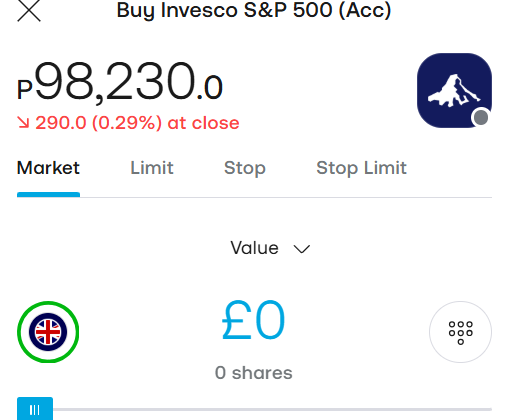
0 -
It's like any brokerage account, it has a cash balance and it's used automatically when you buy something. Or have you deposited your money in T212's separate cash Isa account? If so, you'd need to transfer the cash across to the S&S Isa.Robin9 said:I opened a SS ISA a month ago and the monies went straight into the Investment,
I have subsequently made a top up and that is being held as Cash.
How do I transfer this to the Investment ?
0








Categories
- All Categories
- 356K Banking & Borrowing
- 255K Reduce Debt & Boost Income
- 456.3K Spending & Discounts
- 248.5K Work, Benefits & Business
- 606.3K Mortgages, Homes & Bills
- 179.1K Life & Family
- 264.1K Travel & Transport
- 1.5M Hobbies & Leisure
- 16.2K Discuss & Feedback
- 37.7K Read-Only Boards