We’d like to remind Forumites to please avoid political debate on the Forum.
This is to keep it a safe and useful space for MoneySaving discussions. Threads that are – or become – political in nature may be removed in line with the Forum’s rules. Thank you for your understanding.
📨 Have you signed up to the Forum's new Email Digest yet? Get a selection of trending threads sent straight to your inbox daily, weekly or monthly!
Onestream Broadband - renting their router seems to be mandatory!

lad22
Posts: 81


 Forumite
Anyone else had this problem? It doesn't give you the option not to click on it, and it's £5.95 per month!
0
Comments
-
Onestream seem to be the Ryan Air of broadband providers. They charge for the router, anti-virus, help and support (another £4.95).
Just don't go with them, there are plenty of providers.1 -
Pretty sure I read a post from a Onestream customer , the option to buy your own router is available, either from them or from a third party , they will provide the logon credentials etc if you supply your own , but as stated , to make the headline price appear ‘cheap’ , things that other providers include in the price are extra, once you add these on , chances are they don’t look quite so good , but TBH that other poster still signed up after realising that’s this company’s MO ( modus operandi ) , to look really cheap ,1
-
It is not mandatory to rent a router from Onestream. I know this because I am with Onestream and opted out of renting a router from them.I use the TP-Link TD-W9970 N300 which I bought from Argos for £29.
Cancel the Mcafee antivirus straight away and you do not need to pay for help and support.3 -
But how did you manage to avoid it? Online when signing up there's no option to refuse it...jbrassy said:It is not mandatory to rent a router from Onestream. I know this because I am with Onestream and opted out of renting a router from them.I use the TP-Link TD-W9970 N300 which I bought from Argos for £29.
Cancel the Mcafee antivirus straight away and you do not need to pay for help and support.0 -
I tried to go with vodacom, but the website keeps changing the postcode I type in, and then saying it can't supply! Infuriating. And if I call, I lose the cashback you get when ordering online.Peter999_2 said:Onestream seem to be the Ryan Air of broadband providers. They charge for the router, anti-virus, help and support (another £4.95).
Just don't go with them, there are plenty of providers.0 -
I can't remember to be honest as I signed up several months ago. There is definitely a way to opt out though.lad22 said:
But how did you manage to avoid it? Online when signing up there's no option to refuse it...jbrassy said:It is not mandatory to rent a router from Onestream. I know this because I am with Onestream and opted out of renting a router from them.I use the TP-Link TD-W9970 N300 which I bought from Argos for £29.
Cancel the Mcafee antivirus straight away and you do not need to pay for help and support.0 -
I signed up a few days ago. The option to use your own router was there then. I was on here asking for info on which one to buy, I bought https://www.tp-link.com/uk/service-provider/dsl-router/archer-vr2800/ last night.
I checked just now, the option is there, "Continue without a router" Bottom right of screen.
https://onestream.co.uk/broadband/router
https://onestream.co.uk/support/technical/a-guide-to-choosing-your-own-router?currentStep=question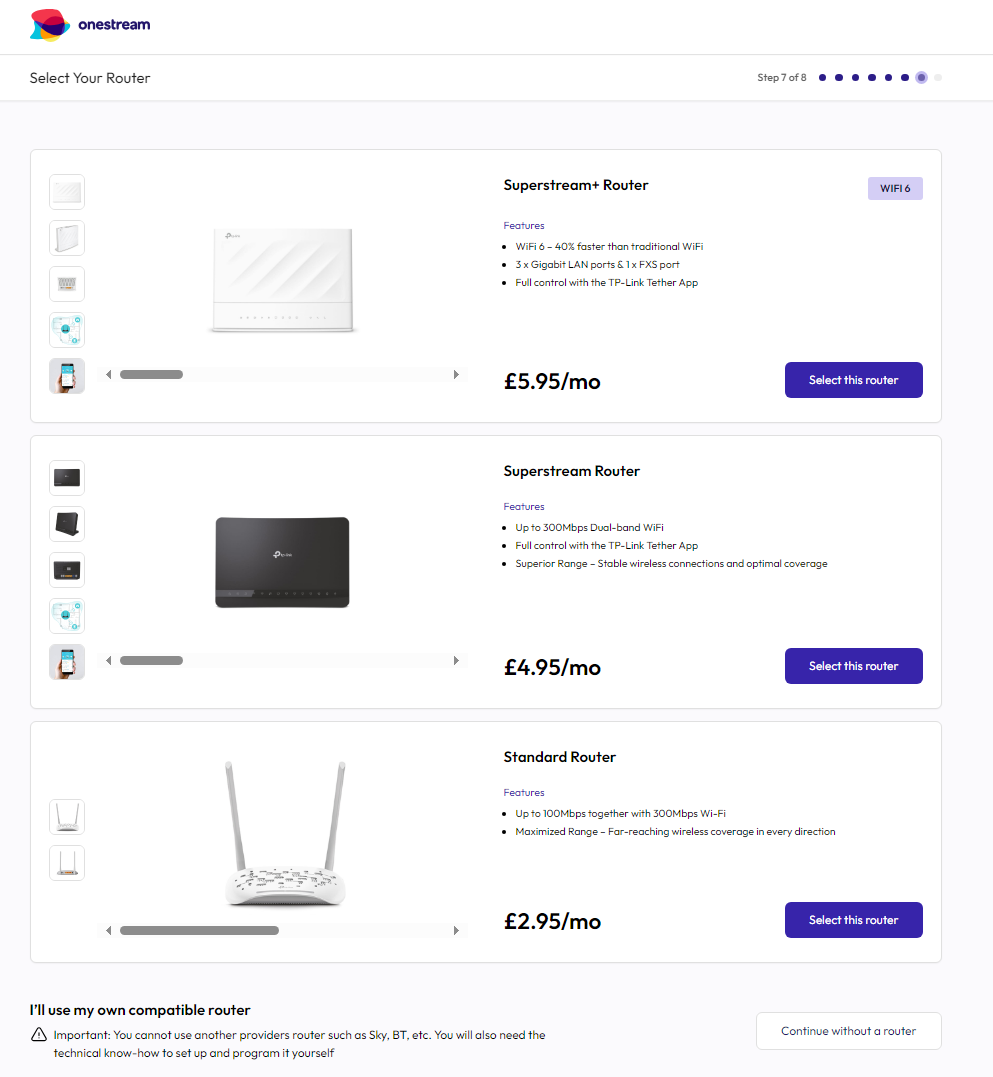
0 -
Just a thought, Maybe it depends which of their speed/products you're purchasing?? I'm getting Onestream Fibre 80.
Regarding the other issues, I chatted to them yesterday morning, telling them to cancel subscriptions to McAfee & Assured, and was told to cancel it in my account online.
The option/s aren't there, when I told them that, was told options won't be there until services are live.
So, I've set up a reminder in my calendar for 24 hours after.0 -
I'm on the Fibre 80 package and use the router I mentioned above. This is exactly the same as Onestream's "Standard" router. It's a very basic router, but I don't really care as it's plugged into my eero mesh router.The basic requirement for the router is that it must have a DSL port.2
-
i am just trying to navigate onestream. it did look an option to me to continue without a router. more useful maybe is to know that i didn't go trhough with the order and they callled me today and gave me the price with router included so i'd wait for that call. HOwever, i have also just come on here for experiences as i'm now in a queue waiting to challenge their email which confirms a contract price that is different to one disussed on phone .. so i'm not quite convinced i should go through with them. Oh for more options but i think they all seem to be cowboys.. and i don't want to go with virign. i dont have many options in devon.0




Confirm your email address to Create Threads and Reply

Categories
- All Categories
- 355.8K Banking & Borrowing
- 254.9K Reduce Debt & Boost Income
- 456.2K Spending & Discounts
- 248.3K Work, Benefits & Business
- 606K Mortgages, Homes & Bills
- 179K Life & Family
- 263.8K Travel & Transport
- 1.5M Hobbies & Leisure
- 16.2K Discuss & Feedback
- 37.7K Read-Only Boards