We’d like to remind Forumites to please avoid political debate on the Forum.
This is to keep it a safe and useful space for MoneySaving discussions. Threads that are – or become – political in nature may be removed in line with the Forum’s rules. Thank you for your understanding.
📨 Have you signed up to the Forum's new Email Digest yet? Get a selection of trending threads sent straight to your inbox daily, weekly or monthly!
The Forum now has a brand new text editor, adding a bunch of handy features to use when creating posts. Read more in our how-to guide
How do I unlock this thermostat?

Rosa_Damascena
Posts: 7,363 Forumite





This clearly needs programming, but before that I need to rid of the display padlock. I am going through my paperwork to find the manual but have tried random combination of the buttons on the panel (in much the same way as I do when resetting the clock on my oven!) with no luck.
This was working when it was installed 2 years ago, but the truth is no haven't used this zoned area and despite having a separate radiator powered with the main heating system the room is today feeling distinctly chilly! My attempt to activate the UFH is a failure :'(
Can anyone help?
This was working when it was installed 2 years ago, but the truth is no haven't used this zoned area and despite having a separate radiator powered with the main heating system the room is today feeling distinctly chilly! My attempt to activate the UFH is a failure :'(
Can anyone help?
No man is worth crawling on this earth.
So much to read, so little time.
So much to read, so little time.
0
Comments
-
Take a clear face-on pic, and do a Google images search. You'll almost certainly find it that way.
Then, 'instructions'! 0
0 -
Easier said than done... The model is HC90-WHT-WIFIThisIsWeird said:Take a clear face-on pic, and do a Google images search. You'll almost certainly find it that way.
Then, 'instructions'!
Try pressing two right buttons together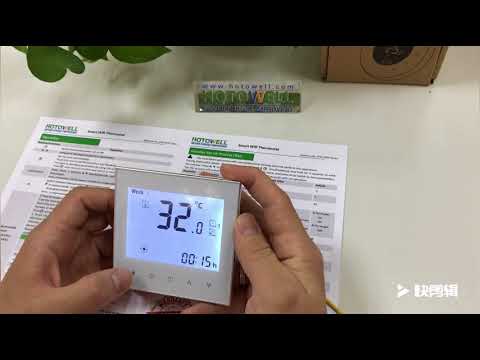 https://www.youtube.com/watch?v=Gc9o7ww4L_s - looks similar
2 -
Thanks for the effort you put into this @grumbler - tried this w/o success. Am convinced it is a Honeywell but there are umpteen models out there and can I find the darned instructions?! No....No man is worth crawling on this earth.
So much to read, so little time.0 -
If it's realy HC90, then it's 'HeatCom Corporation', not Honeywell1
-
Press and hold the second button from the left for 3 seconds (or maybe slightly longer). That might remove the lock.
Any language construct that forces such insanity in this case should be abandoned without regrets. –
Erik Aronesty, 2014
Treasure the moments that you have. Savour them for as long as you can for they will never come back again.1 -
Instructions for the HC90 are here:Section 7.3 says that pressing and holding the return key for 3 seconds activates the lock.It does not mention unlocking, but I'd put money on it being the same process as as locking.......
2 -
Thanks @FreeBear but no dice. When I work it out I shall post the answer!No man is worth crawling on this earth.
So much to read, so little time.0 -
Press & release the ON/OFF to turn the stat on then press/hold the return key for >3 secs to unlock?Signature on holiday for two weeks1
-
Do you know if it's WiFi, Rosa? It doesn't appear to be.
1 -
What happens if you press - or press-and-hold - the LH 'O' button?
1








Confirm your email address to Create Threads and Reply

Categories
- All Categories
- 353.7K Banking & Borrowing
- 254.2K Reduce Debt & Boost Income
- 455.1K Spending & Discounts
- 246.8K Work, Benefits & Business
- 603.2K Mortgages, Homes & Bills
- 178.2K Life & Family
- 260.8K Travel & Transport
- 1.5M Hobbies & Leisure
- 16K Discuss & Feedback
- 37.7K Read-Only Boards