We’d like to remind Forumites to please avoid political debate on the Forum.
This is to keep it a safe and useful space for MoneySaving discussions. Threads that are – or become – political in nature may be removed in line with the Forum’s rules. Thank you for your understanding.
📨 Have you signed up to the Forum's new Email Digest yet? Get a selection of trending threads sent straight to your inbox daily, weekly or monthly!
The Forum now has a brand new text editor, adding a bunch of handy features to use when creating posts. Read more in our how-to guide
Android 12 question
Comments
-
If I was half as smart as I think I am - I'd be twice as smart as I REALLY am.0 -
Neil_Jones said:Then since everything we've suggested doesn't work the issue is probably being caused by an app you have on your phone.When you get the notification you should be able to swipe down on it and it should show you what app is causing it. You can then go into that App's settings and you should be able to change the amount of notifications.The other option could be to get Android to block the notifications, though this may have the unintended effect of blocking something you want to see depending on what app is causing this.But this is a new phone with no apps installed - other than those that came, out of the boxAnd there doesn't appear to be any news apps installed - yet it still keeps on reappearing - Guardian/Telegraph are the main culprits !When you "remove them and all future....." via the 3 dots top right - it does remove THAT page - but another then another appears - its so annoying
If I was half as smart as I think I am - I'd be twice as smart as I REALLY am.0 -
"Mirror" was installed as an app - now uninstalled - but links still appear together with BBC, Homes and Gardens, Telegraph, FT etc etcGrrrr !
If I was half as smart as I think I am - I'd be twice as smart as I REALLY am.0 -
2 days ago @RumRat asked for a screenshot - considering how little progress has been made it would still be very useful as your descriptions of what you are seeing are varying from "home screen", "apps", "links", "page" etc and you haven't been clear on the exact steps to reproduce it.MouldyOldDough said:"Mirror" was installed as an app - now uninstalled - but links still appear together with BBC, Homes and Gardens, Telegraph, FT etc etcGrrrr !
That aside, the old "RTM" advice always stands well with (new) technology and as such I've made a few guesses about what this could be:
Is it the recommendations on the Honor search screen?
https://www.hihonor.com/uk/support/content/en-us15844885/
Is it service cards? Page 5 of this?
Screenshots plus exact steps to reproduce would go a long way to solving this for you.2 -
What I've described is to control an action from the Home Screen - which is the problem you are getting.MouldyOldDough said:
It's not on the home screenNeil49 said:I don't quite understand what you are getting but I recall getting something similarly annoying (but swiping right from Home) a while back which I stopped.
In Settings scroll down and select Home Screen. Part of the way down there should be the option to deselect "Add Media Page to Home Screen" I think this is set to On by default.
Best of luck.
It's a seperate page0 -
Go to settings
Then "Home screen & wallpaper"
Then scroll down till you see "Home screen settings "
Turn off Google Discover
That's it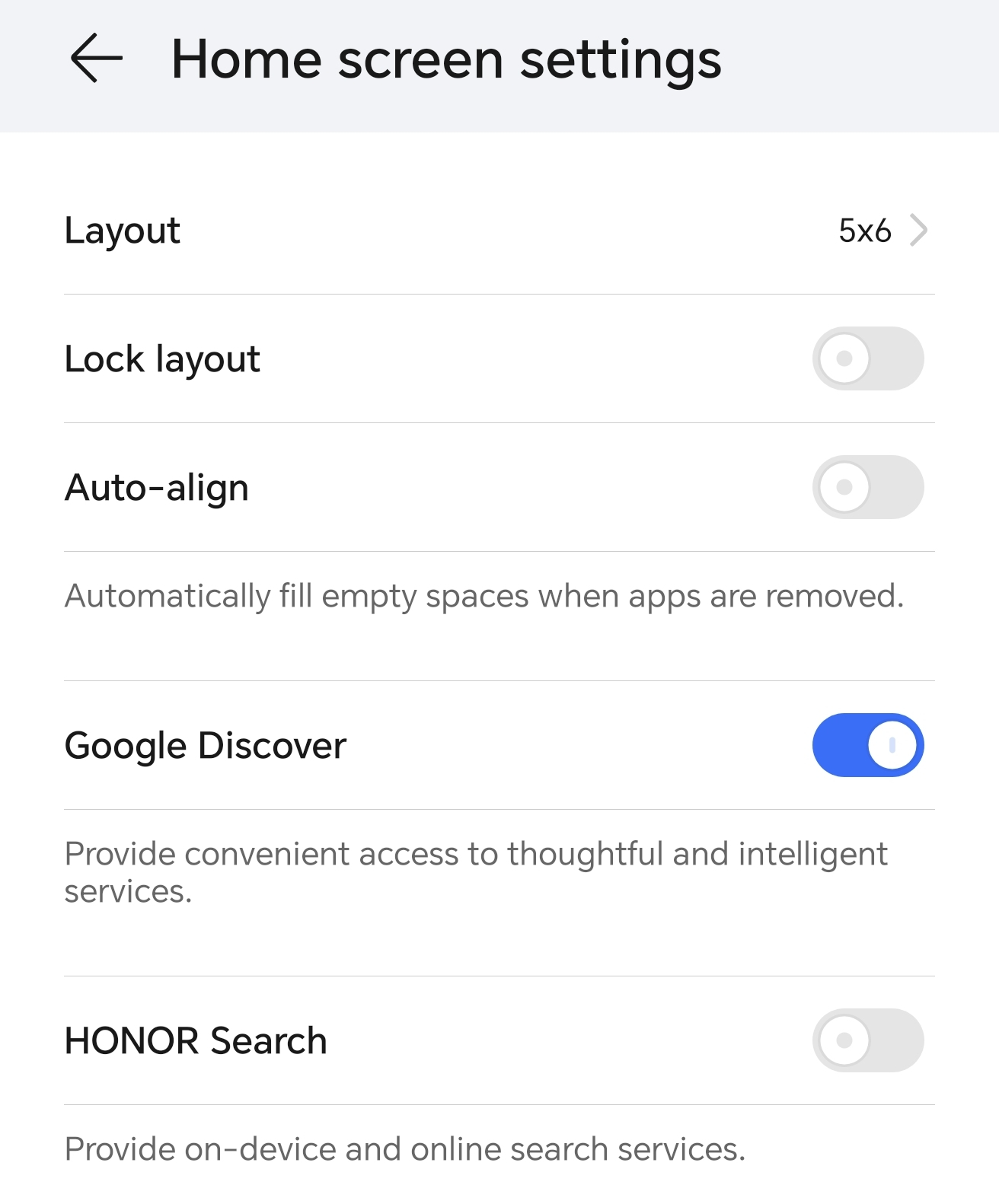
poppy102 -
There IS NO manual provided or supplied with the phone[Deleted User] said:
2 days ago @RumRat asked for a screenshot - considering how little progress has been made it would still be very useful as your descriptions of what you are seeing are varying from "home screen", "apps", "links", "page" etc and you haven't been clear on the exact steps to reproduce it.MouldyOldDough said:"Mirror" was installed as an app - now uninstalled - but links still appear together with BBC, Homes and Gardens, Telegraph, FT etc etcGrrrr !
That aside, the old "RTM" advice always stands well with (new) technology and as such I've made a few guesses about what this could be:
Is it the recommendations on the Honor search screen?
https://www.hihonor.com/uk/support/content/en-us15844885/
Is it service cards? Page 5 of this?
Screenshots plus exact steps to reproduce would go a long way to solving this for you.
If I was half as smart as I think I am - I'd be twice as smart as I REALLY am.0 -
There IS NO manual provided or supplied with the phone
indeed any mobile nowadays.................I just type a query into youtube for an answer
or just ask a teenager! 1
1 -
Hi,1




![[Deleted User]](https://us-noi.v-cdn.net/6031891/uploads/defaultavatar/nFA7H6UNOO0N5.jpg)



Confirm your email address to Create Threads and Reply

Categories
- All Categories
- 353.5K Banking & Borrowing
- 254.1K Reduce Debt & Boost Income
- 455K Spending & Discounts
- 246.6K Work, Benefits & Business
- 602.9K Mortgages, Homes & Bills
- 178K Life & Family
- 260.6K Travel & Transport
- 1.5M Hobbies & Leisure
- 16K Discuss & Feedback
- 37.7K Read-Only Boards