We’d like to remind Forumites to please avoid political debate on the Forum.
This is to keep it a safe and useful space for MoneySaving discussions. Threads that are – or become – political in nature may be removed in line with the Forum’s rules. Thank you for your understanding.
📨 Have you signed up to the Forum's new Email Digest yet? Get a selection of trending threads sent straight to your inbox daily, weekly or monthly!
The Forum now has a brand new text editor, adding a bunch of handy features to use when creating posts. Read more in our how-to guide
Chip Feedback
Comments
-
You don't. Once you're signed in you are signed in until you reset/uninstall the app. No pin's required to log in or anything so I'd recommend putting some sort of passcode/pattern/biometric lock on your phone if you haven't already.trickydicky14 said:
I've now got it sorted, next question, how do you log out of your account?trickydicky14 said:Well that's not a good start, just attempted to sign up to Chip only to get error messages when I press sign up button. Have tried many times with no luck.1 -
I never log out, just leave the app. However, every time I go back to the app it asks for my security pin or fingerprint. I must have setup a secure login to the app, but can't remember how, probably fairly obvious in the settings since I managed it!I've now got it sorted, next question, how do you log out of your account?'Compound interest is the eighth wonder of the world. He who understands it, earns it; he who doesn’t, pays it' - Albert Einstein.3 -
Yeh PIN/Fingering is an option in settings.1
-
I never noticed you could set up a PIN in the chip app. Many thanks for pointing this out.0
-
Be aware that it can be removed by clearing data or reinstalling the app. You'd still want to ensure your device was securely locked when unattended.Bridlington1 said:I never noticed you could set up a PIN in the chip app. Many thanks for pointing this out.
1 -
I never noticed that. Set it up now.Bridlington1 said:I never noticed you could set up a PIN in the chip app. Many thanks for pointing this out.
1. Go to profile
2. Scroll down to Secure log in
3. Type in 4 digits code
4. Confirm by typing it again
5. After that it lets you to enable face ID
I would've thought like in any other apps I use this will be the requirement when you setting up your app, but appears to be optional in Chip.2 -
I set the chip pin up yesterday. There doesn't seem to be any option to set up face ID though this is not unique to the Chip app to be fair.0
-
Face ID works on my iPad, don’t remember setting it up but that was a month ago.Bridlington1 said:I set the chip pin up yesterday. There doesn't seem to be any option to set up face ID though this is not unique to the Chip app to be fair.0 -
This option appeared only after I set up 4 digit PIN.Bridlington1 said:I set the chip pin up yesterday. There doesn't seem to be any option to set up face ID though this is not unique to the Chip app to be fair.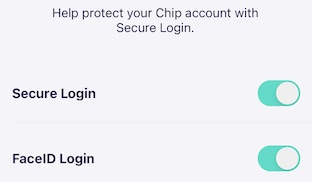 1
1 -
All I can find is this:allegro120 said:
This option appeared only after I set up 4 digit PIN.Bridlington1 said:I set the chip pin up yesterday. There doesn't seem to be any option to set up face ID though this is not unique to the Chip app to be fair.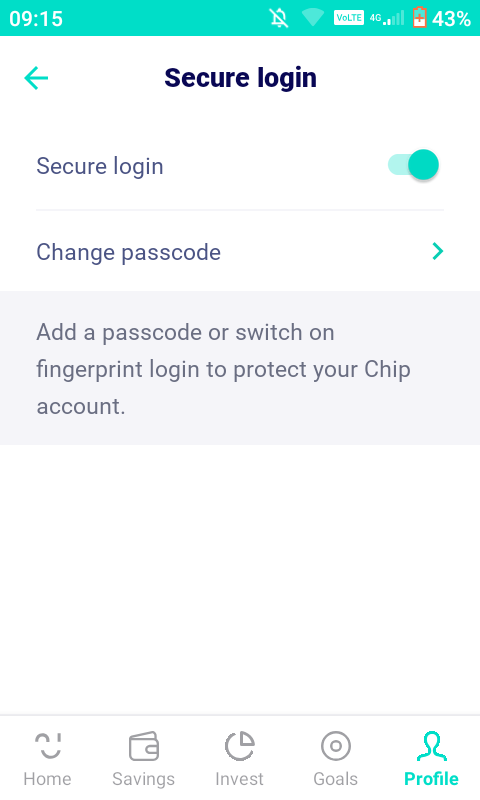
I have had functionality issues with other apps before such as CMC invest not installing a scroll bar until I'd had the app for over a month, not being able to deposit cheques with Virgin etc so I assume the lack of chip face ID will be a similar sort of thing. I haven't got the fanciest of phones let's put it that way so it doesn't surprise me too much.
More often than not I just leave the smartphone at home anyway when I go out and about and the phone is currently locked with a password so I'm happy to leave chip locked with a pin I generated on random.org yesterday.0









Confirm your email address to Create Threads and Reply

Categories
- All Categories
- 354.3K Banking & Borrowing
- 254.4K Reduce Debt & Boost Income
- 455.4K Spending & Discounts
- 247.3K Work, Benefits & Business
- 604K Mortgages, Homes & Bills
- 178.4K Life & Family
- 261.5K Travel & Transport
- 1.5M Hobbies & Leisure
- 16K Discuss & Feedback
- 37.7K Read-Only Boards