We’d like to remind Forumites to please avoid political debate on the Forum.
This is to keep it a safe and useful space for MoneySaving discussions. Threads that are – or become – political in nature may be removed in line with the Forum’s rules. Thank you for your understanding.
📨 Have you signed up to the Forum's new Email Digest yet? Get a selection of trending threads sent straight to your inbox daily, weekly or monthly!
The Forum now has a brand new text editor, adding a bunch of handy features to use when creating posts. Read more in our how-to guide
94yr old says........
![[Deleted User]](https://us-noi.v-cdn.net/6031891/uploads/defaultavatar/nFA7H6UNOO0N5.jpg)
[Deleted User]
Posts: 0 Newbie



Ma in law is 94, uses basic mobile. Of late she says she's not getting our texts. Have to admit I've changed from using the app Messages to Messages, two different platforms. The icons explain. Which should I be using to guarantee she receives our texts 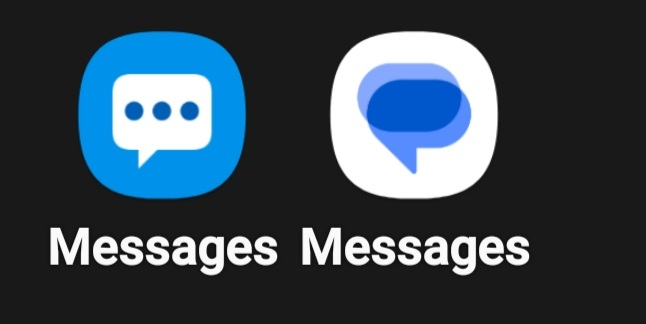
0
Comments
-
Either app is able to !!!!!! up sending of simple text messages. The one one the left is Samsung's, the other is Google's.
Whichever one you are using you need to go into settings and turn off "chat" or "messages" or "RCS" features. There should also be a setting that says to resend message as SMS if chat not delivered.
If neither work then consider installing another "SMS-only" app.2 -
Thanks I will follow through your advice and report back.0
-
I've made the Google icon app the default and she's responding now. The Samsung one ideally I'd delete, but can't, unless you know a way.0
-
Can't, Samsung have made it a permanent "feature" (along with some other stuff like Samsung Pay). It won't get in the way because your phone can only have one SMS app active ("default") at one time.[Deleted User] said:I've made the Google icon app the default and she's responding now. The Samsung one ideally I'd delete, but can't, unless you know a way.0 -
try pressing and holding the Samsung icon and choose 'remove'0
-
That won't work, it's a Samsung OS app.km1500 said:try pressing and holding the Samsung icon and choose 'remove'
Best to just remove the Samsung app from the home screen and leave it in the App drawer and she won't see it then.Drinking Rum before 10am makes you
A PIRATE
Not an Alcoholic...!0 -
well I just did it (galaxy s22) ...0
-
You've removed the app icon from the home screen, you haven't uninstalled it.km1500 said:well I just did it (galaxy s22) ...3 -
Exactly...Remove is not the same as uninstall....It's still there in the App drawer.flaneurs_lobster said:
You've removed the app icon from the home screen, you haven't uninstalled it.km1500 said:well I just did it (galaxy s22) ...Drinking Rum before 10am makes you
A PIRATE
Not an Alcoholic...!1 -
There are a crazy number of Samsung apps on the phone if you look at Apps in Settings. I'd love to get rid of most of them, if only to make scrolling through the Apps I do want to change easier.
0







Confirm your email address to Create Threads and Reply

Categories
- All Categories
- 353.5K Banking & Borrowing
- 254.2K Reduce Debt & Boost Income
- 455.1K Spending & Discounts
- 246.6K Work, Benefits & Business
- 603K Mortgages, Homes & Bills
- 178.1K Life & Family
- 260.6K Travel & Transport
- 1.5M Hobbies & Leisure
- 16K Discuss & Feedback
- 37.7K Read-Only Boards