We’d like to remind Forumites to please avoid political debate on the Forum.
This is to keep it a safe and useful space for MoneySaving discussions. Threads that are – or become – political in nature may be removed in line with the Forum’s rules. Thank you for your understanding.
📨 Have you signed up to the Forum's new Email Digest yet? Get a selection of trending threads sent straight to your inbox daily, weekly or monthly!
The Forum now has a brand new text editor, adding a bunch of handy features to use when creating posts. Read more in our how-to guide
Want to become a Forum Ambassador? Visit the Community Noticeboard for details on how to apply
Computer experts needed, looking to buy a new one!...
Comments
-
facade said:Disneyfuel said:Thats brilliant, thank you so much!
IF...I was to decide to upgrade a few other bits whilst I was there, how do I know if things are compatible? I've never messed about with the inner workings of a computer before, so say I wanted to maybe add more RAM etc? I'm assuming I can't just buy one with a bigger number and its as simple as that...loldownload a program called speccy from ccleaner.com.When you run it it will tell you all about your computer, like this. Check what the motherboard is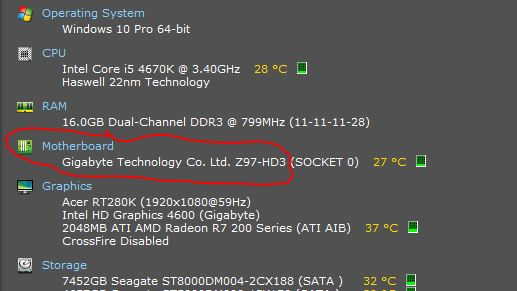 Then when you know what your motherboard is you can get the manual from the manufacturers web site and see what memory it will take, and how much. I'm guessing DDR3. PC3-10600 probably (666MHz). There may be a maximum size for the memory modules it can take.Clicking on RAM, and then the little arrow by slot 1
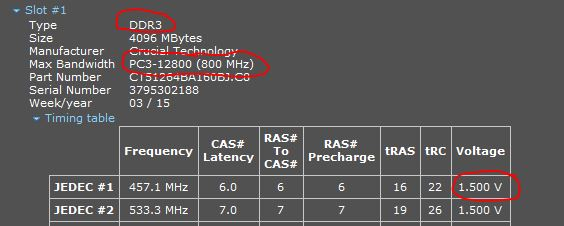 You likely have 2 4GB modules, and if you are lucky, 2 empty slots. If that is the case, get on eBay and buy another 2 4GB modules for around £10 the pair (always fit memory modules in pairs, it runs faster). You must get U- unbuffered or non-ECC type for a desktop. Some sellers have server ram (or Apple mac) cheap, which is buffered/ECC/Registered this will not work in a desktop. Don't buy L (low voltage- 1.35V) type unless you have it already.Then you will have 16GB which is more than ample for win 7 or 10.If has no empty slots then I wouldn't bother with more memory, swapping the 8gb for 16GB will cost more than the benefit, and you won't be able to use this memory in a new pc.I wouldn't be buying anything else for an old machine, a new fan, an SSD (that can be reused in a new pc anyway) and £10 worth of memory is as far as I'd suggest going.
Some good educated guesses. PC3 10600 is likely correct. They'll need to check the manufacturer spec to check the max. size module accepted(though this is not hard and fast).
http://www.uktsupport.co.uk/advent/pc/DT2213.htm
http://www.uktsupport.co.uk/advent/pc/DT1313.htm
Example: https://uk.webuy.com/product-detail/?id=smem8qaa
Quite an old system, so probably needs a bit of a clean. New thermal paste would probably be a good thing too..
OP can clone the Windows 7 drive to SSD AND install Windows 10 to another.
They could buy a new system and run Windows 7 as a Virtual instance or even install Windows 7 to run on a separate drive without network access or locked behind a firewall.
Twelve year old Advent could soon be on it's way out.0 -
If you don't want the hassle of upgrading 11 years old PC.
Used PC like this will fulfil your needs
https://uk.webuy.com/product-detail/?id=sdescusryz5260041b&categoryName=desktops-windows&superCatName=computing&title=custom-ryzen-5-2600-16gb-ddr4-240gb-ssd+2tb-hdd-gtx-1650-w10-b&referredFrom=search&queryID=a902306cb48b79fd1abc013e72935847&position=18Custom/Ryzen 5 2600/16GB DDR4/240GB SSD+2TB HDD/GTX 1650/W10/B £230 @ CEX0 -
Just my opinion
 The system is 12 years old &, while it could be made "useable" for light work (web browsing etc), is it really worth it for the OPs needs? While little upgrades (memory, SSD etc) don't cost much on their own, they add up & is the return worth it for the small performance gain?There is also the problem with what seems to be some corruption in the OS (eg corrupt user profile) I wouldn't want to be cloning that disk to a new drive. Ideally a fresh install is needed.I understand the OPs dilemma with running old programs, I've been there myself, & I know how much time & effort is needed to get these working/find alternatives can be but eventually that time comes.....I've had a quick look on the interweb & found a few companys selling configurable systems that are way better for less than £400 (decent spec)There is also the advantage of newer tech such as...DDR4 mem, NVME/M2, PCIE gen3/4 etcSpend around £100 upgrading an old system with existing problems or an extra £250 on a pretty up to date, much faster, system?Thankfully it's not my decision
 Always try to be at least half the person your dog thinks you are!0
 -
The current system won't cost £100 to upgrade. But I also doubt if it is suitable for video editingParadigm said:Just my opinionThe system is 12 years old &, while it could be made "useable" for light work (web browsing etc), is it really worth it for the OPs needs? While little upgrades (memory, SSD etc) don't cost much on their own, they add up & is the return worth it for the small performance gain?There is also the problem with what seems to be some corruption in the OS (eg corrupt user profile) I wouldn't want to be cloning that disk to a new drive. Ideally a fresh install is needed.I understand the OPs dilemma with running old programs, I've been there myself, & I know how much time & effort is needed to get these working/find alternatives can be but eventually that time comes.....I've had a quick look on the interweb & found a few companys selling configurable systems that are way better for less than £400 (decent spec)There is also the advantage of newer tech such as...DDR4 mem, NVME/M2, PCIE gen3/4 etcSpend around £100 upgrading an old system with existing problems or an extra £250 on a pretty up to date, much faster, system?Thankfully it's not my decision
240GB SSD £15, 480GB SSD £25, 960 SSD £37 right now
Case fan is £7 each
used 8GB DDR3 RAM would be £10 each if his PC could take it. Not required if it is for browsing.
As mentioned, I suggest getting used £230 PC.
If Op want something brand new, Ryzen 5 5700G + 16GB RAM + 480GB SSD could be found at £440. (need to install Windows and re-use the existing windows key)
.1 -
Cisco001 said:The current system won't cost £100 to upgrade. But I also doubt if it is suitable for video editing
If Op want something brand new, Ryzen 5 5700G + 16GB RAM + 480GB SSD could be found at £440. (need to install Windows and re-use the existing windows key)
.£100 was over the top, was just trying to make a point Silk purse & sows ear spring to mind!
Always try to be at least half the person your dog thinks you are!0 -
This is a "money saving" site and that isnt what a Mac is.Disneyfuel said:So no one has recommended a Mac so far, I've been reading that although more user-friendly and powerful, they are pricey for what you could probably get as a PC in the same spec. And they are a bit more 'locked down' in that it won't allow a few 'modified programmes' to be added
Is this the reason for no recommendations?
Been a Mac user for c15 years now, though use Window's machines most the time for work. Mrs is a designer which is why she wanted to replace our home computer with a Mac back then and I thought it would be interesting to try.
I have never found it to be more user friendly, its just different. Needless to say with most innovation in an OS the other copies it fairly soon after if it proves to be good. I do however like not having to deal with drivers, had more than one computer really suffer from driver incompatibilities and that other than major OS updates it virtually never needs rebooting (my current client supplied Surface Laptop needs rebooting every other day)
The thing with Apple computers, and products in general, you are paying for design so absolutely if that isnt important to you then you can get more bang for your buck with another brand of machine. However if you want the ultra thin, all metal case etc then many of the big names are comparable in pricing to Apple for these.
Right now I have a Surface Laptop 4 from my client and a Apple MacBook Pro M1 Pro for myself. Both are now old models but looking at the latest version of each the Apple computer is about 20% more expensive. Starting at 8am my Surface will be out of battery by 2pm, my MBP will still have circa 40% battery by 6pm so when I could use my own laptop with my last client I didnt need to bring a charger with me. The MBP can also charge whilst doing basic office type tasks using a 20w phone/tablet charger whereas the Surface doesnt even recognise it as a charger.
Its hard to do an A / B comparison of heavy processor stuff because my work laptop doesnt have video or photo editing software installed on it but having run some heavy db models on both the Mac is massively quicker. Comparing the current Surface and MBP M2 Pro with Geekbench for that 20% extra cost you get circa 20% extra single core and circa 90% extra multi-core performance.
To me, its a no brainer which I use when I have a choice but then the Surface isnt a money saving device either and similar performance could be gotten at a lower price in a Windows machine without being ultra thin etc.
There are illegal copies of software you can use on a Mac, the Mac isnt any more locked down in that respect than Windows and still most software is installed outside of the App Store. Its been a long time since I was looking at such software but when I did when first transitioning then I would say there were far fewer options out there but I think that says more about the volume and nature of Mac users than the strength of license protection in Macs or Mac software.0 -
Just a note about Speccy mentioned above:Speccy hasn't had a functional update in a number of years, so it can sometimes report a bit oddly when reporting on newer CPU chips, etc.The Free version of Speccy is all that you need, the Paid for 'Pro' version does not have any extra functionality you are paying for 'priority support' (that you don't need*) and automatic updates (what updates?).Save your money and just download the free version.(*Disclosure: I am a moderator on the Piriform/CCleaner official company forum, we support Speccy there too).1
-
An SSD and a RAM upgrade are a way to breath life into an old PC.But 10+ years ain't a bad run for a PC, so maybe a newer one is worth getting.If you do have older applications you want to keep, you can install VMware Player and create a virtual machine (eg. Windows 7 running in a window); I have Windows 7 and Windows XP ones for some legacy apps. However, if the applications are compute-intensive then they may not run so well in a VM.0
-
Most professional software is now subscription based. C’est la Vie.0











Confirm your email address to Create Threads and Reply

Categories
- All Categories
- 353.9K Banking & Borrowing
- 254.3K Reduce Debt & Boost Income
- 455.2K Spending & Discounts
- 246.9K Work, Benefits & Business
- 603.5K Mortgages, Homes & Bills
- 178.3K Life & Family
- 261K Travel & Transport
- 1.5M Hobbies & Leisure
- 16.1K Discuss & Feedback
- 37.7K Read-Only Boards