We’d like to remind Forumites to please avoid political debate on the Forum.
This is to keep it a safe and useful space for MoneySaving discussions. Threads that are – or become – political in nature may be removed in line with the Forum’s rules. Thank you for your understanding.
📨 Have you signed up to the Forum's new Email Digest yet? Get a selection of trending threads sent straight to your inbox daily, weekly or monthly!
The Forum now has a brand new text editor, adding a bunch of handy features to use when creating posts. Read more in our how-to guide
Computer experts needed, looking to buy a new one!...
Comments
-
I'm not the OP but I want to thank you for the Affinity Photo recommendation. Never knew about this. But I just watched a few YouTube videos and it has all the features I use in Photoshop!Tiexen said:Even if you have the installation disc and serial for Photoshop it may not activate, Adobe used to let you download old versions with a common activation code but that's not available any more.Affinity Photo is good and reasonably priced.
My old version of PS is only on my huge Windows 7 desktop PC and I am looking to downsize and declutter, so I can now get rid of that machine and have Affinity Photo on my laptop. So thanks!
(Forgot to say my old version of Photoshop doesn't work on Windows 10 or 11, so that's why I never upgraded my old Windows 7 PC. Not sure if that's the same for OP).Look at it this way... In a hundred years who's gonna care?0 -
It's not a 'proper' discTiexen said:Even if you have the installation disc and serial for Photoshop it may not activate, Adobe used to let you download old versions with a common activation code but that's not available any more.Affinity Photo is good and reasonably priced.
But thank you, I will check out Affinity!
Thank you. This is why I hit the forums, because the internet always says 'the more cores, the more Ram etc' is better for video editing. But when I hit Currys for a starting point, and filter out the computers by cores etc they all show as 11&12th gen...so I want to avoid those?! I'm not knowledgeable enough (and I have tried reading up about it but it goes over my head!)facade said:Get a nice "newer" PC, something with an i5-8400, i5-9400, i5-10400, I'd avoid 11 & 12th gen with old graphics software, some of it relies on old versions of direct x that were removed from 11the gen intel cpus.(avoid earlier than 8th gen, as win 11 doesn't support them, and that effectively limits the lifespan to 2 years)
Yes, my downfall is not knowing what to get. You expect newer, bigger, more = better but it's not always the case. I just don't know how to decipher the processors/cores to know WHY some of the old are better than the new! lolonomatopoeia99 said:A modern i7 will be so much better than a second generation - looking at headline things like clock speeds or even numbers of cores misses the huge improvements that have been made in efficiency in the intervening decade.
I'm curious why you never took the windows 10 upgrade.
I didn't upgrade because 1. I was stupid, and didn't fully understand what I was declining - I didn't like the whole new layout etc
and 2. I am using a heck of a lot of 'old' stuff. Old monitor without a HDMI, old programmes, an old pen tablet.
I recently had to replace the pen tablet - and installing the new driver broke the computer LOL Full black screen, and wouldn't turn on. Had to go into safe mode and uninstall the drivers, so it doesn't have reliable functionality but it at least turns on now! lol0 -
Yes, I would have had a pile of programmes and gadgets that wouldn't work.RealGem said:
(Forgot to say my old version of Photoshop doesn't work on Windows 10 or 11, so that's why I never upgraded my old Windows 7 PC. Not sure if that's the same for OP).
0 -
So no one has recommended a Mac so far, I've been reading that although more user-friendly and powerful, they are pricey for what you could probably get as a PC in the same spec. And they are a bit more 'locked down' in that it won't allow a few 'modified programmes' to be added
Is this the reason for no recommendations?
So, it seems I have to bite the bullet and will need to find alternative cheaper programmes than the Adobe stuff in order to get a faster more reliable computer. Finding computers with more than 8 cores, more than 8GB RAM, are bringing up 11th and 12th gen (which it seems I need to avoid?) so what should I be looking for?
I would love the speed up the one I have but honestly, it's got far more problems than just speed. Nothing works. Just trying to defrag it brings up an error, anything I try to do is just an error! There's an entire other user profile that's locked on it etc0 -
You only need to avoid 11th & 12th gen if your software relies on old versions of DivX (games & animations mainly) or SGX (bluray playback).You will be lucky to find new 10th gen systems still for sale so it would be "refurbished" (as sellers like to call second hand stuff that they have just wiped with a cloth).As others have advised, you might be wise to get an SSD, and clone your disc to it, then disconnect the original hard disc. (After a few years they start to run very slow as they begin to fail, and can hold the computer up or even stop it booting)This may well transform your computer.I would certainly prioritise giving it a good clean, if the fan is running full blast then something is getting hot probably a heatsink passageway blocked with dust, and you might find that it is running in a slow mode to avoid the cpu melting.You would need to upgrade to win 10 to do the disc swapping thing I advised earlier- apologies, I didn't notice you were still on win 7.I want to go back to The Olden Days, when every single thing that I can think of was better.....
(except air quality and Medical Science)1 -
Ahh I see thank you!facade said:You only need to avoid 11th & 12th gen if your software relies on old versions of DivX (games & animations mainly) or SGX (bluray playback).You will be lucky to find new 10th gen systems still for sale so it would be "refurbished" (as sellers like to call second hand stuff that they have just wiped with a cloth).As others have advised, you might be wise to get an SSD, and clone your disc to it, then disconnect the original hard disc. (After a few years they start to run very slow as they begin to fail, and can hold the computer up or even stop it booting)This may well transform your computer.I would certainly prioritise giving it a good clean, if the fan is running full blast then something is getting hot probably a heatsink passageway blocked with dust, and you might find that it is running in a slow mode to avoid the cpu melting.You would need to upgrade to win 10 to do the disc swapping thing I advised earlier- apologies, I didn't notice you were still on win 7.
Ok, bear with me on the fan...
One day I turned the computer on and it was uncharacteristically noisy. It wasn't gradual. I assumed there must have been some fluff getting trapped etc so took the whole side panel off and took out as much muck as I could. Put it back together only for the noise to persist. I realised it was coming from a separate additional fan only accessed by the back panel - which I haven't removed yet because...spaghetti junction/high chance of me screwing it up haha
So, I have resorted to....jabbing the fan with a paintbrush through the panel. haha I know this is terrible and will probably be causing damage, but the fan is only noisy on start -up, once jabbed a few times it remains at its low usual hum for the rest of the day...until I turn it on again the next day and the cycle continues.
Now I can't decide if the fan is loud from running full blast (It's never made this noise before in 12 years) or if the fan is just hitting something/off balance - it's a bit like when you put a carton in your bike spokes to make the loud sound! But needless to say I HAVE to jab it because it's far too loud to let it run.
I just need to bite the bullet I think and open it up, but other than cleaning it out, I'm not sure how else to fix it.
0 -
You probably need a new fan. Eventually the bearings dry up and they get noisy and start to vibrate. Poking it to slow it down for a second or tapping the case quietens it for a few hours. They are a few pounds on eBay.Fans are square, and the size is the length of one side (not the distance between hole centres like you would think).They have 3 or 4 wires, and usually connect to the motherboard with a small rectangular plug- but some may have a large plug that connects to a disc power cable.Just get the same size & type (3 or 4 wire) and it is a straight swap.So your cost is going to be a new SSD, about £60 for 1TB and a few pounds for a fan. Buy a SATA cable as well to connect the drive. The SSD and cable wont be a waste of money as you can use it in a new machine, or get a case with USB for it and use it as a fast portable external drive.The problem is going to be cloning your drive. If it is on its last legs the cloning process will fail, but if it works you won't have to re-install anything.I'd recommend a Samsung drive, these come with a download of cloning software. I've had a few Crucial drives, and they wear out quickly compared to Samsung. Make sure you get SATA. Have a search for Samsung evo 870 1TB. Don't buy second hand, they do wear out.I want to go back to The Olden Days, when every single thing that I can think of was better.....
(except air quality and Medical Science)1 -
Thats brilliant, thank you so much!
IF...I was to decide to upgrade a few other bits whilst I was there, how do I know if things are compatible? I've never messed about with the inner workings of a computer before, so say I wanted to maybe add more RAM etc? I'm assuming I can't just buy one with a bigger number and its as simple as that...lol0 -
My solution would be to change to Windows 10 or 11, install Oracle VM Virtual Box manager and install Windows 7 as a virtual machine. This works fine for me running old programs
Sorry noticed OP is not very tech savvy
0 -
Disneyfuel said:Thats brilliant, thank you so much!
IF...I was to decide to upgrade a few other bits whilst I was there, how do I know if things are compatible? I've never messed about with the inner workings of a computer before, so say I wanted to maybe add more RAM etc? I'm assuming I can't just buy one with a bigger number and its as simple as that...loldownload a program called speccy from ccleaner.com.When you run it it will tell you all about your computer, like this. Check what the motherboard is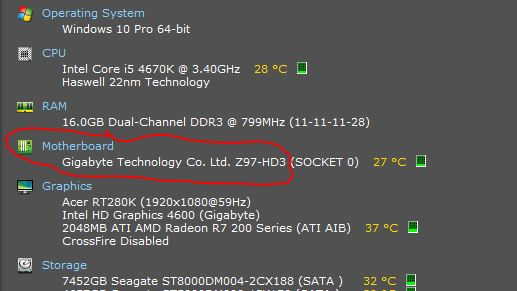 Then when you know what your motherboard is you can get the manual from the manufacturers web site and see what memory it will take, and how much. I'm guessing DDR3. PC3-10600 probably (666MHz). There may be a maximum size for the memory modules it can take.Clicking on RAM, and then the little arrow by slot 1
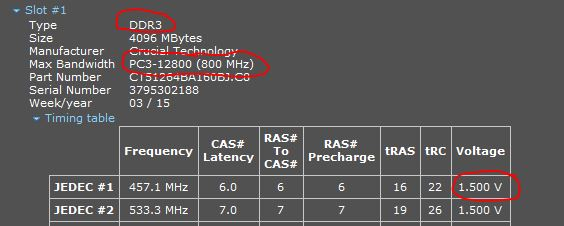 You likely have 2 4GB modules, and if you are lucky, 2 empty slots. If that is the case, get on eBay and buy another 2 4GB modules for around £10 the pair (always fit memory modules in pairs, it runs faster). You must get U- unbuffered or non-ECC type for a desktop. Some sellers have server ram (or Apple mac) cheap, which is buffered/ECC/Registered this will not work in a desktop. Don't buy L (low voltage- 1.35V) type unless you have it already.Then you will have 16GB which is more than ample for win 7 or 10.If has no empty slots then I wouldn't bother with more memory, swapping the 8gb for 16GB will cost more than the benefit, and you won't be able to use this memory in a new pc.I wouldn't be buying anything else for an old machine, a new fan, an SSD (that can be reused in a new pc anyway) and £10 worth of memory is as far as I'd suggest going.
I want to go back to The Olden Days, when every single thing that I can think of was better.....
(except air quality and Medical Science)0








Confirm your email address to Create Threads and Reply

Categories
- All Categories
- 353.8K Banking & Borrowing
- 254.2K Reduce Debt & Boost Income
- 455.2K Spending & Discounts
- 246.9K Work, Benefits & Business
- 603.4K Mortgages, Homes & Bills
- 178.2K Life & Family
- 260.9K Travel & Transport
- 1.5M Hobbies & Leisure
- 16K Discuss & Feedback
- 37.7K Read-Only Boards