We’d like to remind Forumites to please avoid political debate on the Forum.
This is to keep it a safe and useful space for MoneySaving discussions. Threads that are – or become – political in nature may be removed in line with the Forum’s rules. Thank you for your understanding.
📨 Have you signed up to the Forum's new Email Digest yet? Get a selection of trending threads sent straight to your inbox daily, weekly or monthly!
The Forum now has a brand new text editor, adding a bunch of handy features to use when creating posts. Read more in our how-to guide
Online bank statement do not print name or address
Comments
-
Just to add that your browser will usually have 'Print' option/button.
Results can be variable depending on if the page has special formatting.You can use that to print any webpage as a PDF, this is what part of this page looks like in the Firefox Print dialogue, it's set here to print using 'Microsoft Print to PDF.(PS. I used Snipping Tool to get this screenshot).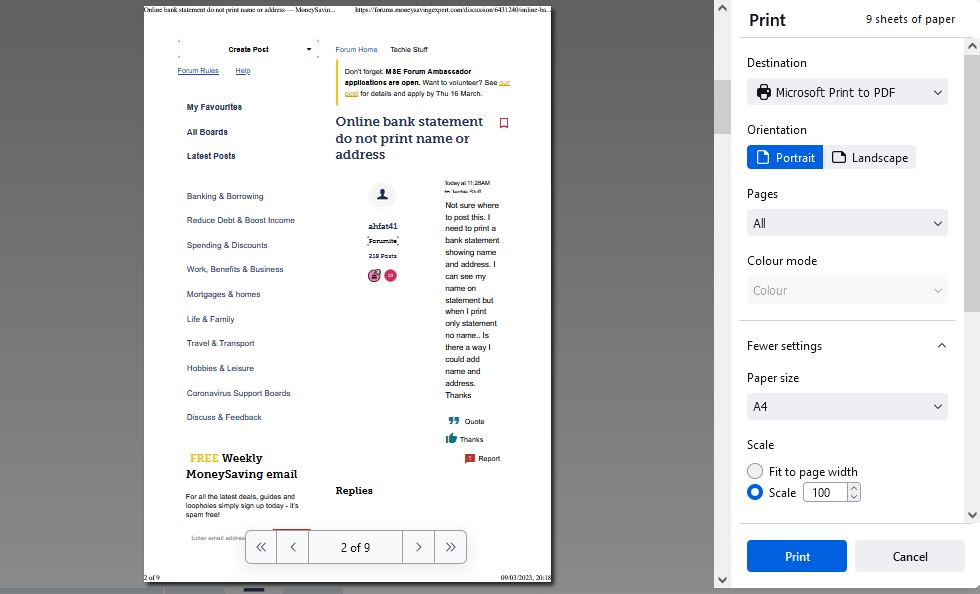
1 -
I bank with NW I have asked when printing saving account if I want name and address to appear I was advised to go in the branch and ask them to print for me if asked they will post. There is no option for their online banking. I used to be able to add my my name on header but not any more.0
-
Most online bank apps have a ‘documents’ section, where formal traditional bank statements (showing address), and other notifications are stored, You can download your statement there. Screenshots are often not acceptable as proof of funds and definitely if the address has been added manually.1
-
Is this for proof of address verificationahfat41 said:Not sure where to post this. I need to print a bank statement showing name and address. I can see my name on statement but when I print only statement no name.. Is there a way I could add name and address. Thanks0 -
Are you using the app or the website?ahfat41 said:I bank with NW I have asked when printing saving account if I want name and address to appear I was advised to go in the branch and ask them to print for me if asked they will post. There is no option for their online banking. I used to be able to add my my name on header but not any more.
On the Nat west website I do to statements -> view and print PDF statements
and download them
My address is on them
1 -
It's one thing not to grasp complicated concepts, but for trivialities it's as easy as a 5 second trip to Google...flaneurs_lobster said:
As a Windows user since 3.n can I just say I still don't understand the snipping tool.debitcardmayhem said:on windows 11 you can also use snipping tool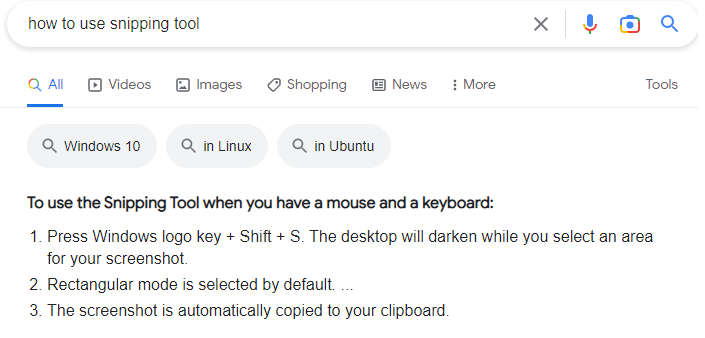
1 -
Thank you.Username03725 said:
It's one thing not to grasp complicated concepts, but for trivialities it's as easy as a 5 second trip to Google...flaneurs_lobster said:
As a Windows user since 3.n can I just say I still don't understand the snipping tool.debitcardmayhem said:on windows 11 you can also use snipping tool
"Google" you say? How does that work exactly?0 -
Use Edge and just use the 'Web Capture' facility, captures sections or whole pages.....No complications..
 Drinking Rum before 10am makes you
A PIRATE
Not an Alcoholic...!0 -
As-in you don't know how to use it?flaneurs_lobster said:
As a Windows user since 3.n can I just say I still don't understand the snipping tool.debitcardmayhem said:on windows 11 you can also use snipping tool
-click on the window you want to screenshot
-hit windows key
-type "snip"
-type Cntl+n (to start a new snip)
-click and drag a box top left to bottom right around the area you want to snip
-there's your snip, you can Cntl+s to save it as a file, or Paste it (Cntl+v) from the clipboard in to another app
-you can also scribble on it first (click on the buttons at the top of the snipping window)
I guess the point is that you can highlight a smaller part of the page, rather than screenshot the whole thing.
I don't have Windows 11, but I think I read that in it, you can scroll off the bottom of the page to capture taller areas, when dragging your rectangle.
0


















Confirm your email address to Create Threads and Reply

Categories
- All Categories
- 354K Banking & Borrowing
- 254.3K Reduce Debt & Boost Income
- 455.3K Spending & Discounts
- 247K Work, Benefits & Business
- 603.6K Mortgages, Homes & Bills
- 178.3K Life & Family
- 261.1K Travel & Transport
- 1.5M Hobbies & Leisure
- 16.1K Discuss & Feedback
- 37.7K Read-Only Boards