We’d like to remind Forumites to please avoid political debate on the Forum.
This is to keep it a safe and useful space for MoneySaving discussions. Threads that are – or become – political in nature may be removed in line with the Forum’s rules. Thank you for your understanding.
📨 Have you signed up to the Forum's new Email Digest yet? Get a selection of trending threads sent straight to your inbox daily, weekly or monthly!
The Forum now has a brand new text editor, adding a bunch of handy features to use when creating posts. Read more in our how-to guide
FTP woes
Comments
-
Can I just wind back a step, you said in the first post that you get the following with the wizard:Is that the network configuration wizard in Filezilla?Response: 150 opening data connection
Response: 503 Failure of data connection.
Server sent unexpected reply.
Connection closed
So this test uses active mode rather than passive mode you need to forward the ports in your router to allow the range through that you specify in Filezilla.
First of all your are best setting a static IP address for your client PC you you don't need to change these settings all the time, but you can skip that for now just to get you going. Best way to do that is via DHCP reservation in your router rather than on the PC itself.
Forward the port range you require in the router - I'm using 6000-7000 in this case as suggested by the FileZilla app: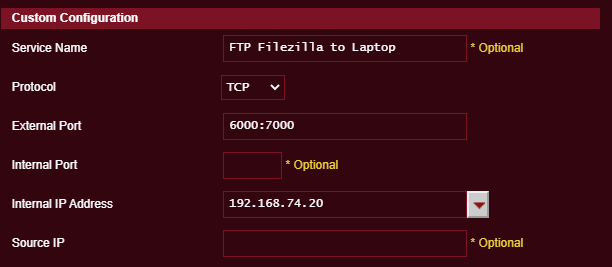
When you have done that, go back to FileZilla and configure active mode to use 6000-7000.
You may also need to set "Get external IP address from the following URL:" if you are having errors related to that.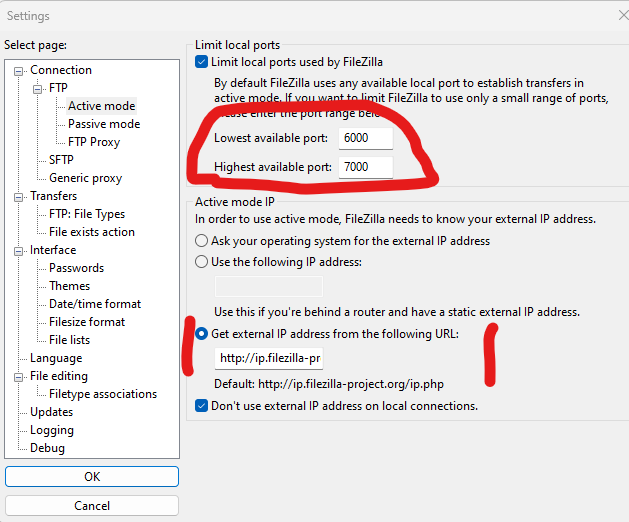
Run the config wizard again and you will see a success message......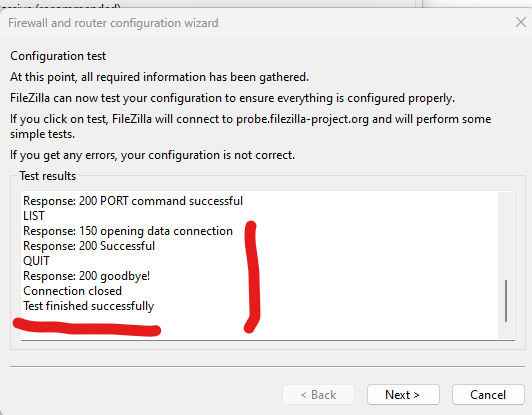
0
![[Deleted User]](https://us-noi.v-cdn.net/6031891/uploads/defaultavatar/nFA7H6UNOO0N5.jpg)




Confirm your email address to Create Threads and Reply

Categories
- All Categories
- 354.1K Banking & Borrowing
- 254.3K Reduce Debt & Boost Income
- 455.3K Spending & Discounts
- 247.1K Work, Benefits & Business
- 603.7K Mortgages, Homes & Bills
- 178.3K Life & Family
- 261.2K Travel & Transport
- 1.5M Hobbies & Leisure
- 16.1K Discuss & Feedback
- 37.7K Read-Only Boards