We’d like to remind Forumites to please avoid political debate on the Forum.
This is to keep it a safe and useful space for MoneySaving discussions. Threads that are – or become – political in nature may be removed in line with the Forum’s rules. Thank you for your understanding.
📨 Have you signed up to the Forum's new Email Digest yet? Get a selection of trending threads sent straight to your inbox daily, weekly or monthly!
The Forum now has a brand new text editor, adding a bunch of handy features to use when creating posts. Read more in our how-to guide
opening a apple document in word

Brie
Posts: 16,639 Ambassador




in Techie Stuff
Hey technoids!
I've got a document that I wrote on a mac (hateful things) that I need to open in word. any easy ideas on how to do that? I have saved it to a folder as a page file but can't open it with word so assume it needs to be "translated" somehow. It's a basic type of doc - just words, lists, some bullet points. No tables or anything fancy at all.
I've got a document that I wrote on a mac (hateful things) that I need to open in word. any easy ideas on how to do that? I have saved it to a folder as a page file but can't open it with word so assume it needs to be "translated" somehow. It's a basic type of doc - just words, lists, some bullet points. No tables or anything fancy at all.
I’m a Forum Ambassador and I support the Forum Team on Debt Free Wannabe, Old Style Money Saving and Pensions boards. If you need any help on these boards, do let me know. Please note that Ambassadors are not moderators. Any posts you spot in breach of the Forum Rules should be reported via the report button, or by emailing forumteam@moneysavingexpert.com. All views are my own and not the official line of MoneySavingExpert.
Click on this link for a Statement of Accounts that can be posted on the DebtFree Wannabe board: https://lemonfool.co.uk/financecalculators/soa.php
Check your state pension on: Check your State Pension forecast - GOV.UK
"Never retract, never explain, never apologise; get things done and let them howl.” Nellie McClung
⭐️🏅😇🏅🏅🏅🏅
Click on this link for a Statement of Accounts that can be posted on the DebtFree Wannabe board: https://lemonfool.co.uk/financecalculators/soa.php
Check your state pension on: Check your State Pension forecast - GOV.UK
"Never retract, never explain, never apologise; get things done and let them howl.” Nellie McClung
⭐️🏅😇🏅🏅🏅🏅
0
Comments
-
What did you do it in on the Mac? Pages?Other than accessing iCloud through a browser, no program can officially view or edit a Pages file using Windows or Linux.You might want to try Word's "recover text from any file" filter.Failing that:https://appletoolbox.com/how-to-open-macs-pages-file-format-on-microsoft-windows/ might be of interest and a couple of other ideas.
1 -
can't see any recover text filter anywhere and the appletool page doesn't offer much hope.
I've gone back to my oh so not at all techie bros and have asked him to do a cut and paste from the page doc and put that directly into the body of an email. That should do the trick. Assuming he can cut and paste.I’m a Forum Ambassador and I support the Forum Team on Debt Free Wannabe, Old Style Money Saving and Pensions boards. If you need any help on these boards, do let me know. Please note that Ambassadors are not moderators. Any posts you spot in breach of the Forum Rules should be reported via the report button, or by emailing forumteam@moneysavingexpert.com. All views are my own and not the official line of MoneySavingExpert.
Click on this link for a Statement of Accounts that can be posted on the DebtFree Wannabe board: https://lemonfool.co.uk/financecalculators/soa.php
Check your state pension on: Check your State Pension forecast - GOV.UK
"Never retract, never explain, never apologise; get things done and let them howl.” Nellie McClung
⭐️🏅😇🏅🏅🏅🏅0 -
0
-
What application did you use? What file extension does the file have? How long ago was it?Brie said:Hey technoids!
I've got a document that I wrote on a mac (hateful things) that I need to open in word. any easy ideas on how to do that? I have saved it to a folder as a page file but can't open it with word so assume it needs to be "translated" somehow. It's a basic type of doc - just words, lists, some bullet points. No tables or anything fancy at all.
Whilst clearly you've got issues (with Mac) if you know anyone with an Apple device, even an iPhone, they can convert it for you. You can also just change the file extension to .zip and if you then open the file you will see a PDF of your document which modern versions of Word can open.2 -
I’m a Forum Ambassador and I support the Forum Team on Debt Free Wannabe, Old Style Money Saving and Pensions boards. If you need any help on these boards, do let me know. Please note that Ambassadors are not moderators. Any posts you spot in breach of the Forum Rules should be reported via the report button, or by emailing forumteam@moneysavingexpert.com. All views are my own and not the official line of MoneySavingExpert.
Click on this link for a Statement of Accounts that can be posted on the DebtFree Wannabe board: https://lemonfool.co.uk/financecalculators/soa.php
Check your state pension on: Check your State Pension forecast - GOV.UK
"Never retract, never explain, never apologise; get things done and let them howl.” Nellie McClung
⭐️🏅😇🏅🏅🏅🏅0 -
@DullGreyGuy
It was originally a "page" doc which I changed to docx. and that doesn't work. I'll see if going back to the original and saving again and using .zip works any better.
I'm sure mac would be find if I used it more than once every couple of years. I'm very much an "office" person accustomed to word and excel and so it's not easy to use something different when I'm visiting my office allergic family. Not helped by being in Canada and so the keyboard is completely wonky as well. (& they insist on using the mouse on the right which is very inconvenient!!)I’m a Forum Ambassador and I support the Forum Team on Debt Free Wannabe, Old Style Money Saving and Pensions boards. If you need any help on these boards, do let me know. Please note that Ambassadors are not moderators. Any posts you spot in breach of the Forum Rules should be reported via the report button, or by emailing forumteam@moneysavingexpert.com. All views are my own and not the official line of MoneySavingExpert.
Click on this link for a Statement of Accounts that can be posted on the DebtFree Wannabe board: https://lemonfool.co.uk/financecalculators/soa.php
Check your state pension on: Check your State Pension forecast - GOV.UK
"Never retract, never explain, never apologise; get things done and let them howl.” Nellie McClung
⭐️🏅😇🏅🏅🏅🏅0 -
Brie said:@DullGreyGuy
It was originally a "page" doc which I changed to docx. and that doesn't work. I'll see if going back to the original and saving again and using .zip works any better.
I'm sure mac would be find if I used it more than once every couple of years. I'm very much an "office" person accustomed to word and excel and so it's not easy to use something different when I'm visiting my office allergic family. Not helped by being in Canada and so the keyboard is completely wonky as well. (& they insist on using the mouse on the right which is very inconvenient!!)You can't just change the extension to a .docx and have Word open it. Doens't work like that.You can't save a file as a ZIP file, again they don't work like that.What you really need to do is change the extension that Pages has saved it as to a ZIP and then you should be able to open that with any unzipper. in theory.If you watch the video I posted it tells you what to do to how to get to the "recover text from any file" option.The traditional position for a mouse has always been on the right by the way 2
2 -
Excel, Word etc all work on Mac's too... even natively on the M1/M2 processors. The only let down at the moment is that Teams runs through Rosetta on modern macs so reduces my battery life to about 10 hours.
I'm with you on the keyboard thing, forever changing between UK Windows, US Windows, UK Mac and ISO Spanish Mac depending on which client I am working for and which computer at home.1 -
You are correct on the first but incorrect on the second... MacOS has a number of bespoke file extensions that are really just archive files... a .pages file is just an archive containing a jpg of the first page and PDFNeil_Jones said:Brie said:@DullGreyGuy
It was originally a "page" doc which I changed to docx. and that doesn't work. I'll see if going back to the original and saving again and using .zip works any better.
I'm sure mac would be find if I used it more than once every couple of years. I'm very much an "office" person accustomed to word and excel and so it's not easy to use something different when I'm visiting my office allergic family. Not helped by being in Canada and so the keyboard is completely wonky as well. (& they insist on using the mouse on the right which is very inconvenient!!)You can't just change the extension to a .docx and have Word open it. Doens't work like that.You can't save a file as a ZIP file, again they don't work like that.1 -
I'll keep looking for a way to change the extension properly. I looked at the video but can't see anything like "recover text" and CTL-F12 so far hasn't worked at all. Likely I'm missing something with that.Neil_Jones said:What you really need to do is change the extension that Pages has saved it as to a ZIP and then you should be able to open that with any unzipper. in theory.If you watch the video I posted it tells you what to do to how to get to the "recover text from any file" option.The traditional position for a mouse has always been on the right by the way
Yeah - mouse positions....I'm a predominantly (but not completely) righty surrounded by almost exclusively lefties (except for baseball and cricket - go figure) and yet I'm the only one that needs to mouse on the left.I’m a Forum Ambassador and I support the Forum Team on Debt Free Wannabe, Old Style Money Saving and Pensions boards. If you need any help on these boards, do let me know. Please note that Ambassadors are not moderators. Any posts you spot in breach of the Forum Rules should be reported via the report button, or by emailing forumteam@moneysavingexpert.com. All views are my own and not the official line of MoneySavingExpert.
Click on this link for a Statement of Accounts that can be posted on the DebtFree Wannabe board: https://lemonfool.co.uk/financecalculators/soa.php
Check your state pension on: Check your State Pension forecast - GOV.UK
"Never retract, never explain, never apologise; get things done and let them howl.” Nellie McClung
⭐️🏅😇🏅🏅🏅🏅0


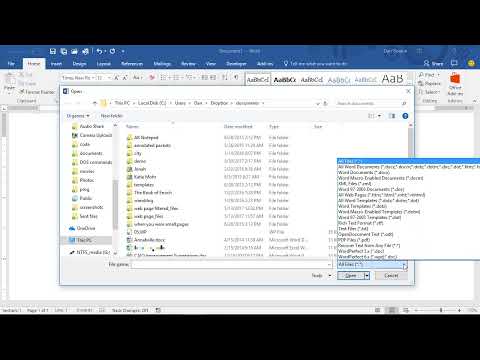 https://www.youtube.com/watch?v=mBCcPs3jK-0
Confirm your email address to Create Threads and Reply

Categories
- All Categories
- 354K Banking & Borrowing
- 254.3K Reduce Debt & Boost Income
- 455.3K Spending & Discounts
- 247.1K Work, Benefits & Business
- 603.7K Mortgages, Homes & Bills
- 178.3K Life & Family
- 261.2K Travel & Transport
- 1.5M Hobbies & Leisure
- 16.1K Discuss & Feedback
- 37.7K Read-Only Boards