We’d like to remind Forumites to please avoid political debate on the Forum.
This is to keep it a safe and useful space for MoneySaving discussions. Threads that are – or become – political in nature may be removed in line with the Forum’s rules. Thank you for your understanding.
📨 Have you signed up to the Forum's new Email Digest yet? Get a selection of trending threads sent straight to your inbox daily, weekly or monthly!
The Forum now has a brand new text editor, adding a bunch of handy features to use when creating posts. Read more in our how-to guide
Resetting laptop help
Comments
-
rich_shot2003 said:
Does it? That looks like a Windows 11 GUI.
Try opening a Command Prompt (Shift + F10).Then type this command,
oobe\bypassnro
and hit the Enter key
0 -
I have done that and have now got into Laptop and yes sorry it is Win11Withbellson said:rich_shot2003 said:
Does it? That looks like a Windows 11 GUI.
Try opening a Command Prompt (Shift + F10).Then type this command,
oobe\bypassnro
and hit the Enter key
Do i need to do anything else?
I will have to reset it again as i am selling it so do not want my MS account left on it but before i did the 1st reset i could not see anywhere to delete my MS account so that was reason for resetting it.
Now there is nowhere to connect to Wifi in the settings or on the taskbar and i did the troubleshoot thing and it came up with message in this photo.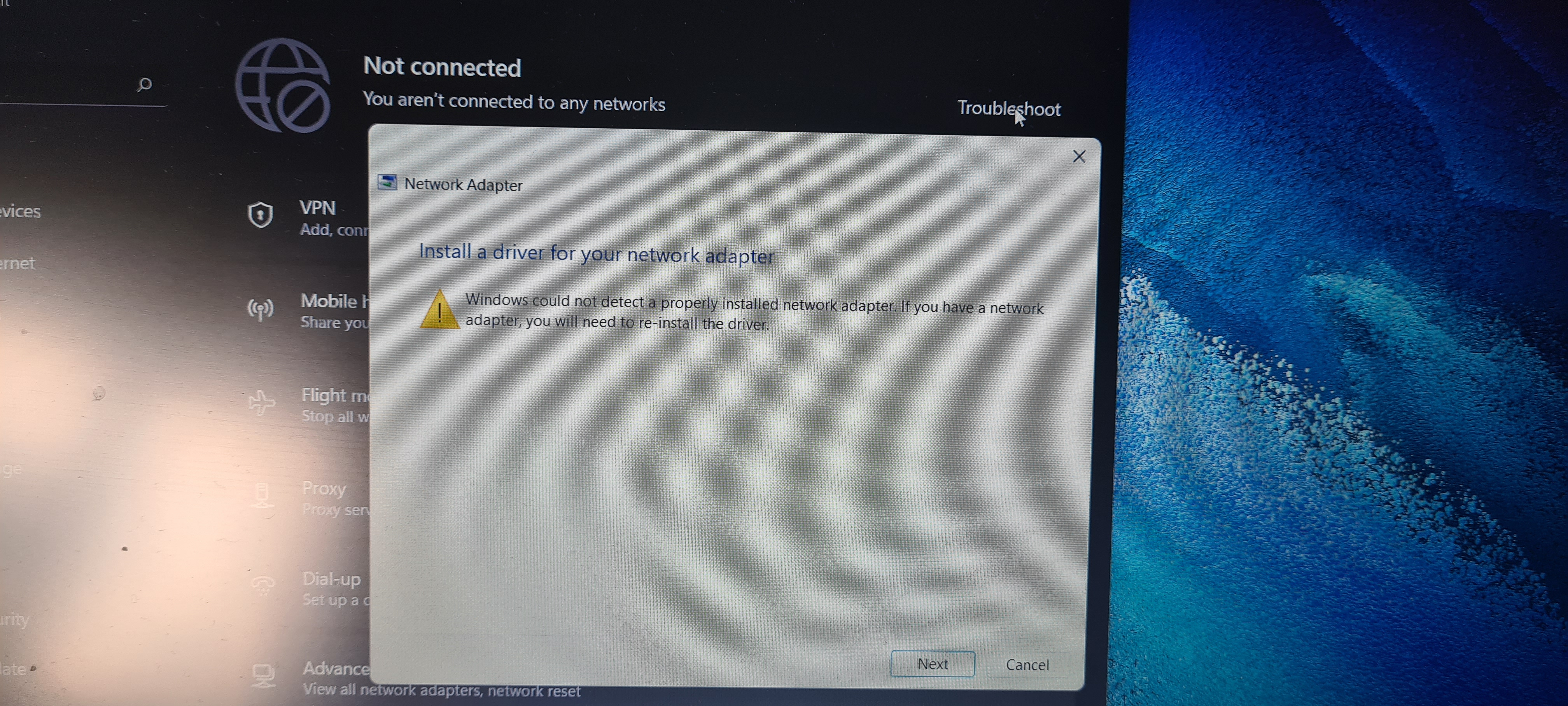 0
0 -
rich_shot2003 said:That's not a Windows 10 screen. That is Windows 11.If you've reset it properly via the Samsung recovery option or wrhatever they call it it should have all the drivers it needs. If you've done your own without the Samsung software, all that does is restore a stock Windows 11 installation with no drivers.And that appears to be your problem. So you need either to use the Samsung software (assuming your reset hasn't trashed it off already), or download and install the drivers yourself.1
-
I can not see anything to do with Samsung software on the laptop.Neil_Jones said:rich_shot2003 said:That's not a Windows 10 screen. That is Windows 11.If you've reset it properly via the Samsung recovery option or wrhatever they call it it should have all the drivers it needs. If you've done your own without the Samsung software, all that does is restore a stock Windows 11 installation with no drivers.And that appears to be your problem. So you need either to use the Samsung software (assuming your reset hasn't trashed it off already), or download and install the drivers yourself.
i am not very good with this kind of stuff but if i bought a Ethernet Adapter and plug that into laptop to my router would it let me get online to download the drivers that i need?0 -
Try on boot up press f10 or f9 to go to the reset to original installation.0
-
Just tried that and did not work.gefnew said:Try on boot up press f10 or f9 to go to the reset to original installation.0 -
The Samsung Galaxy book go should be reset as thus:If there is no trace of Samsung anywhere on this thing and (according to internet search) pressing F4 a few times during bootup does nothing either then it implies the reset you did has completely trashed the drive and the recovery partition.So the only solution then is to get the drivers from here:Or hope Windows Update has them all. If not... manual download time.1







Confirm your email address to Create Threads and Reply

Categories
- All Categories
- 354K Banking & Borrowing
- 254.3K Reduce Debt & Boost Income
- 455.3K Spending & Discounts
- 247.1K Work, Benefits & Business
- 603.7K Mortgages, Homes & Bills
- 178.3K Life & Family
- 261.2K Travel & Transport
- 1.5M Hobbies & Leisure
- 16.1K Discuss & Feedback
- 37.7K Read-Only Boards