We’d like to remind Forumites to please avoid political debate on the Forum.
This is to keep it a safe and useful space for MoneySaving discussions. Threads that are – or become – political in nature may be removed in line with the Forum’s rules. Thank you for your understanding.
📨 Have you signed up to the Forum's new Email Digest yet? Get a selection of trending threads sent straight to your inbox daily, weekly or monthly!
The Forum now has a brand new text editor, adding a bunch of handy features to use when creating posts. Read more in our how-to guide
Resetting laptop help

rich_shot2003
Posts: 2,214 Forumite




I have been trying to reset a Samsung Galaxy book go as i am selling it but need some advice as am having issues doing it.
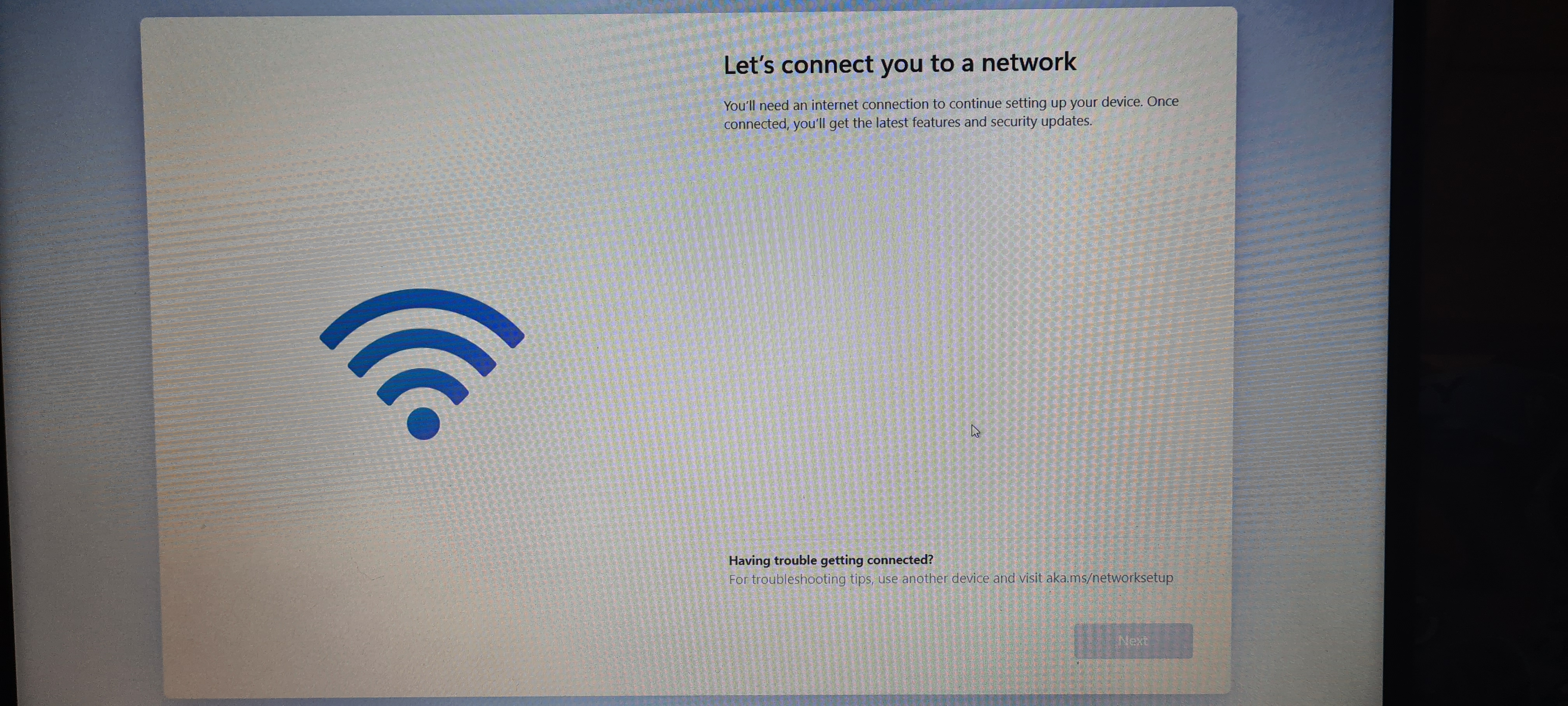
When i turn it on after doing the reset and it tells me to chose keyboard then it goes to Lets connet you to a network but when that box comes up there are no networks for me to connet to so it will not let me go on with setting it up.
I have turned router off and on and have tried using my phone as a mobile hotspot but the laptop will not pick any networks up and there is no FN key which turns wifi off or on.
So what can i do as i have reset it before and did not have this problem.
When i turn it on after doing the reset and it tells me to chose keyboard then it goes to Lets connet you to a network but when that box comes up there are no networks for me to connet to so it will not let me go on with setting it up.
I have turned router off and on and have tried using my phone as a mobile hotspot but the laptop will not pick any networks up and there is no FN key which turns wifi off or on.
So what can i do as i have reset it before and did not have this problem.
0
Comments
-
WIndows 11?
0 -
0
-
Temporary measure can you wire it to the router via ethernet? Then update the wireless drivers
4.8kWp 12x400W Longhi 9.6 kWh battery Giv-hy 5.0 Inverter, WSW facing Essex . Aint no sunshine ☀️ Octopus gas fixed dec 24 @ 5.74 tracker again+ Octopus Intelligent Flux leccy
CEC Email energyclub@moneysavingexpert.com0 -
No as it does not have a ethernet on the laptop.debitcardmayhem said:Temporary measure can you wire it to the router via ethernet? Then update the wireless drivers0 -
Look at the Device Manager. All Drivers installed and working correctly?rich_shot2003 said:I have been trying to reset a Samsung Galaxy book go as i am selling it but need some advice as am having issues doing it.
When i turn it on after doing the reset and it tells me to chose keyboard then it goes to Lets connet you to a network but when that box comes up there are no networks for me to connet to so it will not let me go on with setting it up.
I have turned router off and on and have tried using my phone as a mobile hotspot but the laptop will not pick any networks up and there is no FN key which turns wifi off or on.
So what can i do as i have reset it before and did not have this problem.0 -
I can not do that as it will not go any further that what is in the photo i put up further up.Withbellson said:
Look at the Device Manager. All Drivers installed and working correctly?rich_shot2003 said:I have been trying to reset a Samsung Galaxy book go as i am selling it but need some advice as am having issues doing it.
When i turn it on after doing the reset and it tells me to chose keyboard then it goes to Lets connet you to a network but when that box comes up there are no networks for me to connet to so it will not let me go on with setting it up.
I have turned router off and on and have tried using my phone as a mobile hotspot but the laptop will not pick any networks up and there is no FN key which turns wifi off or on.
So what can i do as i have reset it before and did not have this problem.0 -
Hi,is network hidden?Wi-Fi networks can be hidden so strangers can't try to access them without permission. But how do you connect to a network you can't see? It's easy. Click the Wi-Fi icon in the bottom right corner of the taskbar. Scroll down to the bottom of the list, select Hidden Network, and then select Connect.
0 -
To get by your wired connection problem, I have a Lenovo Ideapad which also doesn't have a LAN connection so I purchased one of the below. Router plugged into one end and a connector from the other end to a usb port. Works great.
https://www.amazon.co.uk/gp/product/B06XQG8KQ6/ref=ppx_yo_dt_b_asin_title_o01_s00?ie=UTF8&psc=1
0 -
our network is not hidden and i have tried with putting my mobile on as a hotspot and it does not pick that up.frugalmacdugal said:Hi,is network hidden?Wi-Fi networks can be hidden so strangers can't try to access them without permission. But how do you connect to a network you can't see? It's easy. Click the Wi-Fi icon in the bottom right corner of the taskbar. Scroll down to the bottom of the list, select Hidden Network, and then select Connect.
i can not click on task bar or get into the laptop as it will not let me go any further as when i turn laptop on it tells me to chose what language i want keyboard in then it goes not next part which is connect to network as in photo above and without connecting to a network it will not let me go any further.1 -
But would that connect laptop to broadband and let me get passed the part i can not go any further at the moment?Gravedigger said:To get by your wired connection problem, I have a Lenovo Ideapad which also doesn't have a LAN connection so I purchased one of the below. Router plugged into one end and a connector from the other end to a usb port. Works great.
https://www.amazon.co.uk/gp/product/B06XQG8KQ6/ref=ppx_yo_dt_b_asin_title_o01_s00?ie=UTF8&psc=10






Confirm your email address to Create Threads and Reply

Categories
- All Categories
- 354K Banking & Borrowing
- 254.3K Reduce Debt & Boost Income
- 455.3K Spending & Discounts
- 247.1K Work, Benefits & Business
- 603.7K Mortgages, Homes & Bills
- 178.3K Life & Family
- 261.2K Travel & Transport
- 1.5M Hobbies & Leisure
- 16.1K Discuss & Feedback
- 37.7K Read-Only Boards