We’d like to remind Forumites to please avoid political debate on the Forum.
This is to keep it a safe and useful space for MoneySaving discussions. Threads that are – or become – political in nature may be removed in line with the Forum’s rules. Thank you for your understanding.
📨 Have you signed up to the Forum's new Email Digest yet? Get a selection of trending threads sent straight to your inbox daily, weekly or monthly!
PC Tune Up Tool Query.

Nick_Sellick
Posts: 83 Forumite



Hi All,
My PC is running so slowly I can boil an egg while it boots up. It's painful.
I have looked at a few tune up/ repair/cleaning tools but don't know which to go with.
Can anyone advise? Are there safe, relaible free ones, is there a recommened paid one?
Any advice really gratefully received.
Thank you.
Cheers
Nick
My PC is running so slowly I can boil an egg while it boots up. It's painful.
I have looked at a few tune up/ repair/cleaning tools but don't know which to go with.
Can anyone advise? Are there safe, relaible free ones, is there a recommened paid one?
Any advice really gratefully received.
Thank you.
Cheers
Nick
Be ALERT - The world needs more LERTS
0
Comments
-
They're all crap. Don't use any of them, they do nothing you can't do yourself.If its Windows 10 you can do a CTRL+ALT+DEL -> Task Manager -> and look at the startup tab, see what's starting with your computer. If its millions of things then there's your problem.0
-
Uninstall anything you don't really use and then try running the windows diskclean-up tool. Also run something like malwarebytes to look for anything undesirable.
If you have the ability and time though I would suggest backing up your data, reformatting your hard disk and doing a clean install.I don't care about your first world problems; I have enough of my own!0 -
CCleaner was good back in the day but not sure what it's like now since the original developers sold out.0
-
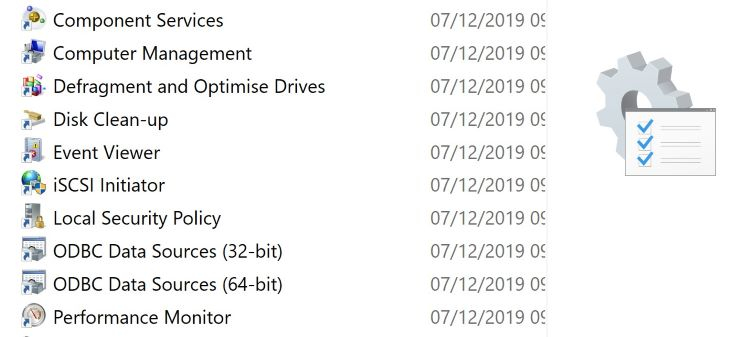
Go to the tools section you can find it in the search box. There is a host of things you can try from there. Get rid of your HDD and replace with a SDD. Go to youtube.....
0 -
Thanks all. Sorry for the lack of replies. For some reason I didn't get notification that someone had replied.Be ALERT - The world needs more LERTS0
-
Hi Neil, Thanks for your reply. There are lots of items on the startup list, but all are disabled. There do seem to be loads of services running though!Neil_Jones said:They're all crap. Don't use any of them, they do nothing you can't do yourself.If its Windows 10 you can do a CTRL+ALT+DEL -> Task Manager -> and look at the startup tab, see what's starting with your computer. If its millions of things then there's your problem.Be ALERT - The world needs more LERTS0 -
It may help others to mention which version of windows, what is the make and model of your PC
4.8kWp 12x400W Longhi 9.6 kWh battery Giv-hy 5.0 Inverter, WSW facing Essex . Aint no sunshine ☀️ Octopus gas fixed 5.07 + Octopus Intelligent Flux leccy
CEC Email energyclub@moneysavingexpert.com0 -
What exactly is the PC?Make/model etc?As mooted above - fit an SSD and watch it fly!0
-
For some time it's been rather fashionable to dismiss all tune up utilities as useless or destructive. There are a lot of utilities in Windows to help tune your PC, but they are fragmented, may be hard to find and are sometimes obscure in what they do. A good utilities package should bring them all together and provide a friendly and unintimidating interface. Yes, they do exist.
Like many people I used to use CCleaner, but like many people I dropped it when it changed owners and decided it knew what I wanted better than I did. What happened to CCleaner probably contributed to the general disdain in which utilities are now held. Recently I have been using Glary Utilities and find it very helpful and time-saving. Check out the Techradar review here if you're interested. The free version is all you need.
While an SSD is sure to improve performance it does not of itself remove the sort of problem you are seeing. If your hard disk is going round in loops due to poor configuration and clutter, so will your SSD - it will just do it faster.
0 -
If your hard disk is going round in loops due to poor configuration and clutter, so will your SSD - it will just do it faster.
Only if you clone the HDD to the SSD ... if an SSD is being fitted then it is sensible to take the path of doing a fresh install of Windows.
Jenni x0






 https://www.youtube.com/watch?v=1UDztcT1jLc



Confirm your email address to Create Threads and Reply

Categories
- All Categories
- 354.8K Banking & Borrowing
- 254.5K Reduce Debt & Boost Income
- 455.6K Spending & Discounts
- 247.6K Work, Benefits & Business
- 604.6K Mortgages, Homes & Bills
- 178.6K Life & Family
- 262.2K Travel & Transport
- 1.5M Hobbies & Leisure
- 16.1K Discuss & Feedback
- 37.7K Read-Only Boards