We’d like to remind Forumites to please avoid political debate on the Forum.
This is to keep it a safe and useful space for MoneySaving discussions. Threads that are – or become – political in nature may be removed in line with the Forum’s rules. Thank you for your understanding.
📨 Have you signed up to the Forum's new Email Digest yet? Get a selection of trending threads sent straight to your inbox daily, weekly or monthly!
The Forum now has a brand new text editor, adding a bunch of handy features to use when creating posts. Read more in our how-to guide
New Laptop as spare - advice
Comments
-
Hi all
Thanks so much for all the helpful replies. I realise I didn't give enough detail to begin with!- Yes, sorry I did mean a good storage capacity (not necessarily memory, but just a reasonably fast memory capacity). Just good enough for internet, emails, mostly Word docs, occasional streaming).
- I know there are options such as separate log ins/drives/usb drives etc but not really tech savvy enough for this. Also, my feeling is I'd like a completely separate laptop so I can have complete separation between work and personal use. And also to have a spare device in case of failure of one of them.
- Current laptop is very old, but has been upgraded. It works fine, but as I'm doing self employed work, I probably need a back up in case of failure.
- Yes, happy with a second hand option if can find safe/reliable supplier.
- Screen size not necessarily important - but prefer larger so can do split screen work if needed.
- Would like ability to plug in standard size USB keyboard for better speed of use.
0 -
Does it really need to be a laptop?
Are you regularly using it in multiple locations?
I have been looking at the micro machines that are very portable
Most of the time I would be using in one place but easy to move if needed. could even take it with me and use a tv for the screen in hotel etc.
The HP elitedesk 800 mini can take 3 storage units 2 M.2 format and 1 regular 2.5" SSD/HDD
the i5-8500 (win 11 supported) start around £200+
They support 3 displays or could just remote access from your current laptop.
An example of what you can find out there
https://uk.webuy.com/product-detail?id=sdeshp800g4m22b
These things are small others do similar size machines.
1 -
Is this just a hard drive? Sorry = very non techy here and needing to get a laptop or something as well. I may have a monitor mouse and keyboard so just need to thing that makes everything work.getmore4less said:
The HP elitedesk 800 mini can take 3 storage units 2 M.2 format and 1 regular 2.5" SSD/HDD
the i5-8500 (win 11 supported) start around £200+
They support 3 displays or could just remote access from your current laptop.
An example of what you can find out there
https://uk.webuy.com/product-detail?id=sdeshp800g4m22bI’m a Forum Ambassador and I support the Forum Team on Debt Free Wannabe, Old Style Money Saving and Pensions boards. If you need any help on these boards, do let me know. Please note that Ambassadors are not moderators. Any posts you spot in breach of the Forum Rules should be reported via the report button, or by emailing forumteam@moneysavingexpert.com. All views are my own and not the official line of MoneySavingExpert.
Click on this link for a Statement of Accounts that can be posted on the DebtFree Wannabe board: https://lemonfool.co.uk/financecalculators/soa.php
Check your state pension on: Check your State Pension forecast - GOV.UK
"Never retract, never explain, never apologise; get things done and let them howl.” Nellie McClung
⭐️🏅😇🏅🏅🏅0 -
Full blown PC in a micro case, you can go Small form factor for a bit more flexibility but bigger.Brie said:
Is this just a hard drive? Sorry = very non techy here and needing to get a laptop or something as well. I may have a monitor mouse and keyboard so just need to thing that makes everything work.getmore4less said:
The HP elitedesk 800 mini can take 3 storage units 2 M.2 format and 1 regular 2.5" SSD/HDD
the i5-8500 (win 11 supported) start around £200+
They support 3 displays or could just remote access from your current laptop.
An example of what you can find out there
https://uk.webuy.com/product-detail?id=sdeshp800g4m22b
For basic use these are ideal as they are low power and functional.
been watching some youtube video from people that are using them eg: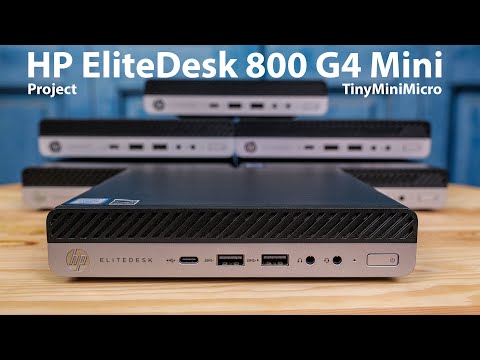 https://www.youtube.com/watch?v=QdEf-dXl-_Y
0 -
One option would be to run a virtual machine (VM) on your current laptop; you could put all of your business work in that.For backups you can copy the entire machine to a USB drive; you can even then restore that VM onto another machine and run it on there if your old one fails.0
-
Any drive can fail. Always back up important data :-:wink:Supatramp said:missile said:A cheaper / simpler option you may like to consider is a USB drive to store only work related items.
Until the USB drive fails!"A nation's greatness is measured by how it treats its weakest members." ~ Mahatma Gandhi
Ride hard or stay home :iloveyou:0 -
Hi getmore4less
Sorry I haven't been online recently, but thanks so much for your reply. I hadn't heard of this option at all. It might be interesting. I will take a look now and come back with any further questions.
Thanks again.0








Confirm your email address to Create Threads and Reply

Categories
- All Categories
- 353.8K Banking & Borrowing
- 254.3K Reduce Debt & Boost Income
- 455.2K Spending & Discounts
- 246.9K Work, Benefits & Business
- 603.4K Mortgages, Homes & Bills
- 178.2K Life & Family
- 260.9K Travel & Transport
- 1.5M Hobbies & Leisure
- 16K Discuss & Feedback
- 37.7K Read-Only Boards