We’d like to remind Forumites to please avoid political debate on the Forum.
This is to keep it a safe and useful space for MoneySaving discussions. Threads that are – or become – political in nature may be removed in line with the Forum’s rules. Thank you for your understanding.
📨 Have you signed up to the Forum's new Email Digest yet? Get a selection of trending threads sent straight to your inbox daily, weekly or monthly!
The Forum now has a brand new text editor, adding a bunch of handy features to use when creating posts. Read more in our how-to guide
Stopping (Samsung) phone from lighting up during the night? (plus review display name change?)

JustAnotherSaver
Posts: 6,709 Forumite




in Techie Stuff
Phone: Samsung Galaxy S10
Android v. 11
ILLUMINATING SCREEN:
So this is the more important of the 2 questions. I purchased a new stand up wireless charger as the flat one I had I'd sometimes not place it right in my tired state. Story short the phone will illuminate during the night because I've got a notification of some description I imagine.
I have do not disturb set to come on between given times and it's still illuminating between these times.
So if i'm semi awake/asleep it can some times wake me up.
This morning I woke for the toilet and as I got near the bedroom door the phone lit up. I don't know if that's because it received a notification to the phone or because maybe my watch (Galaxy 3) triggered it to light up but whatever it was caused my wife to wake up as she must've been semi awake & was facing that way.
So basically I'd like to know how to stop that (IF it's even possible).
REVIEW NAME:
So i've started to leave reviews on apps/themes etc that I purchase. Thing is it leaves my actual name on the review. Well, a shortening of my first name (so say Dave instead of David) and then my full surname so it'll leave it as say DaveSmith. I see some peoples review names are not even names.
I'd rather not have my actual name on reviews. How do I change this?
0
Comments
-
Re your first question; the obvious answer is to turn it off but you clearly want to know about notifications, e-mails and/or calls because you leave it on. Can't see the issue really. Phones will charge in the OFF state.0
-
Re: Q1 - Don't charge the phone in the bedroom?
Re: Q2 - Where are you leaving these reviews?0 -
You can customise the do not disturb settings to prevent the screen from turning on as per image below.
See this link for full details:https://www.technipages.com/android-screen-turns-on-by-itself-what-to-do
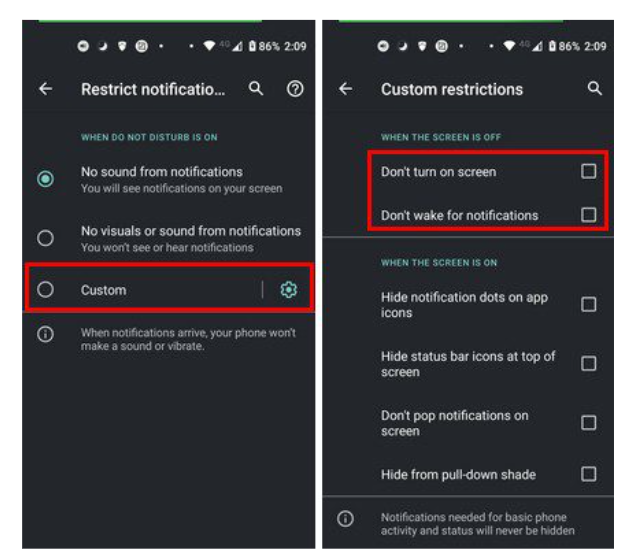
You can also schedule this so you don't need to remember to switch it on and can also allow exceptions. So for example I have do not disturb set automatically for my sleep hours 11am-6am but I also allow exceptions which are if certain family members phone me that will come through regardless.
As for waking up when you went to the bathroom, I doubt your watch caused that but you can check to see if you got a notification at that time.
1 -
Oh and for your second question, change your Google account name:
https://support.google.com/accounts/answer/27442?hl=en&co=GENIE.Platform=Android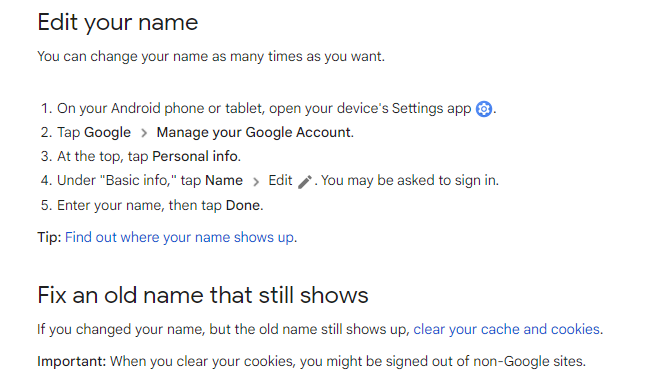
1 -
On my Mororola Moto G7+ I reboot it at bedtime then it will still ring in an emergency but not notifications come through till I unlock it for the first time
0 -
Thanks tallman
 Regards some of the other comments...phones charging when turned off, not needing to charge in the bedroom - all pretty obvious stuff tbh and I wouldn't bother asking if they were answers that I'd settle for.I start the day on 100% battery. Yes I could charge it before going to bed and then stick it on charge again as I wake and hope it's 100% before I leave for work.Or i could just leave it on charge and when i wake up it's 100%. Plus it auto updates during the night so it drops no charge when doing that if it's on charge.And I use it as an alarm too.Regards where am i leaving the reviews - the Galaxy Store was where I saw my name.Haven't tested out Play Store.0
 -
And i'd rather not post another thread for another Android moan so here I am...Overall I prefer Android to Apple but there's some annoyances that I never had when I had an iPhone and on that note:How do I stop getting score updates for every bloody football team in the planet? I don't care about AC Milan vs Napoli!!!! And when I click on the notification and have 2 options along the lines of - continue receiving notifications for AC Milan and stop receiving notifications ........ when I click stop receiving I don't want to then receive more notifications 2mins later and then a few mins later after that too.Make it go away. lol0
-
Swipe right on the notification on the lock screen, tap "options" then "turn off". Works every time for me.JustAnotherSaver said:And i'd rather not post another thread for another Android moan so here I am...Overall I prefer Android to Apple but there's some annoyances that I never had when I had an iPhone and on that note:How do I stop getting score updates for every bloody football team in the planet? I don't care about AC Milan vs Napoli!!!! And when I click on the notification and have 2 options along the lines of - continue receiving notifications for AC Milan and stop receiving notifications ........ when I click stop receiving I don't want to then receive more notifications 2mins later and then a few mins later after that too.Make it go away. lol
Or got to settings > notifications and turn them off for the app that is allowing them.
What app is sending the notifications?0 -
[Deleted User] said:
Swipe right on the notification on the lock screen, tap "options" then "turn off". Works every time for me.JustAnotherSaver said:And i'd rather not post another thread for another Android moan so here I am...Overall I prefer Android to Apple but there's some annoyances that I never had when I had an iPhone and on that note:How do I stop getting score updates for every bloody football team in the planet? I don't care about AC Milan vs Napoli!!!! And when I click on the notification and have 2 options along the lines of - continue receiving notifications for AC Milan and stop receiving notifications ........ when I click stop receiving I don't want to then receive more notifications 2mins later and then a few mins later after that too.Make it go away. lol
Or got to settings > notifications and turn them off for the app that is allowing them.
What app is sending the notifications?Google so it says.I could turn notifications off for Google but the problem is it actually does provide some pretty useful ones from time to time.0 -
I'm not sure if this will work for you or not, but if you go into the Google app, tap your avatar at the top right, then tap on Settings, then Notifications you will see an option for "Notifications that you opted into". See if you have anything set in there. I have three items set in there, although I can't ever having received any notifications for them so I'm not sure if this is where yours could be coming from. Worth a try though I guess.
Also, below "Notifications that you opted into" you will see the main "Notifications" option. If you tap on that you will see notification options and if you scroll down there is a list of subjects that you can set to on or off. There is, for example, a Sport option, so you could see if this is set also.Retired at age 56 after having "light bulb moment" due to reading MSE and its forums. Have been converted to the "budget to zero" concept and use YNAB for all monthly budgeting and long term goals.2










Confirm your email address to Create Threads and Reply

Categories
- All Categories
- 354.6K Banking & Borrowing
- 254.5K Reduce Debt & Boost Income
- 455.5K Spending & Discounts
- 247.5K Work, Benefits & Business
- 604.3K Mortgages, Homes & Bills
- 178.6K Life & Family
- 261.9K Travel & Transport
- 1.5M Hobbies & Leisure
- 16.1K Discuss & Feedback
- 37.7K Read-Only Boards