We’d like to remind Forumites to please avoid political debate on the Forum.
This is to keep it a safe and useful space for MoneySaving discussions. Threads that are – or become – political in nature may be removed in line with the Forum’s rules. Thank you for your understanding.
📨 Have you signed up to the Forum's new Email Digest yet? Get a selection of trending threads sent straight to your inbox daily, weekly or monthly!
The Forum now has a brand new text editor, adding a bunch of handy features to use when creating posts. Read more in our how-to guide
Outlook

Just_Passing_Bi
Posts: 435 Forumite




in Techie Stuff
Hello, I have an acer laptop with windows 10, some webpages seemed very slow, so, I stupidly done a factory reset (please don't criticise, see my signature)
I've now lost all named folders in outlook, because I cleared the hard drive, is there any way I can get the folders back, or have they gone for good?
I'm hopeless with technology, in addition, I suffer with MH issues, what may appear simple, I struggle with, may I ask, please be patient, thank you
0
Comments
-
Which Outlook? As part of the Office suite? At Outlook.com? Something else?
Did you backup your files/data before doing a factory reset?
Which exact model of Acer laptop?Jenni x1 -
Hello JenniWhich Outlook? As part of the Office suite? At Outlook.com? Something else? Outlook 2016, I think it's part of office suiteDid you backup your files/data before doing a factory reset? NoWhich exact model of Acer laptop?
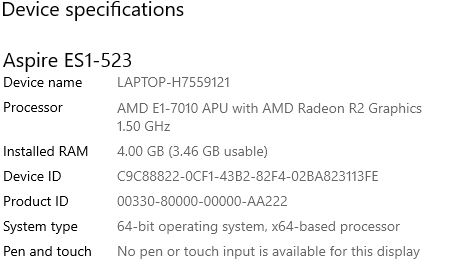 This is really strange, I tried the search fuction for emails within the missing folders, Outlook didn't find anything, but suggested "search online" I clicked the "search online" and my emails relating to the missing folders are showing, but, when I click on one of the emails, they all start disappearingBefore this version, I had an older version of Outlook
I'm hopeless with technology, in addition, I suffer with MH issues, what may appear simple, I struggle with, may I ask, please be patient, thank you0 -
OK, I think you're saying the Outlook application which is part of MS Office. Which version of Office? (2016? 2019? 365?)
What email type do you have linked to your Outlook program? (Gmail? Outlook/Hotmail? Something else?)
What connection type have you set up? (POP? IMAP? If you're not sure, what instructions did you follow to set up the email account in your Outlook application?)Jenni x1 -
I'm wondering if your reset preserved your last copy of data. Have a look on your C: drive for a folder named windows.old. If it's there try a file search for any outlook data files - *.pst.1
-
Jenni, Neil, thank you, I've gone into C;, there's a file winhpl32 with a yellow ? on it, I've double clicked on it, but all I get is "feature not supported / help not supportedI hope this makes sence tom you than it does to me, it's freaking me out, I've searched outlook for all missing emails / folders, outlook has found all my saved (folder) emails going back to at least 2019, the problem is, I can see them listed, but can't view / save any of them, the moment I click on anyone of the emails, they just start disappering individually.I'm hopeless with technology, in addition, I suffer with MH issues, what may appear simple, I struggle with, may I ask, please be patient, thank you0
-
IIRC then the default these days is for there to be an OST file rather than a PST file (although I still use a PST file for local copies of emails).neilmcl said:I'm wondering if your reset preserved your last copy of data. Have a look on your C: drive for a folder named windows.old. If it's there try a file search for any outlook data files - *.pst.
@Just_Passing_Bi if there's a Windows.old folder (not file) it will be visible on the C drive, near to the Windows folder. If you can't see one then you don't have one.
And please answer the specific questions I asked in my previous reply. Jenni x1
 -
Ant555, @outlook.comJenni, I struggle with technology, I didn't ignore your question, just trying to figure out how I find the information, it's outlook.com,When I reinstalled outlook, I just follwed the prompts, I'm almost sure it was POPI'm really grateful for everyone's helpI'm hopeless with technology, in addition, I suffer with MH issues, what may appear simple, I struggle with, may I ask, please be patient, thank you0
-
OK ... If it was POP, and when you reset your PC you didn't select to retain your data, then it'll depend upon whether your email server settings were set to retain a copy of email s on the server. (That's how I have my Gmail account setup ... emails are downloaded to my local PST file when I use the Outlook app, but a copy of all emails is retained on the email server).
If your POP settings are not configured to retain server copies then it may be that you can see the email headers but as soon as you go to read an email it realises it can't find it so deletes it. But I may be wrong as I'm now out of my depth - sorry.
PS - Office version (2016, 2019 etc.) in case it helps anyone?Jenni x0 -
Just_Passing_Bi said:Ant555, @outlook.comJenni, I struggle with technology, I didn't ignore your question, just trying to figure out how I find the information, it's outlook.com,When I reinstalled outlook, I just follwed the prompts, I'm almost sure it was POPI'm really grateful for everyone's help
We should now try accessing your emails online - go to www.outlook.com and enter your email address and password.
This web address is a microsoft site and allows people to view their emails in a web browser/online.
All being well, you should be looking at your emails 'on the web' - if, at this point it looks like you are viewing your email then thats great, have a look on the left side for 'inbox' and if there is a little arrow by the side of it then click it.
>>is there any way I can get the folders back, or have they gone for good?
All being well, your folders will be visible here in the browser.
This isnt the fix but it will give you confidence that your folders/messages are still 'somewhere' and that you have immediate access to them if you need to whilst we figure out viewing them on your computer.
2






Confirm your email address to Create Threads and Reply

Categories
- All Categories
- 353.5K Banking & Borrowing
- 254.2K Reduce Debt & Boost Income
- 455K Spending & Discounts
- 246.6K Work, Benefits & Business
- 602.9K Mortgages, Homes & Bills
- 178.1K Life & Family
- 260.6K Travel & Transport
- 1.5M Hobbies & Leisure
- 16K Discuss & Feedback
- 37.7K Read-Only Boards