We’d like to remind Forumites to please avoid political debate on the Forum.
This is to keep it a safe and useful space for MoneySaving discussions. Threads that are – or become – political in nature may be removed in line with the Forum’s rules. Thank you for your understanding.
📨 Have you signed up to the Forum's new Email Digest yet? Get a selection of trending threads sent straight to your inbox daily, weekly or monthly!
The Forum now has a brand new text editor, adding a bunch of handy features to use when creating posts. Read more in our how-to guide
The time has come to replace my trusty old laptop.
Comments
-
Hi it is a Samsung R530. I have tried clearing all files etc that l don['t use anymore and defraged and cleaned the disc but it never makes any difference. Do l need to be a techie person to fit an SSD (never done this before)?Stash Busting Challenge 2016 6/520
-
you really don't need to be a techie person. it's worth trying (i've done it to 2 older machines and the results are amazing. just make sure you backup any document files and folders (pics, music etc) that may be on your old machine, and watch a few of these youtube vids. just type into youtube search ' install SSD in Samsung R530 'Kit1 said:Hi it is a Samsung R530. I have tried clearing all files etc that l don['t use anymore and defraged and cleaned the disc but it never makes any difference. Do l need to be a techie person to fit an SSD (never done this before)?
good luck
1 -
LOL, that's what happens when you post when only half awake. Worst part is I'd mentioned eMMC as something to avoid to my brother the day before as he's wanting a cheap laptop for my neice.TheRightOne said:*eMMC.0 -
The NP-R530 has a dedicated hatch for the HDD on the underside. Remove two screws and you have access to the HDD. You then remove the HDD and replace it with the SSD. Taking perhaps 5 minutes. Clean installing Windows 10 taking perhaps 20 minutes.Kit1 said:Hi it is a Samsung R530. I have tried clearing all files etc that l don['t use anymore and defraged and cleaned the disc but it never makes any difference. Do l need to be a techie person to fit an SSD (never done this before)?
Of course it will help if you have prepared everything in advance. i.e. creating the installation media, having a screwdriver at hand etc
If you decide to go forward with this, will write you a simple step by step guide.
Look here, from the 0:30s to the 0:45s second mark(ignore what takes place beforehand and afterwards other than turning the device off and removing the battery.). Takes fifteen seconds to open the hatch and to remove the old, slow HDD. So no need to be a techie of any sort. No need to back up any data other than Browser Bookmarks/Favourites, since you'll be installing Windows 10 on a completely different drive.
Once installed, you can simply copy off any files you need from the old HDD to the new SSD.
If it's the model with the Pentium T4400, it won't break any records, but will become usable, with much quicker start up and application opening times.1 -
Here is more or less what to do: youtube.com/watch?v=WDhs_aRqvnc
I would install the newest bios before upgrading, if there is one.
I would not migrate, or clone your old c: drive, just after a new install copy over the data manually.
1 -
Use ccleaner to disable unnecessary programmes from the start up list. Google any you don't recognise.Kit1 said:Hi it is a Samsung R530. I have tried clearing all files etc that l don['t use anymore and defraged and cleaned the disc but it never makes any difference.
0 -
I'm not that techie and I've updated 2 laptops and an iMac to SSD, I just followed the instructions that came with the SSDs and used the suggested cloning software, there are plenty of tutorials on the net and it really is quite easy, the iMac even easier, my 8 year old Toshiba Satellite C850D is comfortably running Windows 10 Home on an AMD E1-1200 1.4ghz processor, 8GB RAM and a Sandisk 480GB SSD dirveKit1 said: Do l need to be a techie person to fit an SSD (never done this before)?I hate football and do wish people wouldn't keep talking about it like it's the most important thing in the world1 -
Thank you everyone. I will have a look at the SSD.
Stash Busting Challenge 2016 6/520 -
A better video, covering the same model, can be found here:a said:Here is more or less what to do: youtube.com/watch?v=WDhs_aRqvnc
I would install the newest bios before upgrading, if there is one.
I would not migrate, or clone your old c: drive, just after a new install copy over the data manually.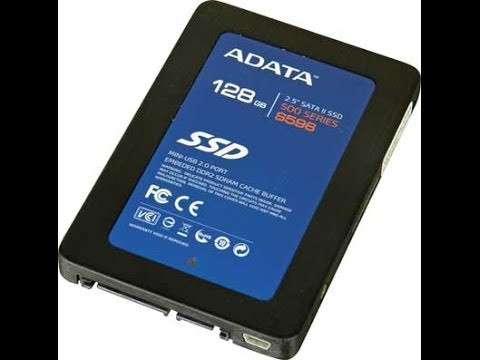 https://www.youtube.com/watch?v=t7WnJBtyUHE
Though, unless you speak Ukrainian, turn off the sound.
OP only needs to follow the video up to 7:30. After that, he shows another not relevant procedure.
It shows that it really does take around five minutes to swap the drives.1 -
I have had a look at the youtube info you have all sent and l think an SSD is worth getting. Stupid question coming up so l apologise...

Are SSD's all the same or do l need to find one for my model laptop and where does one start to look for one? Haven't bought anything for my laptop before except a new power lead.
Many thanks again.Stash Busting Challenge 2016 6/520











Confirm your email address to Create Threads and Reply

Categories
- All Categories
- 354.8K Banking & Borrowing
- 254.5K Reduce Debt & Boost Income
- 455.6K Spending & Discounts
- 247.6K Work, Benefits & Business
- 604.5K Mortgages, Homes & Bills
- 178.6K Life & Family
- 262.1K Travel & Transport
- 1.5M Hobbies & Leisure
- 16.1K Discuss & Feedback
- 37.7K Read-Only Boards