We’d like to remind Forumites to please avoid political debate on the Forum.
This is to keep it a safe and useful space for MoneySaving discussions. Threads that are – or become – political in nature may be removed in line with the Forum’s rules. Thank you for your understanding.
📨 Have you signed up to the Forum's new Email Digest yet? Get a selection of trending threads sent straight to your inbox daily, weekly or monthly!
The Forum now has a brand new text editor, adding a bunch of handy features to use when creating posts. Read more in our how-to guide
Laptop clock not keeping time
Comments
-
Okay, so am I adding 2GB to the laptop's 1GB RAM or replacing it?TheRightOne said:pphillips said:
Thanks, should I get the 500, 540 or 560 mbps SDD drive?TheRightOne said:
Yes, Windows 10 32 bit.pphillips said:
Okay so just to clarify, if I upgrade the RAM and SSD then my laptop should be able to handle Windows 10.TheRightOne said:
That is ridiculous...pphillips said:
Thanks, although I don't think the first two videos apply as I have Windows xp.TheRightOne said:pphillips said:
The processor is an x86 Family 6 Model 14 Stepping 8 GenuineIntel ~1662 MhzTheRightOne said:
Swapping the old and very slow storage method for the much faster solid state storage brings old laptops back to life.pphillips said:Yes, it does take much longer to do normal things than my Samsung tablet but thankfully I can do most things on the tablet. The primary consideration is cost and the fact that all PCs and laptops I have owed eventually get slower over time to the point of almost grinding to a halt. So far I haven't worked our how to reverse the aging process 😁
£4 for the RAM; https://www.ebay.co.uk/itm/2GB-4GB-8GB-Memory-RAM-Laptop-PC2-4200-DDR2-533-MHz-200-Non-ECC-Unbuffered-Lot/224000015693
and
£20 for an SSD; https://www.mymemory.co.uk/memory/data-storage/ssd-drives.html?dir=asc&order=price
But don't do anything before reporting back on exactly which CPU is powering your laptop.
Would appreciate video links on how to make appropriate changes.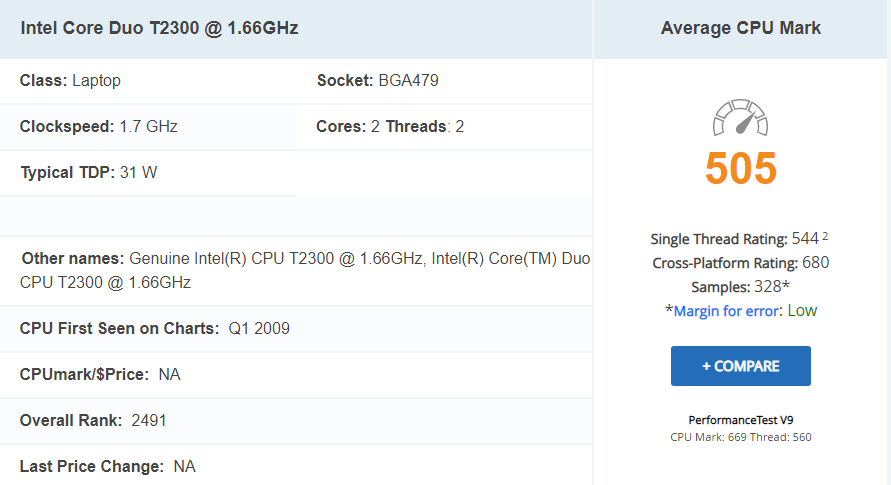
Once you have installed the upgrades, perhaps you can give Windows 10 a try. It doesn't cost anything.
How much RAM and how many modules can my laptop take?
£4 for the RAM; https://www.ebay.co.uk/itm/2GB-4GB-8GB-Memory-RAM-Laptop-PC2-4200-DDR2-533-MHz-200-Non-ECC-Unbuffered-Lot/224000015693
Problem now is that there is only one left and you need two. You may need to pay more for the second; https://www.ebay.co.uk/itm/RANDOMLY-SELECTED-1GB-PC2-4200-533MHZ-240-PIN-DDR2-LAPTOP-RAM/324162141175
So £5 now
£20 for an SSD; https://www.mymemory.co.uk/memory/data-storage/ssd-drives.html?dir=asc&order=price
Crucial one should have good support, so choose that one.
£25 in total to refurb. Don't spend more.0 -
pphillips said:
Replacing.
Okay, so am I adding 2GB to the laptop's 1GB RAM or replacing it?TheRightOne said:pphillips said:
Thanks, should I get the 500, 540 or 560 mbps SDD drive?TheRightOne said:
Yes, Windows 10 32 bit.pphillips said:
Okay so just to clarify, if I upgrade the RAM and SSD then my laptop should be able to handle Windows 10.TheRightOne said:
That is ridiculous...pphillips said:
Thanks, although I don't think the first two videos apply as I have Windows xp.TheRightOne said:pphillips said:
The processor is an x86 Family 6 Model 14 Stepping 8 GenuineIntel ~1662 MhzTheRightOne said:
Swapping the old and very slow storage method for the much faster solid state storage brings old laptops back to life.pphillips said:Yes, it does take much longer to do normal things than my Samsung tablet but thankfully I can do most things on the tablet. The primary consideration is cost and the fact that all PCs and laptops I have owed eventually get slower over time to the point of almost grinding to a halt. So far I haven't worked our how to reverse the aging process 😁
£4 for the RAM; https://www.ebay.co.uk/itm/2GB-4GB-8GB-Memory-RAM-Laptop-PC2-4200-DDR2-533-MHz-200-Non-ECC-Unbuffered-Lot/224000015693
and
£20 for an SSD; https://www.mymemory.co.uk/memory/data-storage/ssd-drives.html?dir=asc&order=price
But don't do anything before reporting back on exactly which CPU is powering your laptop.
Would appreciate video links on how to make appropriate changes.
Once you have installed the upgrades, perhaps you can give Windows 10 a try. It doesn't cost anything.
How much RAM and how many modules can my laptop take?
£4 for the RAM; https://www.ebay.co.uk/itm/2GB-4GB-8GB-Memory-RAM-Laptop-PC2-4200-DDR2-533-MHz-200-Non-ECC-Unbuffered-Lot/224000015693
Problem now is that there is only one left and you need two. You may need to pay more for the second; https://www.ebay.co.uk/itm/RANDOMLY-SELECTED-1GB-PC2-4200-533MHZ-240-PIN-DDR2-LAPTOP-RAM/324162141175
So £5 now
£20 for an SSD; https://www.mymemory.co.uk/memory/data-storage/ssd-drives.html?dir=asc&order=price
Crucial one should have good support, so choose that one.
£25 in total to refurb. Don't spend more.1 -
Looks like I'll have to spend a bit more as the Integral 560mbps is the only one in stock.TheRightOne said:pphillips said:
Replacing.
Okay, so am I adding 2GB to the laptop's 1GB RAM or replacing it?TheRightOne said:pphillips said:
Thanks, should I get the 500, 540 or 560 mbps SDD drive?TheRightOne said:
Yes, Windows 10 32 bit.pphillips said:
Okay so just to clarify, if I upgrade the RAM and SSD then my laptop should be able to handle Windows 10.TheRightOne said:
That is ridiculous...pphillips said:
Thanks, although I don't think the first two videos apply as I have Windows xp.TheRightOne said:pphillips said:
The processor is an x86 Family 6 Model 14 Stepping 8 GenuineIntel ~1662 MhzTheRightOne said:
Swapping the old and very slow storage method for the much faster solid state storage brings old laptops back to life.pphillips said:Yes, it does take much longer to do normal things than my Samsung tablet but thankfully I can do most things on the tablet. The primary consideration is cost and the fact that all PCs and laptops I have owed eventually get slower over time to the point of almost grinding to a halt. So far I haven't worked our how to reverse the aging process 😁
£4 for the RAM; https://www.ebay.co.uk/itm/2GB-4GB-8GB-Memory-RAM-Laptop-PC2-4200-DDR2-533-MHz-200-Non-ECC-Unbuffered-Lot/224000015693
and
£20 for an SSD; https://www.mymemory.co.uk/memory/data-storage/ssd-drives.html?dir=asc&order=price
But don't do anything before reporting back on exactly which CPU is powering your laptop.
Would appreciate video links on how to make appropriate changes.
Once you have installed the upgrades, perhaps you can give Windows 10 a try. It doesn't cost anything.
How much RAM and how many modules can my laptop take?
£4 for the RAM; https://www.ebay.co.uk/itm/2GB-4GB-8GB-Memory-RAM-Laptop-PC2-4200-DDR2-533-MHz-200-Non-ECC-Unbuffered-Lot/224000015693
Problem now is that there is only one left and you need two. You may need to pay more for the second; https://www.ebay.co.uk/itm/RANDOMLY-SELECTED-1GB-PC2-4200-533MHZ-240-PIN-DDR2-LAPTOP-RAM/324162141175
So £5 now
£20 for an SSD; https://www.mymemory.co.uk/memory/data-storage/ssd-drives.html?dir=asc&order=price
Crucial one should have good support, so choose that one.
£25 in total to refurb. Don't spend more.0 -
Okay I put the new RAM and new SSD drive into my laptop but it won't go any further than the BIOS setup screen, an I doing something wrong?0
-
Have you created a Windows installer USB disk? Have you followed the install instructions? (An SSD is blank - you need to install an operating system, like Windows, on it).1
-
Okay so I need to create the windows 10 USB disk, will a memory stick be large enough or do I need to use an external hard drive?0
-
You need a USB stick of minimum 8GB.1
-
I don't have one that big so I'll just use an external hard drive.0
-
Remember that the Installation creation tool will (probably) wipe and format the drive as it needs to make it a bootable disk ... so don't use one that has data on it that you need to keep.1










Confirm your email address to Create Threads and Reply

Categories
- All Categories
- 354.1K Banking & Borrowing
- 254.3K Reduce Debt & Boost Income
- 455.3K Spending & Discounts
- 247.1K Work, Benefits & Business
- 603.7K Mortgages, Homes & Bills
- 178.3K Life & Family
- 261.2K Travel & Transport
- 1.5M Hobbies & Leisure
- 16.1K Discuss & Feedback
- 37.7K Read-Only Boards