We’d like to remind Forumites to please avoid political debate on the Forum.
This is to keep it a safe and useful space for MoneySaving discussions. Threads that are – or become – political in nature may be removed in line with the Forum’s rules. Thank you for your understanding.
📨 Have you signed up to the Forum's new Email Digest yet? Get a selection of trending threads sent straight to your inbox daily, weekly or monthly!
The Forum now has a brand new text editor, adding a bunch of handy features to use when creating posts. Read more in our how-to guide
Laptop so slow? Should I do a Restore to Factory Settings? Windows 7 See screenshots

joe565
Posts: 135 Forumite



in Techie Stuff
Hello
My laptop has been running so slow and I'm thinking of Restoring it back to factory settings. Don't have any disks though so can it still be done?
Obviously need to do a back up as I've loads of photos etc and if I take these off my laptop would that help?
I'm used a Toshiba Satellite C660-108 laptop, Windows 7 and wondering would a Restore help?
I'll attach three screenshots which might be helpful?
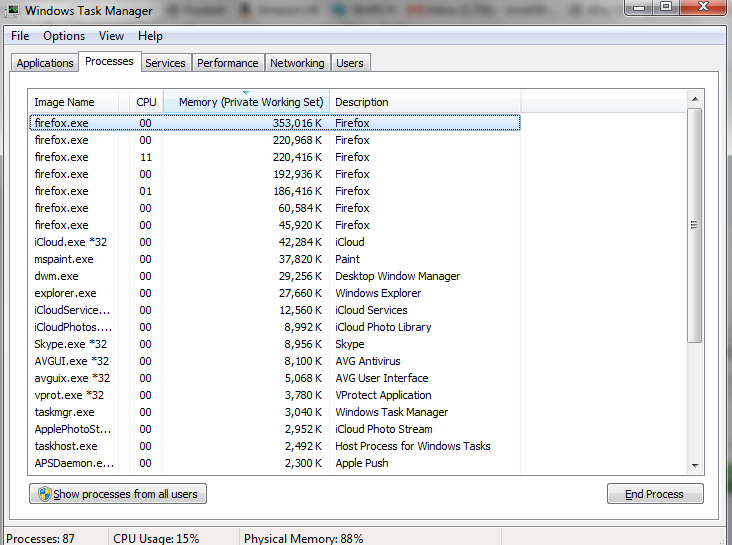

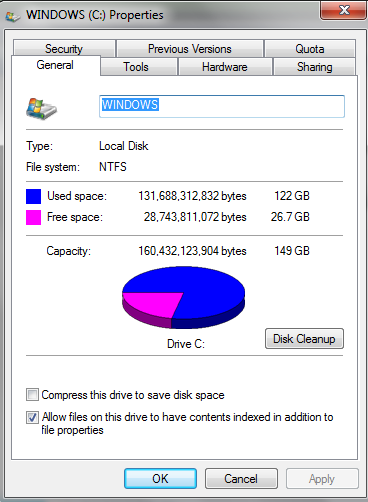
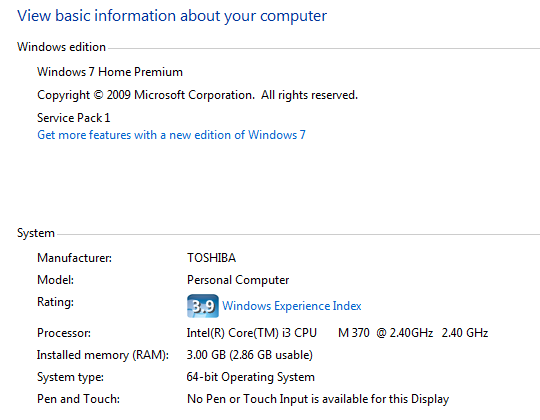

My laptop has been running so slow and I'm thinking of Restoring it back to factory settings. Don't have any disks though so can it still be done?
Obviously need to do a back up as I've loads of photos etc and if I take these off my laptop would that help?
I'm used a Toshiba Satellite C660-108 laptop, Windows 7 and wondering would a Restore help?
I'll attach three screenshots which might be helpful?
0
Comments
-
Although there a few factors there which could slow it down, i see nothing serious enough to warrant a reinstall.
The most common cause BY FAR of a slow machine is malware.
So first, run this :
https://www.malwarebytes.com/ (free version)
And then this :
https://www.malwarebytes.com/adwcleaner/ (first click scan, and then click clean)
Let us know how you get on
Edit : I would strongly suggest you remove AVG0 -
Although there a few factors there which could slow it down, i see nothing serious enough to warrant a reinstall.
The most common cause BY FAR of a slow machine is malware.
So first, run this :
https://www.malwarebytes.com/ (free version)
And then this :
https://www.malwarebytes.com/adwcleaner/ (first click scan, and then click clean)
Let us know how you get on
Edit : I would strongly suggest you remove AVG
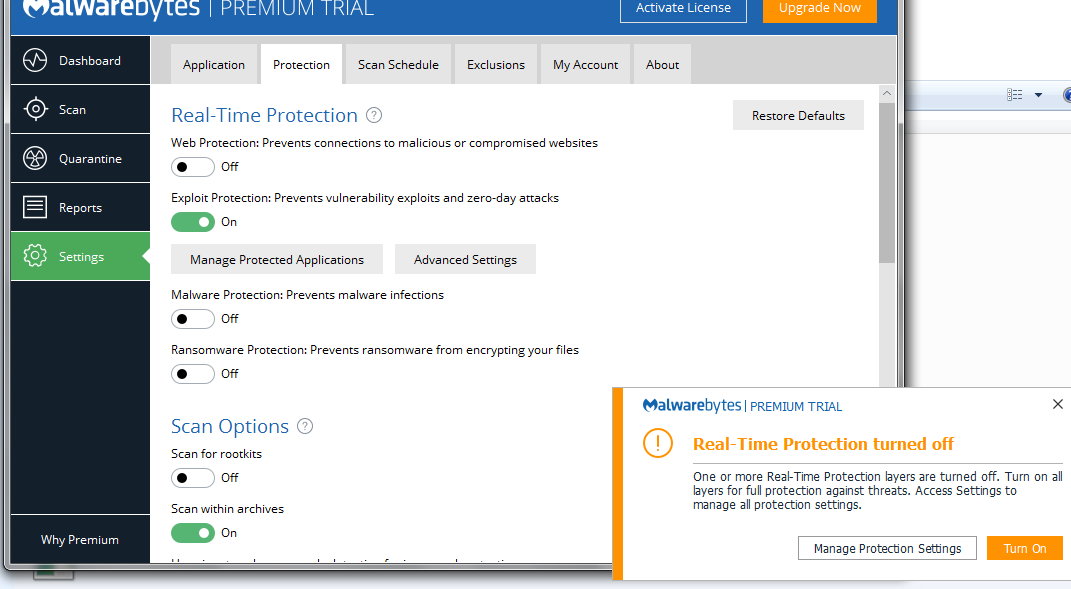
Thanks for this! See malwarebytes screenshot below. 209 seems alot!! So do I click save or quarantine (sorry am newbie lol)
I'll do the other adwcleaner now soon and remove AVG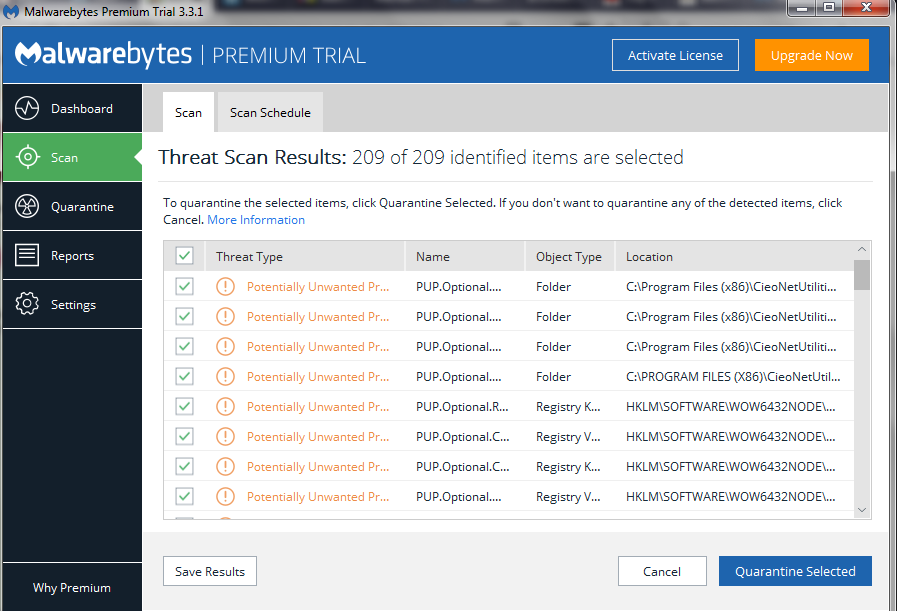 0
0 -
Quarantine - then reboot0
-
Help to show the disk use on the task manager, basically cpu, memory and disk
are the 3 key things regards performance.
I show all processes too then click on the top of each of the three columns to see what is using what most.
Looks like some CieoNet toolbar is installed and that looks like the culprit.0 -
Can't find the toolbar anywhere to uninstall. I'll do screenshot of programsChesterBarnacle wrote: »Help to show the disk use on the task manager, basically cpu, memory and disk
are the 3 key things regards performance.
I show all processes too then click on the top of each of the three columns to see what is using what most.
Looks like some CieoNet toolbar is installed and that looks like the culprit.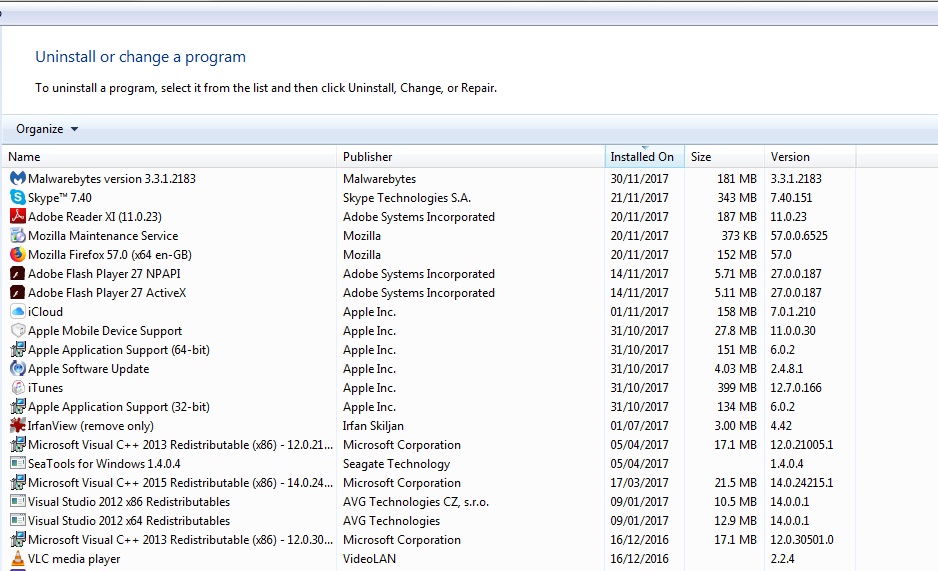
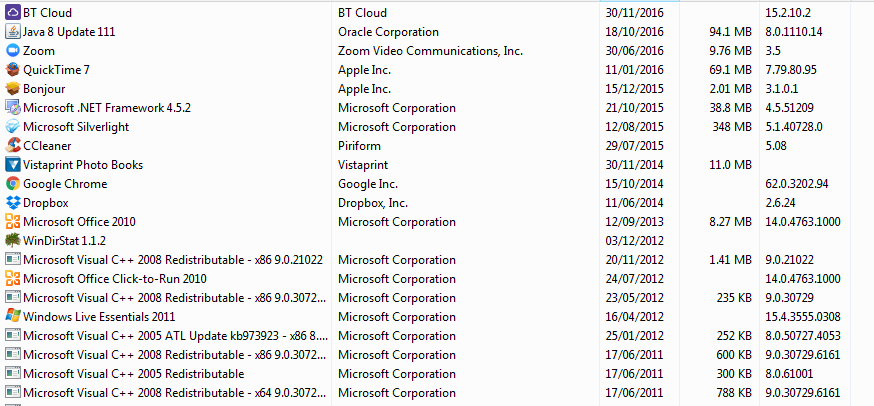
 0
0 -
I experienced the same thing. I had tried a lot of ways, including that virus and malware things, but finally:
1. backup all data
2. restore factory setting
It works well then. Good luck. I know how frustrating it is.0 -
Better still, swap the current HDD for an SSD. Such as this Kingston SSD A400 for £40 and maybe swap out the 1 GB RAM module for a 2 GB RAM module £8
Ten to fifteen minutes to swap both.
No need to back anything up, as it will be stored on the old hard drive.
Just install Windows 7 to the SSD and then move your stuff over from the old drive.
Will solve any problem with slowness and improve the performance of your laptop considerably.
Mechanical hard drives are old tech. SSD will make your laptop 'lightning fast'. 0
0 -
You're missing the obvious - in your task manager screenshot you're using 88% physical memory and 87 processes running, there's lots of background carp running. This will lead to lots of pagefile useage and therefore slow the machine down.
Use either CCleaner's Startup tool or msconfig and turn off all the crap from running at startup, then reboot and check task manager agan.
If you're feeling a bit more adventurous, see blackviper's W7 configurations to stop more carp from running when it's not needed...
http://www.blackviper.com/service-configurations/black-vipers-windows-7-service-pack-1-service-configurations/
Oh, and you'll still need an av....when you remove avg use the removal tool
https://www.avg.com/en-gb/utilities
and get avira free from filehippo
https://filehippo.com/download_avira/74187/......Gettin' There, Wherever There is......
I have a dodgy "i" key, so ignore spelling errors due to "i" issues, ...I blame Apple 0
0 -
Better still, swap the current HDD for an SSD. Such as this Kingston SSD A400 for £40 and maybe swap out the 1 GB RAM module for a 2 GB RAM module £8
Ten to fifteen minutes to swap both.
No need to back anything up, as it will be stored on the old hard drive.
Just install Windows 7 to the SSD and then move your stuff over from the old drive.
Will solve any problem with slowness and improve the performance of your laptop considerably.
Mechanical hard drives are old tech. SSD will make your laptop 'lightning fast'.
hi alsto
you say no need to back up but how would the new SSD drive fit in the laptop without removing the old HDD. sorry if this is a dumb question but i too would like to upgrade my HP Envy windows 10 laptop to an SSD.0










This discussion has been closed.
Confirm your email address to Create Threads and Reply

Categories
- All Categories
- 354.6K Banking & Borrowing
- 254.4K Reduce Debt & Boost Income
- 455.5K Spending & Discounts
- 247.4K Work, Benefits & Business
- 604.3K Mortgages, Homes & Bills
- 178.5K Life & Family
- 261.8K Travel & Transport
- 1.5M Hobbies & Leisure
- 16.1K Discuss & Feedback
- 37.7K Read-Only Boards