We’d like to remind Forumites to please avoid political debate on the Forum.
This is to keep it a safe and useful space for MoneySaving discussions. Threads that are – or become – political in nature may be removed in line with the Forum’s rules. Thank you for your understanding.
📨 Have you signed up to the Forum's new Email Digest yet? Get a selection of trending threads sent straight to your inbox daily, weekly or monthly!
The Forum now has a brand new text editor, adding a bunch of handy features to use when creating posts. Read more in our how-to guide
Completing "Office" forms when only have Libre Office

P0123
Posts: 88 Forumite



in Techie Stuff
I downloaded Libre Office a while ago, because I cannot afford the annual Office Packages, and Libre Office was suggested and recommended on here.
It seemed okay until I found that all the documents saved seemed to have the "odt" ending, which most of the websites that want the documents downloaded upon do NOT accept. They only accept doc, docx, pdf, or similar.
Eventually, I found that if I BOUGHT Adobe Acrobat, (I believe,) it would transfer one document to the other for attaching or downloading, but again it was too expensive for me.
Recently, on my pc it came up with a update to Libre Office which I downloaded, hoping that this may be a better version that will produce the appropriate format.
I now have to go to the Library to book one hour sessions to try to create a new CV, and other important documents, in the 'right' format, plus now, I have just downloaded an application form to complete, but it downloads in word which my pc will not let me complete unless I log into Office, (ie, buy a new package or subscription).
I found a 'file converter' on the MSE site (Zamzar) to convert it to a pdf, thinking this version will allow me to complete it, but then I have to click on 'edit PDF' and buy Adobe Acrobat to do so!
How can I use Libre Office and still be able to create acceptable formats of CVs and complete application forms that are based on the Office format/Word?
Please help, (the closing dates are due and the DWP are on my back too)!
THANK YOU in advance.
It seemed okay until I found that all the documents saved seemed to have the "odt" ending, which most of the websites that want the documents downloaded upon do NOT accept. They only accept doc, docx, pdf, or similar.
Eventually, I found that if I BOUGHT Adobe Acrobat, (I believe,) it would transfer one document to the other for attaching or downloading, but again it was too expensive for me.
Recently, on my pc it came up with a update to Libre Office which I downloaded, hoping that this may be a better version that will produce the appropriate format.
I now have to go to the Library to book one hour sessions to try to create a new CV, and other important documents, in the 'right' format, plus now, I have just downloaded an application form to complete, but it downloads in word which my pc will not let me complete unless I log into Office, (ie, buy a new package or subscription).
I found a 'file converter' on the MSE site (Zamzar) to convert it to a pdf, thinking this version will allow me to complete it, but then I have to click on 'edit PDF' and buy Adobe Acrobat to do so!
How can I use Libre Office and still be able to create acceptable formats of CVs and complete application forms that are based on the Office format/Word?
Please help, (the closing dates are due and the DWP are on my back too)!
THANK YOU in advance.
0
Comments
-
You just need to save the doc as ....
file...save as....change from all formats to the Microsoft format eg .doc .docx etc etc4.8kWp 12x400W Longhi 9.6 kWh battery Giv-hy 5.0 Inverter, WSW facing Essex . Aint no sunshine ☀️ Octopus gas fixed dec 24 @ 5.74 tracker again+ Octopus Intelligent Flux leccy
CEC Email energyclub@moneysavingexpert.com0 -
Thank you, but I've already tried that, but it doesn't convert in the same format.
Also, it doesn't solve the problem of downloading an application form, for example, which is in the standard Office Word format, and not being able to edit it because Office is not downloaded on my pc.0 -
You can also use the same technique for saving to PDF (or it may be under File / Export instead) so you shouldn't need any complicated solutions.
If you're saving as PDF there shouldn't be any problems, however if you save as doc or docx, try and keep formatting simple, as more complex formatting doesn't always transfer 100% faithfully between odt and doc(x). By complex formatting I mean stuff like outline numbering schemes, bookmarks, field codes, macros etc.0 -
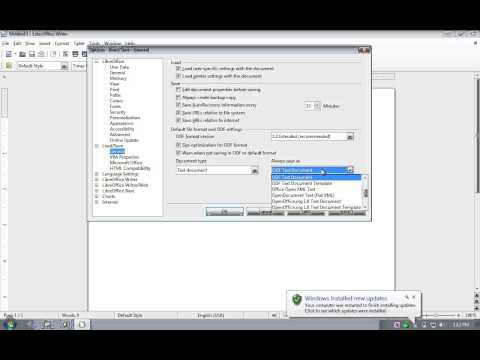
I'd suggest you set the defaults to save in Office format, makes things far easier to share with others.
Options > Load/Save > General
Then run through the different Document Types dropdown list near the bottom and for each one use the Always save as dropdown to choose the relevant Microsoft type (if there isn't one, just ignore that document type).0 -
Thank you, but I've already tried that, but it doesn't convert in the same format.
Also, it doesn't solve the problem of downloading an application form, for example, which is in the standard Office Word format, and not being able to edit it because Office is not downloaded on my pc.
Change the default format from ODF to DOCX
Also make sure you have the latest version of Libreoffice
https://www.libreoffice.org/download/libreoffice-fresh/Science isn't exact, it's only confidence within limits.0 -
LibreOffice will happily edit docx documents.Thank you, but I've already tried that, but it doesn't convert in the same format.
Also, it doesn't solve the problem of downloading an application form, for example, which is in the standard Office Word format, and not being able to edit it because Office is not downloaded on my pc.
If you're trying to edit pdf documents then whoever is putting them on their website expecting anybody to be able to edit them is an idiot, and you probably don't want to be working there.0 -
that does not make sense , libre office can open most (if not all with macros embedded) where are you downloading the "Office" form from, it may be just that the associations for .doc .docx etc are pointing at Microsoft office because of a trial being installed on your pc. Save the file rather than open with, then in your downloads open with Libreoffice writer.4.8kWp 12x400W Longhi 9.6 kWh battery Giv-hy 5.0 Inverter, WSW facing Essex . Aint no sunshine ☀️ Octopus gas fixed dec 24 @ 5.74 tracker again+ Octopus Intelligent Flux leccy
CEC Email energyclub@moneysavingexpert.com0 -
Trying to edit a pdf you have had converted is a PITA.0
-
This is a system account and does not represent a real person. To contact the Forum Team email forumteam@moneysavingexpert.com0
-
Regarding the production of a file meeting application requirements then producing a PDF is simple. Several bits of free software for doing that job such as PDF creator (that I use on one of - but there are others) that create a PDF when you 'print' your document.
They install to make it look like you have another printer selection option but then allow you to select a filename for saving. Work very well in my experience. All you do from the application you are using is normally select -file-print-pdfprinter (instead of usual printer) and print.
Job done for free!
(PDF creator gives various option at print time for filename save location etc. Worked well on XP and still does with right version on Win 10)0





 https://www.youtube.com/watch?v=6GUuSDO_EGc
This discussion has been closed.
Confirm your email address to Create Threads and Reply

Categories
- All Categories
- 353.5K Banking & Borrowing
- 254.1K Reduce Debt & Boost Income
- 455K Spending & Discounts
- 246.6K Work, Benefits & Business
- 602.9K Mortgages, Homes & Bills
- 178.1K Life & Family
- 260.6K Travel & Transport
- 1.5M Hobbies & Leisure
- 16K Discuss & Feedback
- 37.7K Read-Only Boards