We’d like to remind Forumites to please avoid political debate on the Forum.
This is to keep it a safe and useful space for MoneySaving discussions. Threads that are – or become – political in nature may be removed in line with the Forum’s rules. Thank you for your understanding.
📨 Have you signed up to the Forum's new Email Digest yet? Get a selection of trending threads sent straight to your inbox daily, weekly or monthly!
The Forum now has a brand new text editor, adding a bunch of handy features to use when creating posts. Read more in our how-to guide
PC problem or monitor problem? (Need help fast!)

jenniewb
Posts: 12,847 Forumite




in Techie Stuff
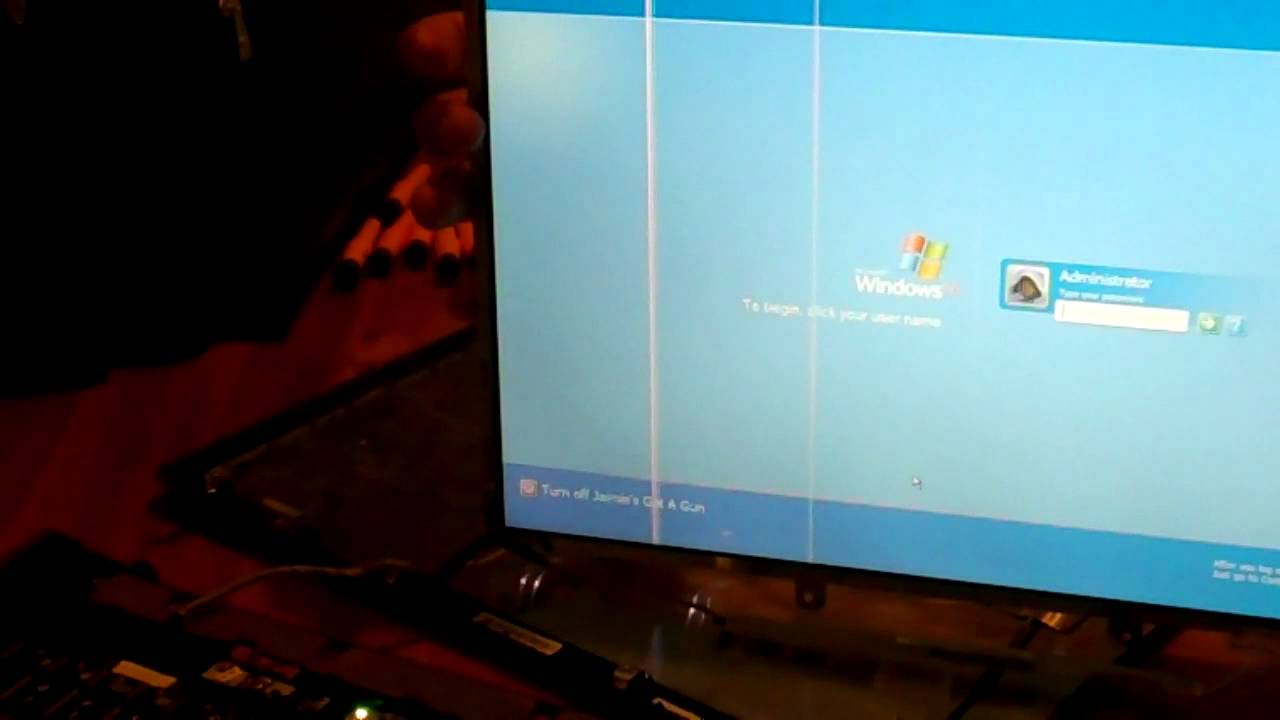
Started up my PC today to find a stream of vertical lines running down one side (the left if that makes any difference) and a few running horizontally at the base of the screen.
I've checked all my updates, nothing stood out. I've checked all the cables are in properly and am now wondering where the fault is; with the monitor or with the PC components.
Looks a bit like this: https://i.ytimg.com/vi/ftHa-3caedg/maxresdefault.jpg but imagine a few hundred lines not just a handful.
Obviously I want to try to fix/repair this, so far I don't know where to begin. I've run a Google search to be told what to do...if I have a laptop. I have a PC and separate monitor and it's also very difficult to read a lot of what is on the screen at the moment anyway. I think it's slowly getting worse.
I only got the PC and monitor 4 years ago- I didn't expect it to break this early on!
I've checked all my updates, nothing stood out. I've checked all the cables are in properly and am now wondering where the fault is; with the monitor or with the PC components.
Looks a bit like this: https://i.ytimg.com/vi/ftHa-3caedg/maxresdefault.jpg but imagine a few hundred lines not just a handful.
Obviously I want to try to fix/repair this, so far I don't know where to begin. I've run a Google search to be told what to do...if I have a laptop. I have a PC and separate monitor and it's also very difficult to read a lot of what is on the screen at the moment anyway. I think it's slowly getting worse.
I only got the PC and monitor 4 years ago- I didn't expect it to break this early on!
0
Comments
-
Judging by the image provided. It looks as though the monitor screen is dying. There is no software patch or fix for this. The only option is to buy a new monitor or replace the screen.:A:dance:1+1+1=1:dance::A
"Marleyboy you are a legend!"
MarleyBoy "You are the Greatest"
Marleyboy You Are A Legend!
Marleyboy speaks sense
marleyboy (total legend)
Marleyboy - You are, indeed, a legend.0 -
Thankyou! This really helps! And tbh is likely to be the easiest thing to replace (though not cheap and I'd only just cleared my credit card!)Judging by the image provided. It looks as though the monitor screen is dying. There is no software patch or fix for this. The only option is to buy a new monitor or replace the screen.
I've not had the monitor long at all, only just 3 years (almost to the day) having just checked the date, and am baffled that it's gone so soon- I'd expected it to be the last thing that broke down.
Just before I start spitting bricks at the manufacturer ASUS) how long are monitors supposed to last? The last one I had was over almost 10 years old and still going strong despite now living in a very dusty house.0 -
if you have a flat screen tv you could probably plug the pc into it to see if it is the display or the pc.
Monitors are cheap as chips now. it could be the power supply to the monitor that has failed.
Without knowing the model its hard to tell.0 -
The fix is a process of elimination. Is it the monitor or the graphics card/system? Or is it a problem with the cable or connectors (doubtful from the sound of it). The obvious way to find out is to borrow another monitor / cable; if the problem goes away you know yours is faulty. Or try someone else's laptop with your monitor. No point in buying a new one until you know it's bust.For every complex problem there is an answer that is clear, simple and wrong.0
-
Also have a look in device manager to see if it's a driver problem.You know what uranium is, right? It's this thing called nuclear weapons. And other things. Like lots of things are done with uranium. Including some bad things.
Donald Trump, Press Conference, February 16, 20170 -
plug your 10 yr old monitor into the computer, if it has the same problem then it is a problem with your computer.0
-
As above try your old monitor and a different cable before assuming it is the monitor. Also try this monitor on your other PC.0
-
Laurie_Sicard-Askey wrote: »Also have a look in device manager to see if it's a driver problem.
Did this- was the first thing I did after making sure everything was updated. The drivers were all running fine when I checked.plug your 10 yr old monitor into the computer, if it has the same problem then it is a problem with your computer.As above try your old monitor and a different cable before assuming it is the monitor. Also try this monitor on your other PC.
The 10 year old monitor now lives with my dad. I don't live with him and we operate totally different lifestyles so isn't so easy to arrange to pick up this monitor.0 -
Checked the cables, no idea how to check the graphics card but about an hour after posting the message, non pixilated black blobs started to appear on one corner of the monitor. I am imagining any PC issues would appear as a pixilated or at least linear results on the screen, but more organically formed blobs? I can only assume it's the monitor not the computer.The fix is a process of elimination. Is it the monitor or the graphics card/system? Or is it a problem with the cable or connectors (doubtful from the sound of it). The obvious way to find out is to borrow another monitor / cable; if the problem goes away you know yours is faulty. Or try someone else's laptop with your monitor. No point in buying a new one until you know it's bust.if you have a flat screen tv you could probably plug the pc into it to see if it is the display or the pc.
Monitors are cheap as chips now. it could be the power supply to the monitor that has failed.
Without knowing the model its hard to tell.
No TV (everything I do is via the PC). I don't own a laptop or a tablet. I have a phone but I'm pretty sure that wouldn't be of any use to me in this situation.
In the end, having tested the cables, it was either a new graphics card or a new monitor. I opted for the latter and now the screen works perfectly so I can only assume it was the monitor which was at fault. I've managed to trace the original online receipt and it was only 3 years old which makes me think it's a fault rather than anything else as even in today's throw-away culture, 3 years? That's just nowhere near enough for a PC screen with a careful owner.0 -
I'd agree 3 years is short, but with non-linear depreciation, the refund value of it may be rather low. It's worth asking the maker if they'll sell you another unit at a discount as a good will thing0





This discussion has been closed.
Confirm your email address to Create Threads and Reply

Categories
- All Categories
- 354.1K Banking & Borrowing
- 254.3K Reduce Debt & Boost Income
- 455.3K Spending & Discounts
- 247.1K Work, Benefits & Business
- 603.7K Mortgages, Homes & Bills
- 178.3K Life & Family
- 261.2K Travel & Transport
- 1.5M Hobbies & Leisure
- 16.1K Discuss & Feedback
- 37.7K Read-Only Boards