Ready, steady… save!
You don’t need a chart to join in. Here are 2 ways to record your savings:
1. Cross it off
Pop a chart into your first post. Saved an amount? Cross it out! Read more »
£0.01 £0.02 £0.03
2. Write it down
Skip the chart and add updates to your first post. Read more »
“Another +£3 saved today. Go me!”
Use +£ before each new saving so it counts towards your total.
📨 Have you signed up to the Forum's new Email Digest yet? Get a selection of trending threads sent straight to your inbox daily, weekly or monthly!
New HP laptop, no cursor?
Comments
-
I have tried the 'fn' button with numerous 'f' buttons, nothing works.
Lorain, I can't seem to open that link but thanks.0 -
Try right-click and select save-as and then run it. that link is the driver for your trackpad.
Also in device manager do you see any entries with a yellow exclamation mark?0 -
pappa_golf wrote: »because the drives are ghosted from a master , and are often well out of date when unpacked from the box
That sounds like an excuse.
I've bought half a dozen laptops in recent years, and every one of them has worked straight out of the box. If it didn't, I'd take it back to the shop, just as I would any other consumer durable. Yes, I've got the computing chops to make computers do what I want, and obviously I could re-install the OS and get the right suite of drivers installed. But it's outrageous that computers aren't shipped working correctly, and it's only in the weird world of computing that this is considered even remotely acceptable.0 -
Try right-click and select save-as and then run it. that link is the driver for your trackpad.
Also in device manager do you see any entries with a yellow exclamation mark?
There are no red or yellow markers showing in device manager. Will installing this driver affect the warranty if I have to take it back?0 -
securityguy wrote: »That sounds like an excuse.
I've bought half a dozen laptops in recent years, and every one of them has worked straight out of the box. If it didn't, I'd take it back to the shop, just as I would any other consumer durable. Yes, I've got the computing chops to make computers do what I want, and obviously I could re-install the OS and get the right suite of drivers installed. But it's outrageous that computers aren't shipped working correctly, and it's only in the weird world of computing that this is considered even remotely acceptable.
I agree with you. I can't believe I've had to do updates & resets on a brand new laptop (and it still isn't working). I think it will be going back in the morning.0 -
Hi,
have a look here, might help, try link second from bottom.
Try this though, from HP support.
On some touchpads you can turn on or off the TouchPad by double tapping in the upper left corner of the TouchPad. Double tap to turn the TouchPad on, repeat to turn the TouchPad off.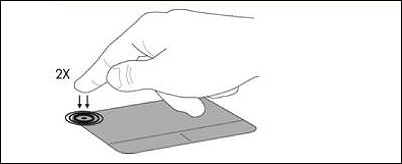 0
-
As JIVESINGER says, it sounds like you or the manufacturer have accidentally disabled the trackpad using the FN (function, usually highlighted in blue, on a key left of the space bar, bottom row) key. Hold down the key marked 'fn' and press the F keys at the top of the keyboard one by one. You should be able to see the key to dim and brighten the screen, plus volume up and down, the trackpad one usually looks like a little square with buttons. Make sure to hold FN once and tap it ONCE and check0







This discussion has been closed.
Confirm your email address to Create Threads and Reply

Categories
- All Categories
- 355.9K Banking & Borrowing
- 255K Reduce Debt & Boost Income
- 456.2K Spending & Discounts
- 248.4K Work, Benefits & Business
- 606.1K Mortgages, Homes & Bills
- 179.1K Life & Family
- 263.9K Travel & Transport
- 1.5M Hobbies & Leisure
- 16.2K Discuss & Feedback
- 37.7K Read-Only Boards