We’d like to remind Forumites to please avoid political debate on the Forum.
This is to keep it a safe and useful space for MoneySaving discussions. Threads that are – or become – political in nature may be removed in line with the Forum’s rules. Thank you for your understanding.
📨 Have you signed up to the Forum's new Email Digest yet? Get a selection of trending threads sent straight to your inbox daily, weekly or monthly!
The Forum now has a brand new text editor, adding a bunch of handy features to use when creating posts. Read more in our how-to guide
Windows 7 drive wiped, re-install no disk?

fuzzgun19
Posts: 7,767 Forumite


in Techie Stuff
I'm not very techy.
I'm looking to sell my laptop, so I saved all photo's/files etc onto an SD card then have wiped everything off the laptop using the guide here.
http://www.howtogeek.com/171980/how-to-prepare-a-computer-tablet-or-phone-before-selling-it/
Now I'd like to re-install windows 7 onto it, but can't see how.
When I boot the laptop, I have 2 choices, F2 or F12.
I can't see anything about a recovery partition, or factory default on the blue menu I'm seeing.
Can anyone help (in basic speak lol)?
I'm looking to sell my laptop, so I saved all photo's/files etc onto an SD card then have wiped everything off the laptop using the guide here.
http://www.howtogeek.com/171980/how-to-prepare-a-computer-tablet-or-phone-before-selling-it/
Now I'd like to re-install windows 7 onto it, but can't see how.
When I boot the laptop, I have 2 choices, F2 or F12.
I can't see anything about a recovery partition, or factory default on the blue menu I'm seeing.
Can anyone help (in basic speak lol)?
I Hate Jobsworths!!!
0
Comments
-
The wipe drive section says "Bear in mind that this tool wipes your entire drive and will erase any manufacturer recovery partition found on it", so, if you've used dban, you'll need a windows disc.
You should have used the recovery partition instead of wiping it.
Data on sd cards should be copied elsewhere for safety
You'll need to specify the machine, the operating system and exactly what you did to get any further, but this may help:
http://forums.moneysavingexpert.com/showpost.php?p=68396497&postcount=12Don't you dare criticise what you cannot understand0 -
Thank you. Like I said, I'm not too techy

The machine is Lenovo G550, it did have Windows 7 already installed when I bought it, and no disk was supplied. I still have the original box etc.
I haven't tried to do anything else with it yet as I was waiting to see if someone on here could advise.
If I just boot then leave, I get a black screen with lots of white writing on it, it looks like it's trying to check something with the system, but just the same thing comes up over and over down the screen.
I did wonder if I could download a windows version from another machine - I have Vista, and 8.1.
I'll try the link you gave, to see if I can get Win7.
I actually do have disks for genuine Windows XP from a long time ago, is it possible to put this on the laptop, then upgrade somehow?I Hate Jobsworths!!!0 -
Have you used dban or not?
The link you provided has a long list of things, what did you do, and what is this text on screen?
If you haven't used dban, hold down f8 when you boot or use the novo button next to the power button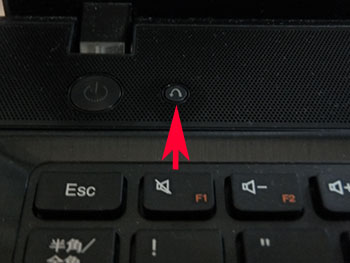
https://www.youtube.com/watch?v=9-TSkj6HENQ
http://support.lenovo.com/us/en/documents/127597018499211
Forget about xp, it's of no use, and of no value to a future owner
What's the reason behind the decision to sell?Don't you dare criticise what you cannot understand0 -
Sorry, yes I did use dban. I just tried the novo button in case, but nothing happened, it just went on to the text over and over as below.
I want to sell as we have upgraded to a new laptop.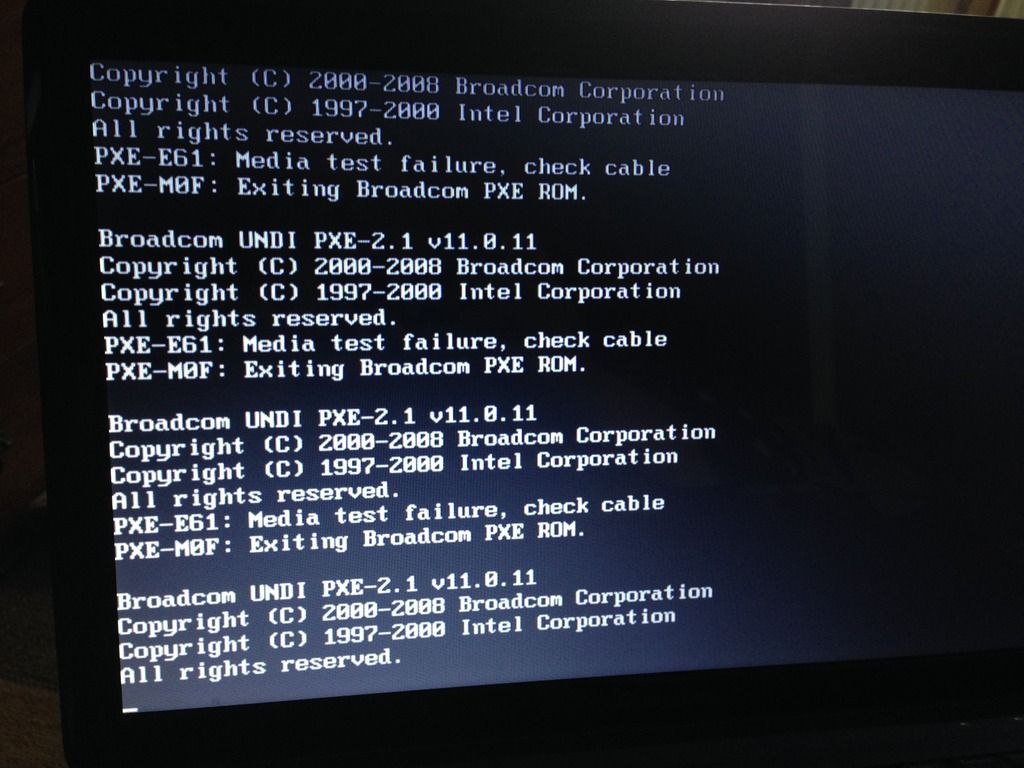
So, my only option is to use the Win7 download you linked to?I Hate Jobsworths!!!0 -
You've wiped not only your data, but the recovery partition, the create rescue disk facility, and removed the ability to do a quick factory restore then - (it's all stored on the (now empty) hard disk) - the dangers of following random internet advice, so you'll need to create the windows7 disc from Mr NiftyDigits's link, and may need to download additional drivers to get it fully working once windows 7 is installed.
I'd advise researching the factory restore method and how to create recovery media on your new system, and any others you may have, as most people end up wishing they had them to hand one day and instead find they're stuck when the machine needs a reinstall without any form of backup being available.
And, copy the sd card data to another machine.
The PXE screen you see btw, means the machine can't find any information on the hard disk to boot from, so it's looking around to see if it can find and boot from a special server on your network, called a pxe server, used in corporate environments for quick re-installs sometimes - Obviously you don't have one of these either, so it just loops forever as it can't find any bootable info.Don't you dare criticise what you cannot understand0 -
You've wiped not only your data, but the recovery partition, the create rescue disk facility, and removed the ability to do a quick factory restore then - (it's all stored on the (now empty) hard disk) - the dangers of following random internet advice, so you'll need to create the windows7 disc from Mr NiftyDigits's link, and may need to download additional drivers to get it fully working once windows 7 is installed.
I'd advise researching the factory restore method and how to create recovery media on your new system, and any others you may have, as most people end up wishing they had them to hand one day and instead find they're stuck when the machine needs a reinstall without any form of backup being available.
And, copy the sd card data to another machine.
The PXE screen you see btw, means the machine can't find any information on the hard disk to boot from, so it's looking around to see if it can find and boot from a special server on your network, called a pxe server, used in corporate environments for quick re-installs sometimes - Obviously you don't have one of these either, so it just loops forever as it can't find any bootable info.
Thanks for explaining. I'll see if I can download from the link.I Hate Jobsworths!!!0 -
Ok, I'm having an issue with burning the win7. It says "send to Windows Image Burner. Place a tick within 'verify' and start the burning process."
There is neither of these options (on my Vista PC) when I right click on the downloaded file.
I tried right click then send to the DVD drive that had a blank disk in, but that did nothing in the laptop.I Hate Jobsworths!!!0 -
If you've downloaded the iso you can use this tool to put the install on a USB stick and boot from that:
https://www.microsoft.com/en-us/download/windows-usb-dvd-download-tool
John0 -
or, download imgburn to your vista pc and use that to burn the ISO you have downloaded to a dvd
http://www.filehippo.com/download_imgburn/
WARNING - if you do this, as you go through the installation, MAKE SURE you do not install any of the additional toolbars, search engines etc., Imgburn is very good, but you don't want the other stuff.......Gettin' There, Wherever There is......
I have a dodgy "i" key, so ignore spelling errors due to "i" issues, ...I blame Apple 0
0 -
Would it re install automatically, from a reset?
Check on back / base- may have the Windows sticker with a long auth code on.breathe in, breathe out- You're alive! Everything else is a bonus, right? RIGHT??0





This discussion has been closed.
Confirm your email address to Create Threads and Reply

Categories
- All Categories
- 353.6K Banking & Borrowing
- 254.2K Reduce Debt & Boost Income
- 455.1K Spending & Discounts
- 246.7K Work, Benefits & Business
- 603K Mortgages, Homes & Bills
- 178.1K Life & Family
- 260.7K Travel & Transport
- 1.5M Hobbies & Leisure
- 16K Discuss & Feedback
- 37.7K Read-Only Boards