We’d like to remind Forumites to please avoid political debate on the Forum.
This is to keep it a safe and useful space for MoneySaving discussions. Threads that are – or become – political in nature may be removed in line with the Forum’s rules. Thank you for your understanding.
📨 Have you signed up to the Forum's new Email Digest yet? Get a selection of trending threads sent straight to your inbox daily, weekly or monthly!
TV as monitor

castle96
Posts: 3,099


 Forumite
Hi,
my continuing problems with this bl**dy TV (LG42LB65OV wifi)
I want to also use it as a PC monitor. My HP computer is oldish and only has a VGA (blue/2 screws), like this

the back of the TV is this (56secs in)
https://www.youtube.com/watch?v=CXmjBnubufE
there is no VGA connection, though lots of USBs and HDMIs
???????
The only way to get a signal from the computer to the TV IS through the VGA lead - true ?
Is there some sort of converter/connection t get round this ?
(the spare USBs on the computer wil do nothing ? if connected to a USB on the TV, will they ?
thanks for your help
my continuing problems with this bl**dy TV (LG42LB65OV wifi)
I want to also use it as a PC monitor. My HP computer is oldish and only has a VGA (blue/2 screws), like this

the back of the TV is this (56secs in)
https://www.youtube.com/watch?v=CXmjBnubufE
there is no VGA connection, though lots of USBs and HDMIs
???????
The only way to get a signal from the computer to the TV IS through the VGA lead - true ?
Is there some sort of converter/connection t get round this ?
(the spare USBs on the computer wil do nothing ? if connected to a USB on the TV, will they ?
thanks for your help
0
Comments
-
Have just been to Maplins. "Not possible"
Magic box to convert VGA to HDMI is £60, + £10 for leads 'if' ! I want audio.
Would this do the same job ?
http://www.ebay.co.uk/itm/1080P-PC-VGA-to-HDMI-USB-Audio-Video-Adapter-Converter-Cable-For-Laptop-HDTV-/2912147924890 -
gizmo says "make sure your graphics card supports........"
don't know. Can't find any info on my computer info. PC is 7-8 years old
http://support.hp.com/us-en/product/HP-Pavilion-a6000-Desktop-PC-series/3677047/model/3705513/0 -
You'd be better off just replacing the PC video card with one that supports HDMI. £25 tops.
Probably would have been a good idea to check the TV had all the inputs you needed before you bought it, but hey ho.0 -
Agree with the above - you don't even have to have HDMI. A PC with DVI plus a cheap HDMI to DVI converter and a 3.5mm to twin phono from the PC to Tv for sound, which is how I have set up on a similar LG TV. Cheaper than a VGA converter if you're happy to load an OS:-
http://www.ebay.co.uk/itm/Dell-Optiplex-745-Core-2-Duo-Intel-E4300-1-8-Ghz-2Gig-Ram-80-HDD-USFF-/171645611644?pt=LH_DefaultDomain_3&hash=item27f6e02e7c0 -
It might be cheaper to buy a new graphics card for your PC. You could get one for ~£30 which has an HDMI output, such as an Nvidea 610
http://www.ebay.co.uk/itm/Asus-nvidia-geforce-gt-610-OdB-cooling-2gb-DDR3-/171756862379?pt=LH_DefaultDomain_3&hash=item27fd81bbab0 -
Cancel that, your PC is too old to support that card0
-
Hi,
would this not work, with an HDMI extension?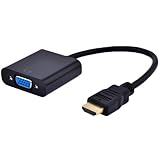 0
0 -
I dont realy want to mess with the computer. Would have to pay someone.
Frugal - your picture has one lead out of it. Mine has two.... ?
I assume with the two that one is for audio and one is for visual - yes ? At £9 this seems the answer I think. Plug one in a USB slot and one in an HDMI slot.
CAN it really be that simple and just work ??!0 -
frugal's pic - you would have a VGA lead from the computer to that, then plug that HDMI into the TV. That would get you PICTURE, but not SOUND.
Does your TV not have DVI? Big white rectangle?
Easy to convert VGA to DVI, and there should then be a 3.5mm input beside it to receive the sound.
Also, before you waste any money, does your PC's video card support 1920x1080 or 720 by whatever? You could end up with a distorted image or 'letterbox'.0






This discussion has been closed.
Confirm your email address to Create Threads and Reply

Categories
- All Categories
- 355.8K Banking & Borrowing
- 254.9K Reduce Debt & Boost Income
- 456.1K Spending & Discounts
- 248.3K Work, Benefits & Business
- 605.9K Mortgages, Homes & Bills
- 179K Life & Family
- 263.7K Travel & Transport
- 1.5M Hobbies & Leisure
- 16.2K Discuss & Feedback
- 37.7K Read-Only Boards