We’d like to remind Forumites to please avoid political debate on the Forum.
This is to keep it a safe and useful space for MoneySaving discussions. Threads that are – or become – political in nature may be removed in line with the Forum’s rules. Thank you for your understanding.
📨 Have you signed up to the Forum's new Email Digest yet? Get a selection of trending threads sent straight to your inbox daily, weekly or monthly!
The Forum now has a brand new text editor, adding a bunch of handy features to use when creating posts. Read more in our how-to guide
to Mac or not
Comments
-
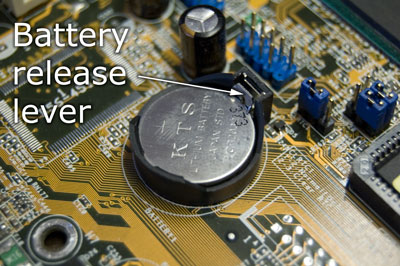
The certificate errors you are getting are due to having a dead cmos battery, for a pound or less you could cure it without resorting to a new pc. Takes a couple of minutes to fit - google.
Or, you could just correct the date and time manually each time, or tell the machine to sync the time at login.Don't you dare criticise what you cannot understand0 -
Highly likely that a USB-parallel interface could be acquired; I have a USB-Serial one which I use on my Mac.securityguy wrote: »VMWare runs Windows 95 quite happily as a virtual machine, although you might have some entertainment getting a parallel port rigged to your modern host system.0 -
You could use a VM (Virtual Machine), rather than a separate partition.That's encouraging! I'm not having any of OP's problems running XP on my 10yr old Dell Dimension 3000, but have in mind a change - for Windows 10 perhaps - or I may be tempted by a Mac Mini.
I've also still been running a Windows 95 machine with a scanner - which I don't need any more - but a superb Minolta-QMS Pagepro 1200W mono laser printer which I would hate to throw out! Perhaps I could install a W95 partition? I never got round to seeing if I could run it on XP!
My other problem might be how to run Lotus123 for my many spreadsheets. I've tried others but much prefer it.
I have VMware Fusion on my Mac, which is a commercial product; an alternative is Parallels, but I chose VMware for compatibility with Windows and Linux hosts.
There's a free virtualisation option, Oracle VirtualBox, which isn't quite as good at Fusion but is free!
All of these virtualisation platforms work in the same way; there is a piece of software which, along with the CPU's VM support features, pretend to be a standalone computer (even with a BIOS!); all you do is give it a name, create a 60 GB (or whatever size is appropriate) file which will pretend to be its system disk, and then you boot it and install Windows/Linux/Unix as if it were a standalone machine; the only difference is it runs inside a window on your "host" computer.
I've got a Windows 7 one on my Mac, which has MS Office Pro, Visio, Project and Outlook on i, which operates just fine. Since it is the Intel processor which is supporting the VM, performance is perfectly acceptable.
You can run multiple VMs at the same time; the most obvious limiting factor is the amount of memory your "host" computer has; if each "guest" VM takes 1 GB, then you just have to add up the numbers to see what your machine can take.
My Mac mini has 16 GB, which I upgraded, easily and cheaply. One or two posters here have poo-poohed the idea of upgrading, but it is a great way of extending the life of a computer, and the current base model is 4 GB non-upgradeable, which makes it a dead-end product - I would hazard a guess that OS X will be specifying 8 GB in 5 years time.0 -
I put a Crucial SSD into my Mac mini, and the only noticeable effect was that my machine got a heck of a lot faster.Ok, how many different brands of internal Hard Drives can I buy for the Imac mini? Which external driver should I go for..The WD passport Ultra, or the Samsung D3 Station....?
How is it with Android, will it still interact with my phone, My music? My Chromecast? Am I safe in the knowledge, that I can still choose the cheaper alternative hardware to Apple branded?
I would expect any brand of external USB drive to work. There are some which say they are for the Mac, but all that means is that they are pre-formatted. I use a selection of external USB hard disks and memory sticks with my Mac. I have encountered one issue, with an older one, which I think draws too much power from my Mac mini's USB; it's an old 40 GB IDE drive, so not a major issue.
I also have a WD MyCloud drive, which my Mac can access over my Wi-Fi, so that's fine too.
The truth is that the underlying hardware architecture of an Intel Mac PC is remarkably similar to an IBM compatible PC from any known brand.0 -
I used to have one of the original iMacs (around 2001). The hard drive failed after 3 years. Not impressed. I also found iPods failed quickly. I know this is a long time ago, but it has left me with the impression that you are not getting what you pay for.
The most frustrating thing for me though, after using Windows for nearly 20 years, is the lack of the right hand mouse button and the lack of keyboard shortcuts. I really struggle when I try to use a Mac.
Finally, price. You can get a 17" laptop with a full size keyboard cheaper than a smaller less powerful Mac.
You really are paying for the name IMO, and if you are used to a Windows PC then stick to it.
For an older person who has never used a computer before, and is looking for their first machine, then a Mac might be appropriate for ease of use, when you don't have to unlearn all you have learned on Windows.0 -
The truth is that the underlying hardware architecture of an Intel Mac PC is remarkably similar to an IBM compatible PC from any known brand.
True. Macs lost their competitive edge for graphic designers etc when Motorola stopped investing in faster chips that could outpace Intel, and Adobe introduced Windows software that worked just as well as on the Mac platform with true compatibility.
Apple are trading on their reputation, nothing else.0 -
The most frustrating thing for me though, after using Windows for nearly 20 years, is the lack of the right hand mouse button and the lack of keyboard shortcuts.
Apple haven't had a single-button mouse interface for a decade or more. All the mice have at least one, if not more, extra gestures and the trackpads on the laptops respond to clicks to the left and right as well as all the usual multi-touch stuff.
There are keyboard shortcuts in just the same profusion as one Windows. Want to cut with Ctrl-C and paste with Ctrl-V? That'll be Cmd-C and Cmd-V, then.
These are all pre-OSX claims.0 -
Highly likely that a USB-parallel interface could be acquired; I have a USB-Serial one which I use on my Mac.
The problem would be presenting it to the Windows 95 VM. The W95 VM won't understand the USB (so you can't just plumb the device straight through) and the parallel interface may not have Mac drivers because Macs never really had parallel ports so there's little market for it. I don't say it's impossible, but it's equally not plug and play.0 -
Not quite true...True. Macs lost their competitive edge for graphic designers etc when Motorola stopped investing in faster chips that could outpace Intel, and Adobe introduced Windows software that worked just as well as on the Mac platform with true compatibility.
Apple are trading on their reputation, nothing else.
If you are only interested in the CPU horsepower, then maybe you have a point.
But there is a bit more to Apple's products than just the bogomips.
I would say that there is not another brand whose product styling matches Apple's.
And the design and manufacturing of the products exceed any other brand's too, for instance the unibody laptops, and the Mac mini. As for the Mac Pro, none of the other mainstream companies are even capable of thinking of something like that.
Beyond that, consider the displays; 2880x1800 resolution on a 15" laptop is twice the detail of a 1080p HDTV, and most Wintel laptops don't even have 1080p.
Then you've got the OS, which is free and has free version updates.
The old "I can buy a PC for half the price of a Mac" routine really doesn't stand up to scrutiny.
In the end, you pays your money and you takes your choice; I've got Mac and Windows (and Linux) PCs; each has their place, and I can appreciate the differences between them.0 -
Why won't Windows 95 understand USB?securityguy wrote: »The problem would be presenting it to the Windows 95 VM. The W95 VM won't understand the USB (so you can't just plumb the device straight through) and the parallel interface may not have Mac drivers because Macs never really had parallel ports so there's little market for it. I don't say it's impossible, but it's equally not plug and play.
You wouldn't need Mac drivers - you simply allow the USB port to be attached to the Windows VM.
Of course, though, the Windows would need a driver for the device.
I haven't needed to try it with Windows 95, but I do have XP running with drivers for an old Canon USB scanner, and for a USB serial adapter (as I mentioned).
So what would be needed would be a Windows 95 compatible USB-parallel adapter.0







This discussion has been closed.
Confirm your email address to Create Threads and Reply

Categories
- All Categories
- 353.5K Banking & Borrowing
- 254.2K Reduce Debt & Boost Income
- 455.1K Spending & Discounts
- 246.6K Work, Benefits & Business
- 603K Mortgages, Homes & Bills
- 178.1K Life & Family
- 260.6K Travel & Transport
- 1.5M Hobbies & Leisure
- 16K Discuss & Feedback
- 37.7K Read-Only Boards