We’d like to remind Forumites to please avoid political debate on the Forum.
This is to keep it a safe and useful space for MoneySaving discussions. Threads that are – or become – political in nature may be removed in line with the Forum’s rules. Thank you for your understanding.
📨 Have you signed up to the Forum's new Email Digest yet? Get a selection of trending threads sent straight to your inbox daily, weekly or monthly!
The Forum now has a brand new text editor, adding a bunch of handy features to use when creating posts. Read more in our how-to guide
Phone Battery running down - something updating and running down?

waterwatereverywhere
Posts: 456 Forumite
in Techie Stuff
Hi
I have a Samsung Galaxy SII.
Recently I've found the battery keeps running right down and I've noticed that there is a symbol on the phone - it's a sort of circle with arrows, the kind you get when an App is updating. (Usually an App updates and then the circle disappears).
It is like something is updating for several hours and running the battery down.
Also the Wi-Fi keeps switching on by itself and sometimes is difficult to switch off.
How can I find out which of the Apps on my phone (or something else?) is causing this so I can disable or remove it?
Many thx for any advice.
I have a Samsung Galaxy SII.
Recently I've found the battery keeps running right down and I've noticed that there is a symbol on the phone - it's a sort of circle with arrows, the kind you get when an App is updating. (Usually an App updates and then the circle disappears).
It is like something is updating for several hours and running the battery down.
Also the Wi-Fi keeps switching on by itself and sometimes is difficult to switch off.
How can I find out which of the Apps on my phone (or something else?) is causing this so I can disable or remove it?
Many thx for any advice.
0
Comments
-
Have you got sync/auto sync turned on? Sounds like the same symbol on mine, although it is an LG it is Android.
To see which apps are using battery, on mine I go to Settings>General>Battery and click on where it says battery % and expected time to use.0 -
Go into the battery options and see whats used the most battery life?Censorship Reigns Supreme in Troll City...0
-
Uninstall Google Play Services, reboot phone, re-install Play Services from scratch, reboot phone.Q: What kind of discussions aren't allowed?
A: It goes without saying that this site's about MoneySaving.
Q: Why are some Board Guides sometimes unpleasant?
A: We very much hope this isn't the case. But if it is, please make sure you report this, as you would any other forum user's posts, to forumteam@moneysavingexpert.com.0 -
Easier said than done without root access or some other trickery.PenguinJim wrote: »Uninstall Google Play Services, reboot phone, re-install Play Services from scratch, reboot phone.0 -
?
Just go into the App Manager and uninstall the updates for the Google Play services, restart, let them update, restart.
Edit: like this: http://i.imgur.com/WMUUpaN.jpg
Trickery. Q: What kind of discussions aren't allowed?
A: It goes without saying that this site's about MoneySaving.
Q: Why are some Board Guides sometimes unpleasant?
A: We very much hope this isn't the case. But if it is, please make sure you report this, as you would any other forum user's posts, to forumteam@moneysavingexpert.com.0 -
Uninstall, even stop service is greyed out, as I'm sure it will be for many with unrooted phones. Stock HTC One M8 here but as I said, likely the same on most phones that haven't got root access.PenguinJim wrote: »?
Just go into the App Manager and uninstall the updates for the Google Play services, restart, let them update, restart.0 -
Are you looking at "Google Services" by any chance? Q: What kind of discussions aren't allowed?
A: It goes without saying that this site's about MoneySaving.
Q: Why are some Board Guides sometimes unpleasant?
A: We very much hope this isn't the case. But if it is, please make sure you report this, as you would any other forum user's posts, to forumteam@moneysavingexpert.com.0 -
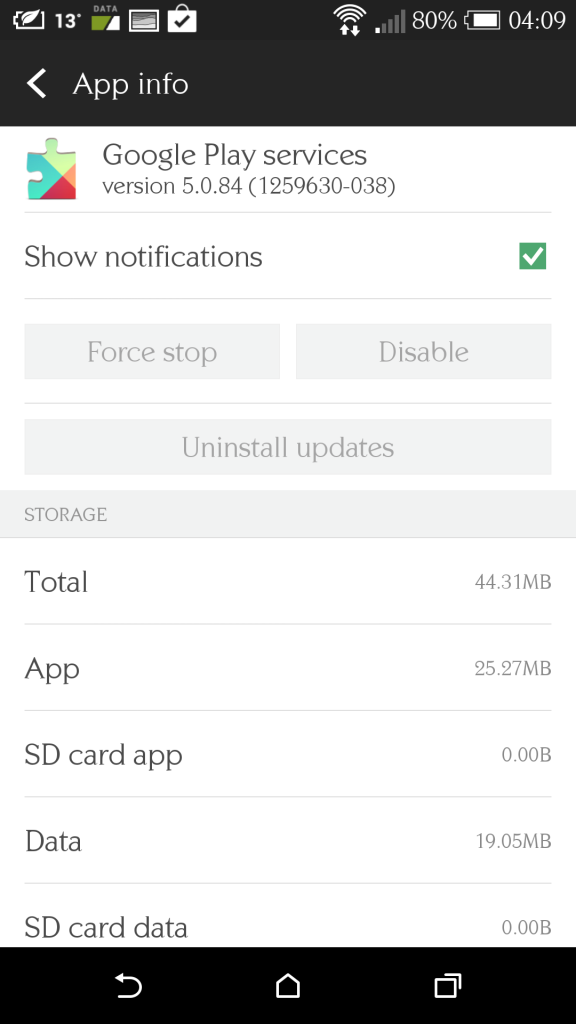 0
0 -
Wow, I'll be avoiding the M8. But I take your point that the limitations of a One M8 running Android 4.4 may also apply to a Samsung SII running 4.2.Q: What kind of discussions aren't allowed?
A: It goes without saying that this site's about MoneySaving.
Q: Why are some Board Guides sometimes unpleasant?
A: We very much hope this isn't the case. But if it is, please make sure you report this, as you would any other forum user's posts, to forumteam@moneysavingexpert.com.0 -
And any other phone that's not rooted. I could of course root this and even change ROM, I have the technical knowledge to do so and have done with previous phones including Samsung Galaxy 3, HTC Desire, Orange San Francisco etc etc. I chose not to on this device (so far) but I think uninstalling Google Play services is generally not doable if you're not into the more technical side of messing with phones. Good idea I guess, but likely not the problem and a lot of work for the uninitiated to try.PenguinJim wrote: »Wow, I'll be avoiding the M8. But I take your point that the limitations of a One M8 running Android 4.4 may also apply to a Samsung SII running 4.2.
EDIT: Son's just tried the same on his Galaxy S5 - greyed out also but again, not rooted. Looking at your pictures suggests a much older version of Android / phone.0






This discussion has been closed.
Confirm your email address to Create Threads and Reply

Categories
- All Categories
- 353.5K Banking & Borrowing
- 254.1K Reduce Debt & Boost Income
- 455K Spending & Discounts
- 246.5K Work, Benefits & Business
- 602.9K Mortgages, Homes & Bills
- 178K Life & Family
- 260.5K Travel & Transport
- 1.5M Hobbies & Leisure
- 16K Discuss & Feedback
- 37.7K Read-Only Boards