We’d like to remind Forumites to please avoid political debate on the Forum.
This is to keep it a safe and useful space for MoneySaving discussions. Threads that are – or become – political in nature may be removed in line with the Forum’s rules. Thank you for your understanding.
📨 Have you signed up to the Forum's new Email Digest yet? Get a selection of trending threads sent straight to your inbox daily, weekly or monthly!
The Forum now has a brand new text editor, adding a bunch of handy features to use when creating posts. Read more in our how-to guide
laptop temperatures
Comments
-
Thanks everyone
Closed- Sorry I do not understand
If temperatures are cool, isn't that good? Even though the temps are okay (or cool?) is it still advisable to use a power saving or reduce processor to 90%those temperatures are cool, use a power saving power plan (or reduce your maximum processor state to 90% and use passive cooling(system cooling policy)) and scan with malwarebytes
try it without the battery in and check for bios updates if it continues
Would scanning with Malwarebites help with system cooling. I regulary scan with Malwarebites. I can only think that if it had some rogue (malware) programs running all the time that might cause processor to 'run' more than normal.
Try what without the battery? I guess you mean use the laptop without the battery (on mains) . Same with Bios-to see if any updates will aid cooling?
Sorry for being so dumb, but I get the general feeling that the temps are okay, although maybe the fan is working overtime to achieve this.0 -
Have a look here, at the section titled "Removing the Thermal Module". I must admit, it looks tedious to do!
If you want to download the PDF file and open it with an external application, such as Foxit Reader, then here you go: http://www.datafilehost.com/d/52cf0449.0 -
I was trying to cover all bases.
Temperatures are cool, probably because your fan is going like mad (common on acers anyway).
If you let the processor continually step up to 100%, it can cause the machine to get hotter than it needs to and cause the fan to be ramping up and down continuously - simple cure is to turn on power saving or limit the processor max in advanced power settings and turn on passive cooling - this is normal on battery power, but not on mains.
Bad software/browser plugs, AV bloat, and crap websites can cause heavy cpu usage, and therefore heat, hence the malwarebytes suggestion.
Try without the battery is to cover faulty or old batteries, which can get very hot when charging.
Bios updates are to make sure there isn't an update relating to system cooling available.
I can't hear or feel the blow of my fan, similar temps, similar processor, no cooling mat.
Sat looking at mse, the processor maxes out at 3%, and is usually on 0%, whats yours? (task manager, performance)!!
> . !!!! ----> .0 -
Poppellerant. Thanks for that. Downloaded and saved.
Closed - thanks for explanation. While just on internet now, processor performance mainly from 0 to 3 (85 processes running) with spikes up to 15% every 10 to 15 seconds but has run up to 30%. 7 tabs in use in internet explorer. 2.69GB of memory used.0 -
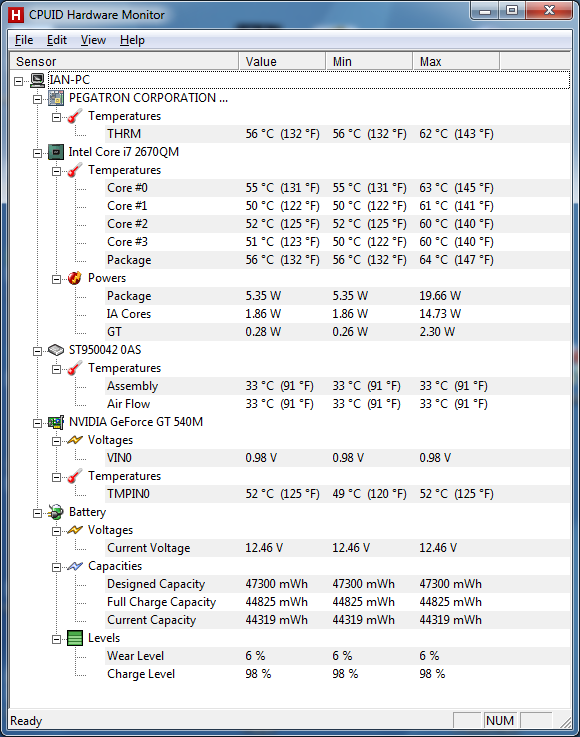
Just for comparison, here is my CPUID HW Monitor display whilst simply browsing. (I got this laptop in January 2012).
 0
0 -
Thanks to all. Not too worried about my temps now but will try and clean the dust out.
BOD1467 thanks for the image (would post mine but don't know how to do it). My temps seem slightly lower than yours so, as above, not too worried.0









This discussion has been closed.
Confirm your email address to Create Threads and Reply

Categories
- All Categories
- 353.7K Banking & Borrowing
- 254.2K Reduce Debt & Boost Income
- 455.1K Spending & Discounts
- 246.8K Work, Benefits & Business
- 603.3K Mortgages, Homes & Bills
- 178.2K Life & Family
- 260.8K Travel & Transport
- 1.5M Hobbies & Leisure
- 16K Discuss & Feedback
- 37.7K Read-Only Boards