We’d like to remind Forumites to please avoid political debate on the Forum.
This is to keep it a safe and useful space for MoneySaving discussions. Threads that are – or become – political in nature may be removed in line with the Forum’s rules. Thank you for your understanding.
📨 Have you signed up to the Forum's new Email Digest yet? Get a selection of trending threads sent straight to your inbox daily, weekly or monthly!
The Forum now has a brand new text editor, adding a bunch of handy features to use when creating posts. Read more in our how-to guide
laptop temperatures

northernsoul
Posts: 232 Forumite




in Techie Stuff
Hi
I have got a Acer Aspire 8943G laptop with 18 inch screen. I think my fan is working harder and louder. I have got a program that measures temperature called CPUID Hardware monitor.
What are 'reasonable' temperatures for the laptop to reach? My readings are as follows. I only have been browsing on and off during the last 2 hours and been charging for the last hour. The temperature is 19C in the house at the moment
THRM (whatever that is) 43C
Intel core i5 450M core 0 44C
core 2 38C
WDC WD50 assembly 35C
Battery 47C
On another note I notice battery wear rate is 15%. My laptop was a refurbished one bought about 3 years ago with medium use (no games played). Is this normal
Thanks
I have got a Acer Aspire 8943G laptop with 18 inch screen. I think my fan is working harder and louder. I have got a program that measures temperature called CPUID Hardware monitor.
What are 'reasonable' temperatures for the laptop to reach? My readings are as follows. I only have been browsing on and off during the last 2 hours and been charging for the last hour. The temperature is 19C in the house at the moment
THRM (whatever that is) 43C
Intel core i5 450M core 0 44C
core 2 38C
WDC WD50 assembly 35C
Battery 47C
On another note I notice battery wear rate is 15%. My laptop was a refurbished one bought about 3 years ago with medium use (no games played). Is this normal
Thanks
0
Comments
-
Laptops are renowned for the heatsinks getting clogged up with dust/debris. This restricts airflow so the fan has to work harder to expel the heat generated.
How easy is it to remove the bottom cover on your laptop? If you do so, can you see the heatsink and fan? If yes then cleaning it out should be fairly easy.
To give you an idea, below is what mine looks like when I remove the bottom cover.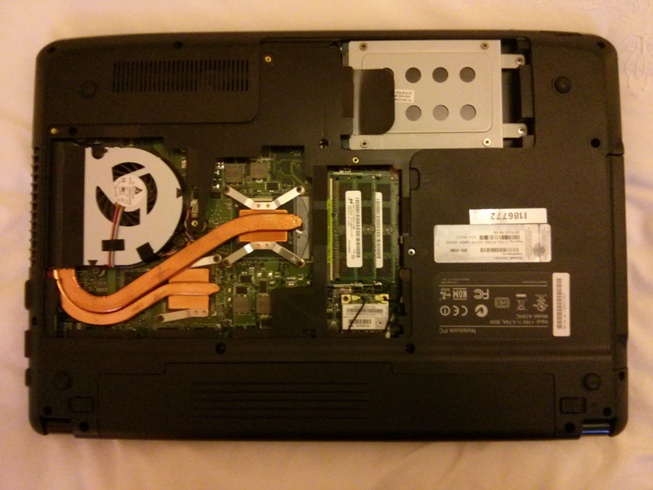
There are 3 screws holding the fan. Removing them (and unplugging the lead) allows the fan to be removed to allow access to the heatsink. This can then be cleaned of dust and so allow improved airflow.0 -
Will look into that. thanks0
-
Grab yourself a £1 laptop stand (from the poundshop).. it does wonders for CPU temperatures. It even has a USB-powered fan built in.0
-
To be honest those temperature readings are pretty average. I wouldn't worry about them. My laptop runs at about 55 and had no problems. Avoid using it on a duvet/thick carpet etc as this blocks air flow.11K Challenge
5,785/11k 0
0 -
Thanks to everyone. I use it on a laptop stand (no fan) but its a problem persuading everyone to use it, especially when upstairs in bed0
-
Mine (an early top-end i7 desktop processor laptop) is too hot to touch for long in one corner - 'mobile' processors run slower and cooler, but some cheaper (or leading-edge) machines use desktop processors which give more grunt, but create more heat.0
-
The laptop in the photo above has the following:
CPU:Intel® Core™ i7-2670QM Mobile Processor 2.20 GHz 6M Intel Smart Cache, Max Turbo Freq. 3.10 GHz
I don't know what temperatures it is running, but the air coming out of the side vent can be quite toasty when I'm gaming. 0
0 -
those temperatures are cool, use a power saving power plan (or reduce your maximum processor state to 90% and use passive cooling(system cooling policy)) and scan with malwarebytes
try it without the battery in and check for bios updates if it continues
cooling pads and laptop stands should never be required, and, if the outlet is underneath the laptop, can make things worse!!
> . !!!! ----> .0 -
northernsoul wrote: »Thanks to everyone. I use it on a laptop stand (no fan) but its a problem persuading everyone to use it, especially when upstairs in bed
I don't know if you can still buy them, but I have a slim cooling pad, with two fans (works on USB), which goes under the laptop. They used to be about £20.0


This discussion has been closed.
Confirm your email address to Create Threads and Reply

Categories
- All Categories
- 353.7K Banking & Borrowing
- 254.2K Reduce Debt & Boost Income
- 455.1K Spending & Discounts
- 246.8K Work, Benefits & Business
- 603.3K Mortgages, Homes & Bills
- 178.2K Life & Family
- 260.8K Travel & Transport
- 1.5M Hobbies & Leisure
- 16K Discuss & Feedback
- 37.7K Read-Only Boards