We’d like to remind Forumites to please avoid political debate on the Forum.
This is to keep it a safe and useful space for MoneySaving discussions. Threads that are – or become – political in nature may be removed in line with the Forum’s rules. Thank you for your understanding.
📨 Have you signed up to the Forum's new Email Digest yet? Get a selection of trending threads sent straight to your inbox daily, weekly or monthly!
The Forum now has a brand new text editor, adding a bunch of handy features to use when creating posts. Read more in our how-to guide
firefox 23

peter_the_piper
Posts: 30,269 Forumite



in Techie Stuff
OH is haveing problems with the initial page that opens on running, it always defaults to Mozilla/Google.
I have removed all unwanted pages which run on startup using Ccleaner. I have put BBC into the startup box in tools and also ticked the "use last page for startup" and then closed down firefox. Still the mozilla page comes up.
It all started when there was an update from 22 came out and installed Superantispyware installed.
Can't think what else to do, its not a bad problem but just a b nuisance.
Any help much appreciated.
I have removed all unwanted pages which run on startup using Ccleaner. I have put BBC into the startup box in tools and also ticked the "use last page for startup" and then closed down firefox. Still the mozilla page comes up.
It all started when there was an update from 22 came out and installed Superantispyware installed.
Can't think what else to do, its not a bad problem but just a b nuisance.
Any help much appreciated.
I'd rather be an Optimist and be proved wrong than a Pessimist and be proved right.
0
Comments
-
Have you changed the favourites page to whatever you want it as that what got be changed0
-
Yep, typed in BBC.co.uk, page came up. Close browser and reopen and back to Mozilla again.I'd rather be an Optimist and be proved wrong than a Pessimist and be proved right.0
-
So what did you do (to the FF config/settings) between "page came up" and "closed the browser"? If you changed none of the settings then you didn't change the home page, so it's no surprise the Mozilla page came back.0
-
Tools/Options/General,
When Firefox starts = 'Show my home page' (using dropdown arrow)
Home Page = www.bbc.co.uk (or whatever)
SuperAntiSpyware also has (used to) have a 'Protect Home Page' element, but IIRC, that used to give a prompt if a change to home page was being attempted.
Check this via options, can't remember exact method.Move along, nothing to see.0 -
Just waiting for OH to stop using lappy but I think its the Superantispyware is the cause. Thanks, I'll be back if its not.I'd rather be an Optimist and be proved wrong than a Pessimist and be proved right.0
-
Update to 23.0.1 first via Help -> About...0
-
Change the homepage to whatever you want it to come back up with when you close firefox, typically it will not load the pages you had if you simply close it.
But there is an option:
Go to tools
Then general
Then click the drop down menu
Then choose the bottom option, there are only three so you can't screw that up lol
Here is a picture of what you should press
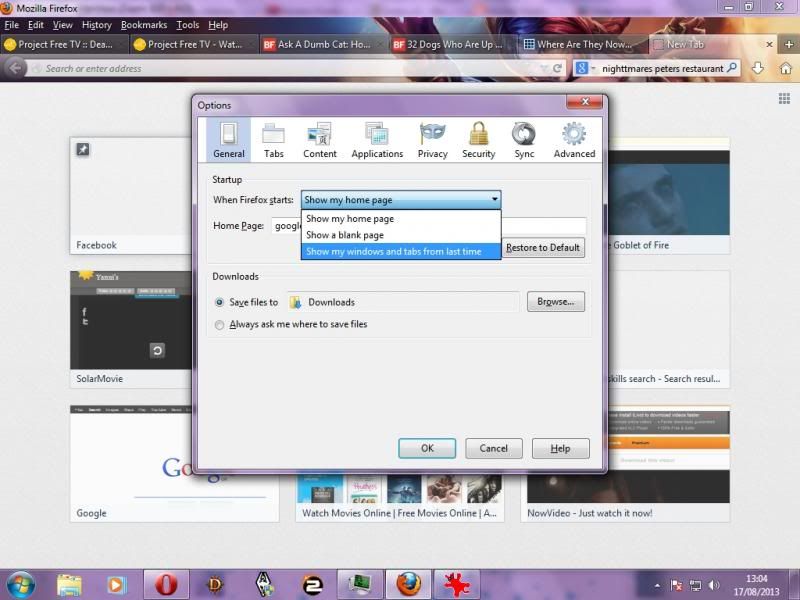
If that does not work I do not know what else to suggest, I have no add-ons and if it doesn't work for me then it is clearly broken.
It has been a problem for a very long time and one that seems never to be fixed."Don't blink. Blink and you're dead. They are fast. Faster than you can believe. Don't turn your back. Don't look away. And don't blink. Good Luck" - The Doctor.0 -
done that, and the superantispyware bit does not work either. We restarted the lappy just in case it needed this for the updates to work (clutching at straws. )Change the homepage to whatever you want it to come back up with when you close firefox, typically it will not load the pages you had if you simply close it.
But there is an option:
Go to tools
Then general
Then click the drop down menu
Then choose the bottom option, there are only three so you can't screw that up lol
Here is a picture of what you should press
If that does not work I do not know what else to suggest, I have no add-ons and if it doesn't work for me then it is clearly broken.
It has been a problem for a very long time and one that seems never to be fixed.I'd rather be an Optimist and be proved wrong than a Pessimist and be proved right.0 -
-
Okay, I got it to work by turning off every single plug-in that i didn't even know that I had such as VLC plugin and flash ones (I so rarely use firefox that I do not even remember installing them) and then that worked.
Then I brought plug ins back one by one to find out which was causing the problem and decided that it was not worth it.
Just out of curiosity how many plug ins are you running?"Don't blink. Blink and you're dead. They are fast. Faster than you can believe. Don't turn your back. Don't look away. And don't blink. Good Luck" - The Doctor.0



This discussion has been closed.
Confirm your email address to Create Threads and Reply

Categories
- All Categories
- 353.5K Banking & Borrowing
- 254.1K Reduce Debt & Boost Income
- 455K Spending & Discounts
- 246.6K Work, Benefits & Business
- 602.9K Mortgages, Homes & Bills
- 178.1K Life & Family
- 260.6K Travel & Transport
- 1.5M Hobbies & Leisure
- 16K Discuss & Feedback
- 37.7K Read-Only Boards