📨 Have you signed up to the Forum's new Email Digest yet? Get a selection of trending threads sent straight to your inbox daily, weekly or monthly!
Security on 3 different computers

belfastgal
Posts: 594 Forumite
in Techie Stuff
How do i make our two laptops secure ? we have a desktop in the living room which is secure ( the friend who set it up told us ) and we run the 2 laptops from a linksey wireless router. I have told daughter never to use online banking on her laptop and not to order anything with her credit card either. how do i make the laptops secure and can i check what security i have on the main computer ?
i am not very technical minded so in easy to understand terms please.
i am not very technical minded so in easy to understand terms please.
0
Comments
-
is your wireless router encrypted?Ever get the feeling you are wasting your time? :rolleyes:0
-
Sorryalbertross wrote: »is your wireless router encrypted?
I dont know what that means ? how could i find out ?0 -
Right click the wireless icon

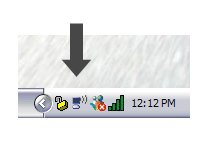
View available wireless networks
what does it say next to your network, which is presumably called linksys?Ever get the feeling you are wasting your time? :rolleyes:0 -
if you click on the wireless icon on your toolbar, bottom right of the screen, there will be a list of networks, yours will show connected and should have a padlock on it
 Ex forum ambassador
Long term forum member0 -
or possibly something like this if the suppliers software does the connection, it should not say NONE
 Ex forum ambassador
Long term forum member0 -
-
Linksys administration page type 192.168.1.1 into internet explorer
when the page comes up the user id and password are both admin
you need to go to this screen
and tick the wep box , nothing else on that page needs to be changedEx forum ambassador
Long term forum member0 -
Click WEP Key Setting
Set the pull-down to 128bit, enter any random string as password, click Generate to make a 128bit key.
Write down the 26 digits of the generated Key:. (If you lose the key, you can still admin your LinkSys with a wired Ethernet connection to get it again. and there's always the reset button on the back.)
Click Apply.Ex forum ambassador
Long term forum member0 -
next time the laptop or any other wireless device try to connect they will ask for that key
just enter it into the box and it should connectEx forum ambassador
Long term forum member0 -





This discussion has been closed.
Confirm your email address to Create Threads and Reply

Categories
- All Categories
- 355.8K Banking & Borrowing
- 254.9K Reduce Debt & Boost Income
- 456.2K Spending & Discounts
- 248.4K Work, Benefits & Business
- 606K Mortgages, Homes & Bills
- 179K Life & Family
- 263.8K Travel & Transport
- 1.5M Hobbies & Leisure
- 16.2K Discuss & Feedback
- 37.7K Read-Only Boards