We’d like to remind Forumites to please avoid political debate on the Forum.
This is to keep it a safe and useful space for MoneySaving discussions. Threads that are – or become – political in nature may be removed in line with the Forum’s rules. Thank you for your understanding.
📨 Have you signed up to the Forum's new Email Digest yet? Get a selection of trending threads sent straight to your inbox daily, weekly or monthly!
The Forum now has a brand new text editor, adding a bunch of handy features to use when creating posts. Read more in our how-to guide
Laptop showing a blue screen and wont load windows - please help

alisoncol
Posts: 6 Forumite
in Techie Stuff
My daughter's Sony Vaio laptop decided yesterday to start showing a blue screen, the recovery option does not seem to work? Any help appreciated.
It is running Windows 7 - she thinks it went wrong after plugging in her ipod lead (which she has used before)
It is running Windows 7 - she thinks it went wrong after plugging in her ipod lead (which she has used before)
0
Comments
-
First off try starting with nothing else connected - usb stuff, cd/dvd etc and see if it helps.
After that try safe mode (F8 on boot) and see if it will boot there - if it can you may be able to do a system restore to a couple of days ago.0 -
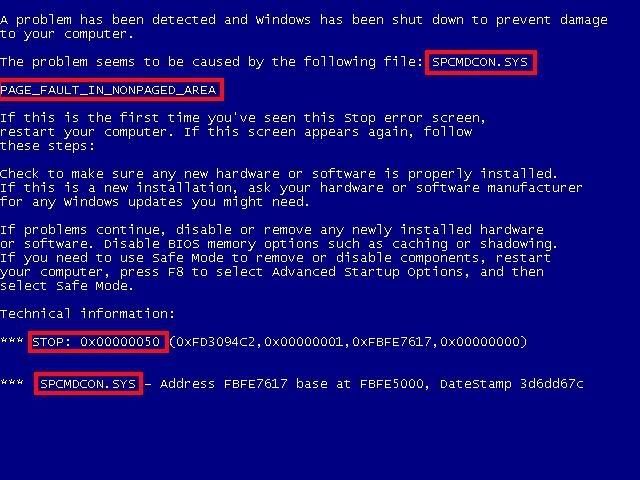
What does the blue screen say?
Even the meaningless numbers might be meaningful to someone 0
0 -
Like this:
 0
0 -
Thank you guys for your replies, i will try this and see if i get anywhere if not will try to capture the numbers that come up. 0
-
There doesnt seem to be any message as such when you launch windows - the only number i could see as it flashed before my eyes was the 3 red box you had on your blue page with the number 50 on the end, there didn't seem to be any error message as such.
When we tried to startup repair - it advises it cannot repair the computer and there is a problem detail option this shows:
Startuprepair offline
6.1.7600.16385
6.1.7600.16385
unknown
21200716
autofailover
10
0x50
6.1.7600.2.0.0.256.1
2057
the above had problem signature next to them.
The next page it says:
If you have recently attached a device to this computer, such as a camera or portable music player, remove it and restart your computer. If you continue to see this message, contact your system administrator or computer manufacturer for assistance.
On the diagnosis and repair details it shows a number of tests performed and states startup repair has tried several times but still cannot determine the cause of the problem.
Any suggestions?0 -
When my laptop got the blue screen of death I was at my wits end until an IT man suggested I try taking out the battery and putting it back in. It worked!
I have no idea if it would work in your case, or even be a good idea, because I don't know if you're having the same problem or seeing the same type of "blue screen."0 -
Continually tap f8 at start up and when you reach the Windows Advanced boot options window, choose the option that says "Disable automatic restart on system failure" That'll give you more time to read the Blue screen error.0
-
hi, found some help on sony vaio website, it said to tap f10 several times and run the sony hardware diagnositc tests which i am doing now but not sure how long will take on 86% now.0
-
Well the test completed and showed up this error message:
Surface Scan Test did not pass = (E-HDD-004)
Errors were detected on this pc
Would you guys recomend i do a complete system recovery?0 -
The error message suggests that your hard drive is failing, and will probably need replacing - and the OS reinstalling (did you make a recovery DVD). If you just do a system restore, you may get it started now, but you are likely to be in the same situation again before long.
The first thing to consider is if you have any important data on the current disk - documents, music, photo's, email etc that aren't backed up elsewhere. There is a chance (not a certainty) that some things could still be recovered.
Secondly, how old is the laptop - is it still under warranty.0


This discussion has been closed.
Confirm your email address to Create Threads and Reply

Categories
- All Categories
- 354.2K Banking & Borrowing
- 254.3K Reduce Debt & Boost Income
- 455.3K Spending & Discounts
- 247.2K Work, Benefits & Business
- 603.8K Mortgages, Homes & Bills
- 178.4K Life & Family
- 261.3K Travel & Transport
- 1.5M Hobbies & Leisure
- 16.1K Discuss & Feedback
- 37.7K Read-Only Boards