We’d like to remind Forumites to please avoid political debate on the Forum.
This is to keep it a safe and useful space for MoneySaving discussions. Threads that are – or become – political in nature may be removed in line with the Forum’s rules. Thank you for your understanding.
📨 Have you signed up to the Forum's new Email Digest yet? Get a selection of trending threads sent straight to your inbox daily, weekly or monthly!
The Forum now has a brand new text editor, adding a bunch of handy features to use when creating posts. Read more in our how-to guide
What processor???

Insane_Drifter
Posts: 465 Forumite
in Techie Stuff
Hiya i have been told my cpu isn't much good as 801mhz if i need to change it how do i find out what i do need???:(
0
Comments
-
If it's suited to you then its fine. If the PC is running slow then an upgrade might be an option.
If it is a 800MhZ processor then it has to be around 10-15 years old! I suspect you would need a new build rather than upgrading just the processor.0 -
Cut down what's running instead.!!
> . !!!! ----> .0 -
My original processor died and pc was taken to a proper pc repair shop where my partner was told they had put a 2.8 in but very obviously not the case. Pc is about 5 years old.0
-
A good starting point would be to download and run CPUID's PC Wizard. It should give you a lot of informations about your present CPU and the motherboard itself.
You can then do a bit more research to find out how fast a CPU the motherboard will take. Be aware that it can be complex, as both Intel and AMD CPUs come in ~many~ different incompatible models.0 -
Thats great , i will give it a go
 0
0 -
Just had this come up, now i am really confused!
Processor : AMD Athlon XP-M 2800+
Frequency : 1600 MHz - (current : 801.82 MHz)
Number of Core : 10 -
Who told you, and why did the conversation come up? If it's slow, it's probably more related to ram and what you have running at startup.!!
> . !!!! ----> .0 -
Insane_Drifter wrote: »Just had this come up, now i am really confused!
Processor : AMD Athlon XP-M 2800+
Frequency : 1600 MHz - (current : 801.82 MHz)
Number of Core : 1
Some older motherboards default to a slow clock speed, just so that it will get up and running. You then need to enter the BIOS setup utility, let it detect the CPU and save the results. It should then run the CPU at full speed.0 -
- It posibly is an AMD Athlon XP-M 2800+
- It possibly is running at 800 not 2800, but that's determined by the FSB / CPU frequency, not the CPU
- It sounds like an old [ 2001-2002 ] 266MHz XP-M
So it depends on the MOBO / BIOS / FSB settingsDisclaimer : Everything I write on this forum is my opinion. I try to be an even-handed poster and accept that you at times may not agree with these opinions or how I choose to express them, this is not my problem. The Disabled : If years cannot be added to their lives, at least life can be added to their years - Alf Morris - ℜ0 -
Your processor is a mobile Athlon (Socket A). From experience, these are not always recognised by the motherboards BIOS as they are not officially meant to be used in desktop PC's. They often were used in desktops because a) they were multiplier unlocked and b) they were reputed to overclock better than the standard chips, run cooler etc. If the motherboard does not recognise the processor, they sometimes default to a low clock speed. If you want it to run at the proper speed you will have to manually change it in the BIOS setup program. Usually you get into this by pressing Delete, F1 or some other key straight after the PC switches on.
Note, these old Athlons used a "performance rating" system - i.e. an XP-M 2800+ was supposed to give equal performance to a 2800mhz Pentium IV. Its clock speed was however not 2800mhz.
The correct speed for an Athlon XP-M 2800+ (Barton core) is 2133mhz. It uses 266mhz FSB and a 16x multiplier. Core voltage 1.55-1.65v. EDIT - The FSB of 266mhz is actually 133mhz "double pumped". The "external clock" of the processor is 133mhz. Below is a screenshot of what a BIOS setup screen for setting the clock speed might look like (it varies depending on the motherboard).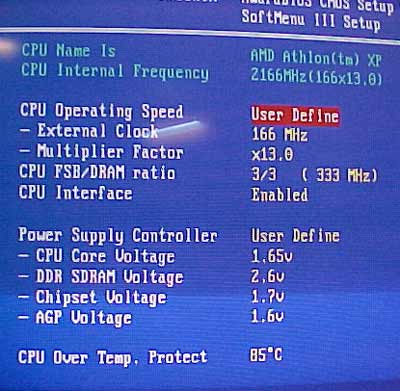 0
0





This discussion has been closed.
Confirm your email address to Create Threads and Reply

Categories
- All Categories
- 353.5K Banking & Borrowing
- 254.1K Reduce Debt & Boost Income
- 455K Spending & Discounts
- 246.5K Work, Benefits & Business
- 602.9K Mortgages, Homes & Bills
- 178K Life & Family
- 260.5K Travel & Transport
- 1.5M Hobbies & Leisure
- 16K Discuss & Feedback
- 37.7K Read-Only Boards