We’d like to remind Forumites to please avoid political debate on the Forum.
This is to keep it a safe and useful space for MoneySaving discussions. Threads that are – or become – political in nature may be removed in line with the Forum’s rules. Thank you for your understanding.
📨 Have you signed up to the Forum's new Email Digest yet? Get a selection of trending threads sent straight to your inbox daily, weekly or monthly!
The Forum now has a brand new text editor, adding a bunch of handy features to use when creating posts. Read more in our how-to guide
internal drive not showing in windows 7
Comments
-
didnt do anything for me
 0
0 -
right so i have 2 internal drives and 4 external hooked up to this PC
i have dual boot with Vista on C and W7 on H
however my H drive isnt showing in my computer
all other drives show and in disk management the H drive shows fine
probably something simple but any ideas on whats up?
check the bios settings or PLUG IT IN0 -
Read previous posts then Plug in serious suggestions.:rotfl:Its-A-New-Age-Thing wrote: »check the bios settings or PLUG IT IN4.8kWp 12x400W Longhi 9.6 kWh battery Giv-hy 5.0 Inverter, WSW facing Essex . Aint no sunshine ☀️ Octopus gas fixed dec 24 @ 5.74 tracker again+ Octopus Intelligent Flux leccy
CEC Email energyclub@moneysavingexpert.com0 -
there you go
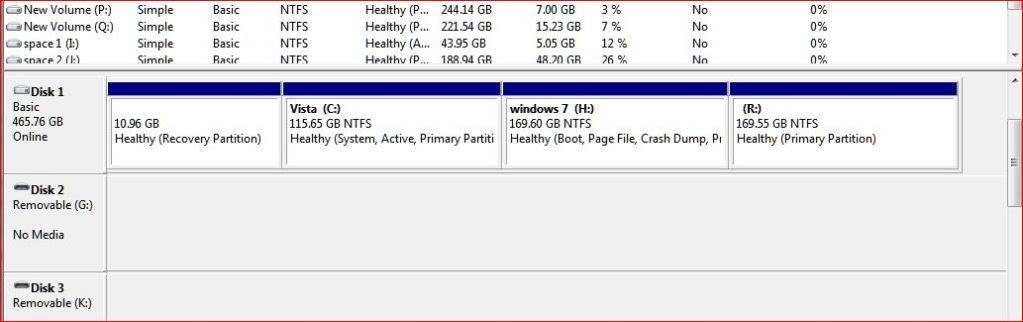
all the drives have separate drive letters C & H for boot drives,I R O P Q D J N are all storage
all drives except the H drive show in my computer so they have their letters in place
the H drive shows under vista so it hasnt changed and i am on the W7 install right now
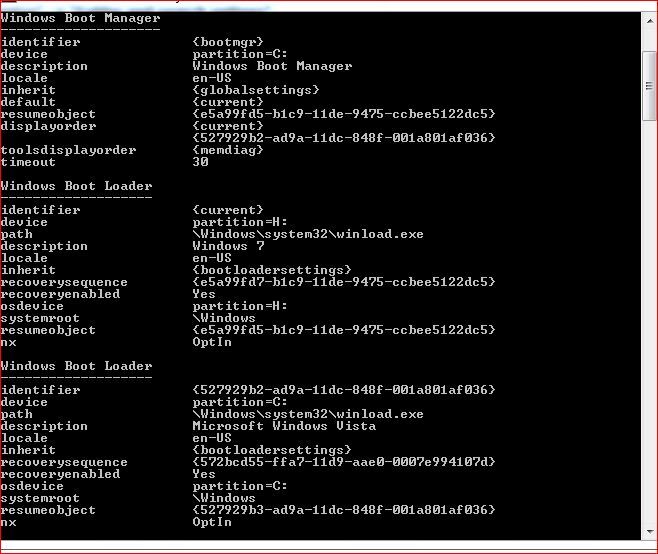
Run CMD as administrator and the enter bcdedit ... this prints out the current BCD out
Mine is like this and mine is Vista / Win 7 too
C:\Windows\system32>bcdedit
Windows Boot Manager
identifier {bootmgr}
device partition=D:
path \bootmgr
description Windows Boot Manager
locale en-US
default {current}
resumeobject {e65a2b4d-3b22-11df-bcba-806e6f6e6963}
displayorder {current}
timeout 30
Windows Boot Loader
identifier {current}
device partition=C:
path \Windows\system32\winload.exe
description Windows 7 Professional (recovered)
locale en-US
recoverysequence {b9a03e58-3b6d-11df-85d1-dd0dcbb01333}
recoveryenabled Yes
osdevice partition=C:
systemroot \Windows
resumeobject {e65a2b4d-3b22-11df-bcba-806e6f6e6963}
The osdevice bit above might give a clue, sadly I can't find the relevant article just yet and am not on my normal pc just now, if I can find it I will try what I found.4.8kWp 12x400W Longhi 9.6 kWh battery Giv-hy 5.0 Inverter, WSW facing Essex . Aint no sunshine ☀️ Octopus gas fixed dec 24 @ 5.74 tracker again+ Octopus Intelligent Flux leccy
CEC Email energyclub@moneysavingexpert.com0 -
this is what i have
 0
0 -
Can't remember what I did with mine, it was last year during the RTM release, I think I changed the letters using storage management eg changed C(Vista) to D, and then D(7) to C, but I honestly cannot remember if I used storage management or if I used neowin easybcd . Sorry I cant help further unitl I get back to my other system back, and cannot be sure if that still contains the link I used:(4.8kWp 12x400W Longhi 9.6 kWh battery Giv-hy 5.0 Inverter, WSW facing Essex . Aint no sunshine ☀️ Octopus gas fixed dec 24 @ 5.74 tracker again+ Octopus Intelligent Flux leccy
CEC Email energyclub@moneysavingexpert.com0







This discussion has been closed.
Confirm your email address to Create Threads and Reply

Categories
- All Categories
- 354.2K Banking & Borrowing
- 254.4K Reduce Debt & Boost Income
- 455.3K Spending & Discounts
- 247.2K Work, Benefits & Business
- 603.8K Mortgages, Homes & Bills
- 178.4K Life & Family
- 261.3K Travel & Transport
- 1.5M Hobbies & Leisure
- 16.1K Discuss & Feedback
- 37.7K Read-Only Boards