We’d like to remind Forumites to please avoid political debate on the Forum.
This is to keep it a safe and useful space for MoneySaving discussions. Threads that are – or become – political in nature may be removed in line with the Forum’s rules. Thank you for your understanding.
📨 Have you signed up to the Forum's new Email Digest yet? Get a selection of trending threads sent straight to your inbox daily, weekly or monthly!
how to make new windows open full size?

choccyface
Posts: 559

 Forumite
in Techie Stuff
Hi, my dad has finally got his new desktop pc up and running - its got IE and firefox with windows 7.
Firefox is fine - it opens full size - but IE doesnt. ive managed to get the homepage opening fine, but when he clicks on links to open new pages, they open to just half of his screen. Ive tried dragging the corners, the clicking red X (with and without holding down Shift or control which i found on a search), then rebooting, but to no avail.
Ive tried clicking on the area at the top of the screen, highlighting size and doing the same, but that doesnt work either.
Please can anyone help me what to do? he's driving me daft!! i keep telling him to click maximise and ignore it, but he won't!
thanks,
Firefox is fine - it opens full size - but IE doesnt. ive managed to get the homepage opening fine, but when he clicks on links to open new pages, they open to just half of his screen. Ive tried dragging the corners, the clicking red X (with and without holding down Shift or control which i found on a search), then rebooting, but to no avail.
Ive tried clicking on the area at the top of the screen, highlighting size and doing the same, but that doesnt work either.
Please can anyone help me what to do? he's driving me daft!! i keep telling him to click maximise and ignore it, but he won't!
thanks,
0
Comments
-
Open internet exploere. Double click the top of the blue bar to make it full screen. Then click the "X" on the top right to close the window. It should remember the full screen mode and open in full screen next time.
Also, hold down shift then right click on the IE icon. Select properties, Go to shortcut tab, select "Run As" drop down and choose maximise.0 -
Are you using tabbed browsing, ie, tools, internet options, tab settings.!!
> . !!!! ----> .0 -
move to top of screen and will open fullythere or their,one day i might us the right one ,until then tuff0
-
stretch any window open to the size you want or click o maximise. Then hold the shift key down and click on the "x" to close the window and voila0
-
no think everyone here has misunderstood what op is saying he has ie maxmised already then when he clicks on a link within the open window it opens a new window but only half height and he wants to change a setting somewhere (which i can't find either for ie8 in win7 either) which will allow the new window to open full screen without having to keep clicking maxmise or dragging the window to the top of the screen basically do what he wants as his dad can't be bothered to keep doing this every time!
have a look at this as an example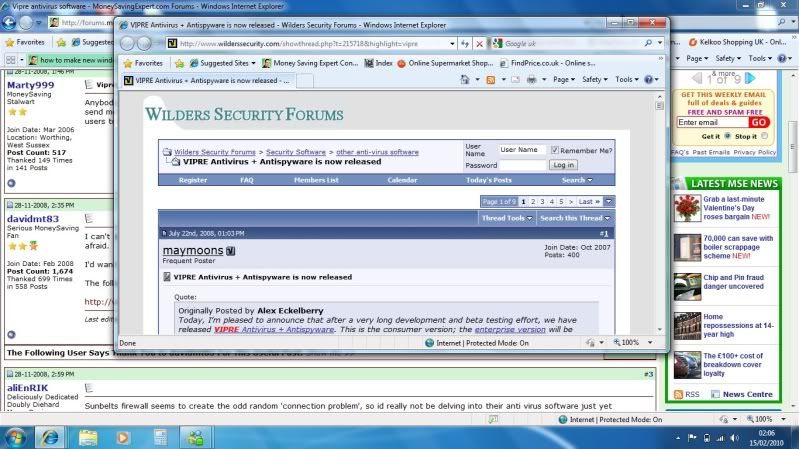 0
0 -
well done that man works a treat now. you wouldn't belive how long been trying to suss that one out for!

edit take it you saying goto press control key everytime want to do that? or is there a way of making perm at all?0 -
what ever size ou put it to it will remain. you must do the same for each different applicationwell done that man works a treat now. you wouldn't belive how long been trying to suss that one out for!
edit take it you saying goto press control key everytime want to do that? or is there a way of making perm at all?
Windows Explorer
IIE
Firefox
Windows Media Player
etc etc0 -
well i just tried 10 diff times and basically remembers whilst main window is open can click link again and works correct size but soon as you shut down ie and then bringback up it goes to how was before in pic0


This discussion has been closed.
Confirm your email address to Create Threads and Reply

Categories
- All Categories
- 355.7K Banking & Borrowing
- 254.9K Reduce Debt & Boost Income
- 456.1K Spending & Discounts
- 248.3K Work, Benefits & Business
- 605.9K Mortgages, Homes & Bills
- 179K Life & Family
- 263.7K Travel & Transport
- 1.5M Hobbies & Leisure
- 16.2K Discuss & Feedback
- 37.7K Read-Only Boards