We’d like to remind Forumites to please avoid political debate on the Forum.
This is to keep it a safe and useful space for MoneySaving discussions. Threads that are – or become – political in nature may be removed in line with the Forum’s rules. Thank you for your understanding.
📨 Have you signed up to the Forum's new Email Digest yet? Get a selection of trending threads sent straight to your inbox daily, weekly or monthly!
The Forum now has a brand new text editor, adding a bunch of handy features to use when creating posts. Read more in our how-to guide
Reinstalling Windows XP any hints?

xxdeebeexx
Posts: 1,964 Forumite



in Techie Stuff
Hi I have spent the last 7-10 days rescuing data from my hard drive and now want to re install Windows XP.
Has anyone got any hints please? I only have a set of recovery discs.
Also can I run Word 2002 and Word 2007 on the same computer ?
TIA
Dx
Has anyone got any hints please? I only have a set of recovery discs.
Also can I run Word 2002 and Word 2007 on the same computer ?
TIA
Dx
0
Comments
-
Theoretically, yes dee but be careful with the 2007 install; you might have to choose a custom install so as to leave 2002 intact. And it goes without saying, but I will say anyhow Lol, install in date order - 2002 followed by 2007.Also can I run Word 2002 and Word 2007 on the same computer ?
Any reason why you want both;)
HTH.0 -
Just an important caveat also. I take it you do mean Word as separate install programs; if it's Office you are talking about that can really complicate matters...0
-
Theoretically, yes dee but be careful with the 2007 install; you might have to choose a custom install so as to leave 2002 intact. And it goes without saying, but I will say anyhow Lol, install in date order - 2002 followed by 2007.
Any reason why you want both;)
HTH.
Thanks.. I didn't know that about date order !
Word 2002 has the speech facility...2007 doesn't.
DS1 is dyslexic and can 'hear' what he has writen.
I only want word 2002 and Office 2007. Thought that 2002 could go in a folder by itself
Thanks
Dx0 -
xxdeebeexx wrote: »Thanks.. I didn't know that about date order !
Word 2002 has the speech facility...2007 doesn't.
DS1 is dyslexic and can 'hear' what he has writen.
I only want word 2002 and Office 2007. Thought that 2002 could go in a folder by itself
Thanks
Dx
OK, I need clarification on this, because you suggested in the first post that you were talking of Word, not Office? Anyhow, I still don't think it will cause a problem dee; I've set up machines with combinations of Word 2002/07/ or Office/Word 2002.
Also, do you have the separate install discs for both/ I'm assuming you do....that will help if things do go awry.
One file note regarding that of file association. Word might very well associate docs with Office/Word 2007 as default; but you can still use the File/Open dialog in each version program as a work-around....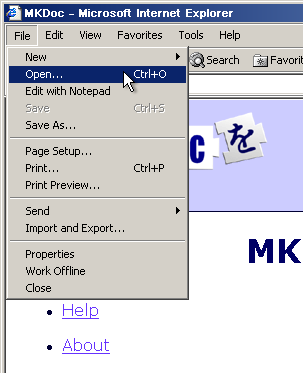
HTH.0 -
My suggestion would be now that you have to do this horrid job, once you have installed XP, your basic applications and configured everything as it should be or you like it (takes me as long as installing!) and used Windows updates to install the zillions of fixes - take a disk image backup. Obviously you will add things to your pc from this point on but should this happen again or you suffer a hard drive failure it will save hours by quickly getting you back to a base clean install. I use a very good free version of a commercial program called Macrium Reflect. With this you can create a compressed image of your hard drive as a single file onto say, an external USB drive and create a Boot CD to reload it onto your hard drive if the worst happens again.0
-
OK, I need clarification on this, because you suggested in the first post that you were talking of Word, not Office? Anyhow, I still don't think it will cause a problem dee; I've set up machines with combinations of Word 2002/07/ or Office/Word 2002.
Also, do you have the separate install discs for both/ I'm assuming you do....that will help if things do go awry.
One file note regarding that of file association. Word might very well associate docs with Office/Word 2007 as default; but you can still use the File/Open dialog in each version program as a work-around....
HTH.
Thanks busenbust...it seems far too complicated to me!
I will have another look in the morning to see if I understand, if not I just have to leave it. I have to get my computer running again as I do a lot of my work from home.
Yet again thanks for your help
Dx0 -
Let us know if you need any additional help dee. Just a note also about backwards compatibility: Office 2007/Word will open 2002 docs but not vice-versa I think. There is, however, a workaround as outlined by Microsoft here. Again, it should not present a problem for you as you are using both versions for distinct purposes, if I read you correctly:xxdeebeexx wrote: »Thanks busenbust...it seems far too complicated to me!
I will have another look in the morning to see if I understand, if not I just have to leave it. I have to get my computer running again as I do a lot of my work from home.
Yet again thanks for your help
DxWord 2002 has the speech facility...2007 doesn't.
DS1 is dyslexic and can 'hear' what he has writen.
I only want word 2002 and Office 2007. Thought that 2002 could go in a folder by itself0 -
xxdeebeexx wrote: »Hi I have spent the last 7-10 days rescuing data from my hard drive and now want to re install Windows XP.
Has anyone got any hints please? I only have a set of recovery discs
Vile job. You'll be downloading updates for years.
Far better that you consider slipstreaming SP3 into your XP installation. This will give you an installation which is the original XP plus all the updates issued up to and including SP3.Warning ..... I'm a peri-menopausal axe-wielding maniac 0
0


This discussion has been closed.
Confirm your email address to Create Threads and Reply

Categories
- All Categories
- 353.4K Banking & Borrowing
- 254.1K Reduce Debt & Boost Income
- 455K Spending & Discounts
- 246.5K Work, Benefits & Business
- 602.8K Mortgages, Homes & Bills
- 178K Life & Family
- 260.5K Travel & Transport
- 1.5M Hobbies & Leisure
- 16K Discuss & Feedback
- 37.7K Read-Only Boards